共计 13623 个字符,预计需要花费 35 分钟才能阅读完成。
最新 OpenClaw 使用手册:安装、卸载命令、换大模型等,新手也能上手
简介
大家好,我是星哥。这段时间好多朋友问我 OpenClaw 怎么装、怎么用、怎么换模型、怎么接 QQ 和 Telegram,我干脆把自己踩过的坑、试过的方案,从头到尾整理成这份最全手册。
从一键安装、常用命令,到大模型切换、配置文件、故障排查,我都写得明明白白,新手跟着敲命令就能跑起来,老手也能直接拿去做定制部署。不管是服务器、还是 Windows 本地,看完这篇,OpenClaw 你就能彻底玩明白。

本文是 openclaw 写文档,星哥做了一些修改。
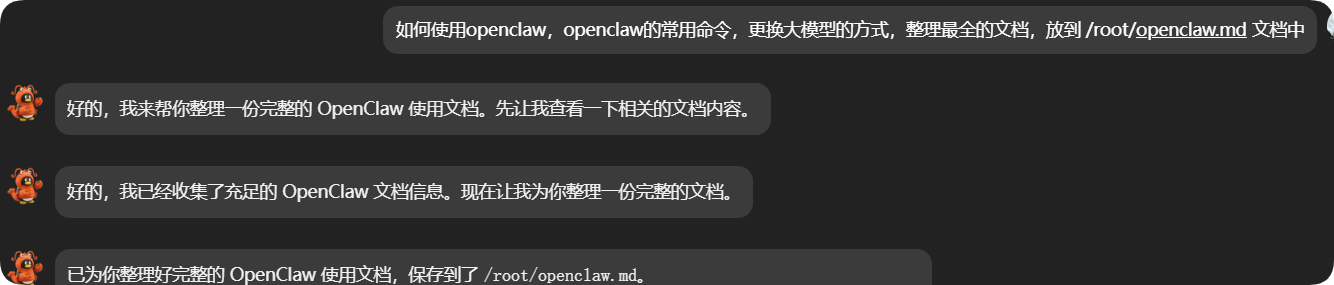
如何使用 openclaw,openclaw 的常用命令,更换大模型的方式,整理最全的文档,放到 /root/openclaw.md 文档中
核心特点
- • 自托管:在你的硬件上运行,按你的规则
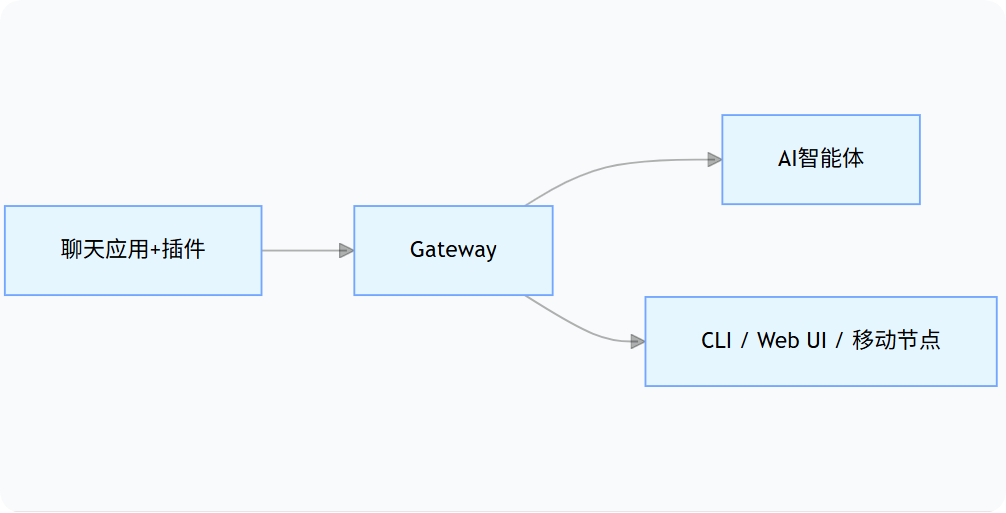
- • 多渠道:一个网关同时服务 WhatsApp、Telegram、Discord 等
- • 智能体原生:专为编程智能体设计,支持工具使用、会话、记忆和多智能体路由
- • 开源:MIT 许可证,社区驱动
工作原理
安装
星哥之前写的文章。
- • 云服务器部署 OpenClaw:轻量应用服务器 + 钉钉和 QQ 机器人
- • 宝塔面板一键部署 OpenClaw,支持 QQ、飞书机器人
- • Windows 11 系统 OpenClaw 安装教程
官方命令安装
# 官方命令
curl -fsSL https://openclaw.ai/install.sh | bash
手动安装
# 如果一键脚本失败,可以手动安装
npm install -g openclaw@latest

# 如果遇到权限问题
sudo npm install -g openclaw@latest
指定淘宝镜像源安装 openclaw(强烈建议)
指定 npm 安装源为「淘宝 npm 镜像源」(国内常用),默认的 npm 官方源(registry.npmjs.org)在国内访问可能慢或不稳定,换这个源能提升安装速度和成功率。
npm i -g openclaw --ignore-scripts --registry=https://registry.npmmirror.com把 npm 的源,永久改成淘宝 npm 镜像源(非必要操作)
使用国内源可以大大提高 npm 的下载速度。
查看 npm 源:
查看 npm 源:npm config get registry

C:\Users\Administrator>npm config get registry
https://registry.npmjs.org/
设置为淘宝 npm 镜像源
npm config set registry https://registry.npmmirror.com

C:\Users\Administrator>npm config get registry
https://registry.npmmirror.com
# 交互式引导(推荐)
openclaw onboard --install-daemon或使用配置向导:
openclaw configure快速开始
1. 配对频道(以 WhatsApp 为例)
openclaw channels login2. 启动网关
openclaw gateway --port 187893. 打开控制面板
浏览器访问:http://127.0.0.1:18789
常用命令
全局标志
- •
--dev:隔离状态到~/.openclaw-dev并切换默认端口 - •
--profile <name>:隔离状态到~/.openclaw-<name> - •
--no-color:禁用 ANSI 颜色 - •
--update:openclaw update的简写 - •
-V, --version:打印版本并退出
设置和配置
# 初始化配置 + 工作空间
openclaw setup

# 交互式配置向导
openclaw configure

# 查看配置
openclaw config get < 路径 >

# 设置配置项
openclaw config set < 路径 > < 值 >

# 删除配置项
openclaw config unset < 路径 >

# 验证配置
openclaw config validate

# 查看配置文件路径
openclaw config file
网关管理
# 运行网关(前台)
openclaw gateway
openclaw gateway run

# 安装网关服务
openclaw gateway install

# 启动 / 停止 / 重启服务
openclaw gateway start
openclaw gateway stop
openclaw gateway restart

# 查看网关状态
openclaw gateway status
openclaw gateway status --deep

# 健康检查
openclaw gateway health

# 探测网关
openclaw gateway probe

# 发现局域网网关
openclaw gateway discover

# 查看日志
openclaw logs
openclaw logs --follow
openclaw logs --limit 200
频道管理
# 列出已配置频道
openclaw channels list

# 查看频道状态
openclaw channels status
openclaw channels status --probe

# 添加频道
openclaw channels add --channel telegram --account alerts --name "Alerts Bot" --token $TELEGRAM_BOT_TOKEN
openclaw channels add --channel discord --account work --name "Work Bot" --token $DISCORD_BOT_TOKEN

# 移除频道
openclaw channels remove --channel discord --account work --delete

# 登录 / 登出(支持 WhatsApp Web)
openclaw channels login
openclaw channels logout

# 查看频道日志
openclaw channels logs
openclaw channels logs --channel telegram --lines 100
添加 QQ 频道
openclaw plugins install @sliverp/qqbot@latest
openclaw channels add --channel qqbot --token "你申请的 APPID: 你申请的密钥"
openclaw gateway restart
模型管理
openclaw models status
openclaw models status --json
openclaw models status --probe

# 列出可用模型
openclaw models list
openclaw models list --all
openclaw models list --provider openai

# 设置默认模型
openclaw models set anthropic/claude-opus-4-6

# 设置图像模型
openclaw models set-image openai/gpt-4o

# 扫描可用模型
openclaw models scan
openclaw models scan --set-default

# 管理模型别名
openclaw models aliases list
openclaw models aliases add gpt4 openai/gpt-4
openclaw models aliases remove gpt4

# 管理回退模型
openclaw models fallbacks list
openclaw models fallbacks add openai/gpt-5.2
openclaw models fallbacks remove openai/gpt-5.2
openclaw models fallbacks clear
身份验证
# 添加认证配置
openclaw models auth add

# 设置 Anthropic Token(通过 Claude Code CLI)
claude setup-token
openclaw models auth setup-token --provider anthropic

# 粘贴 Token
openclaw models auth paste-token --provider anthropic --profile-id my-profile
会话管理
# 列出会话
openclaw sessions
openclaw sessions --active 60

# 向会话发送消息
openclaw message send --target +15555550123 --message "Hello"
智能体管理
# 列出智能体
openclaw agents list
openclaw agents list --bindings

# 添加智能体
openclaw agents add my-agent --workspace ~/.openclaw/workspace-my

# 绑定 / 解绑频道
openclaw agents bind --agent my-agent --bind whatsapp:personal
openclaw agents unbind --agent my-agent --bind whatsapp:personal

# 删除智能体
openclaw agents delete my-agent --force
节点管理(移动设备)
# 列出节点
openclaw nodes list
openclaw nodes list --connected

# 查看待批准节点
openclaw nodes pending

# 批准 / 拒绝节点
openclaw nodes approve <requestId>
openclaw nodes reject <requestId>

# 节点操作
openclaw nodes camera list --node <id>
openclaw nodes camera snap --node <id>
openclaw nodes canvas snapshot --node <id>
openclaw nodes notify --node <id> --title "Hello" --body "Notification"
浏览器控制
# 浏览器状态
openclaw browser status

# 启动 / 停止浏览器
openclaw browser start
openclaw browser stop

# 管理标签页
openclaw browser tabs
openclaw browser open <url>
openclaw browser close <targetId>

# 截图和快照
openclaw browser screenshot
openclaw browser snapshot

# 页面操作
openclaw browser navigate <url>
openclaw browser click <ref>
openclaw browser type <ref> <text>
openclaw browser press <key>
openclaw browser fill --fields '{"email":"test@example.com"}'
技能和插件
# 列出技能
openclaw skills list
openclaw skills list --eligible
openclaw skills info <name>
openclaw skills check

# 插件管理
openclaw plugins list
openclaw plugins info <id>
openclaw plugins install <path>
openclaw plugins enable <id>
openclaw plugins disable <id>
openclaw plugins doctor
记忆管理
openclaw memory status

# 重新索引记忆文件
openclaw memory index

# 语义搜索记忆
openclaw memory search "< 查询 >"
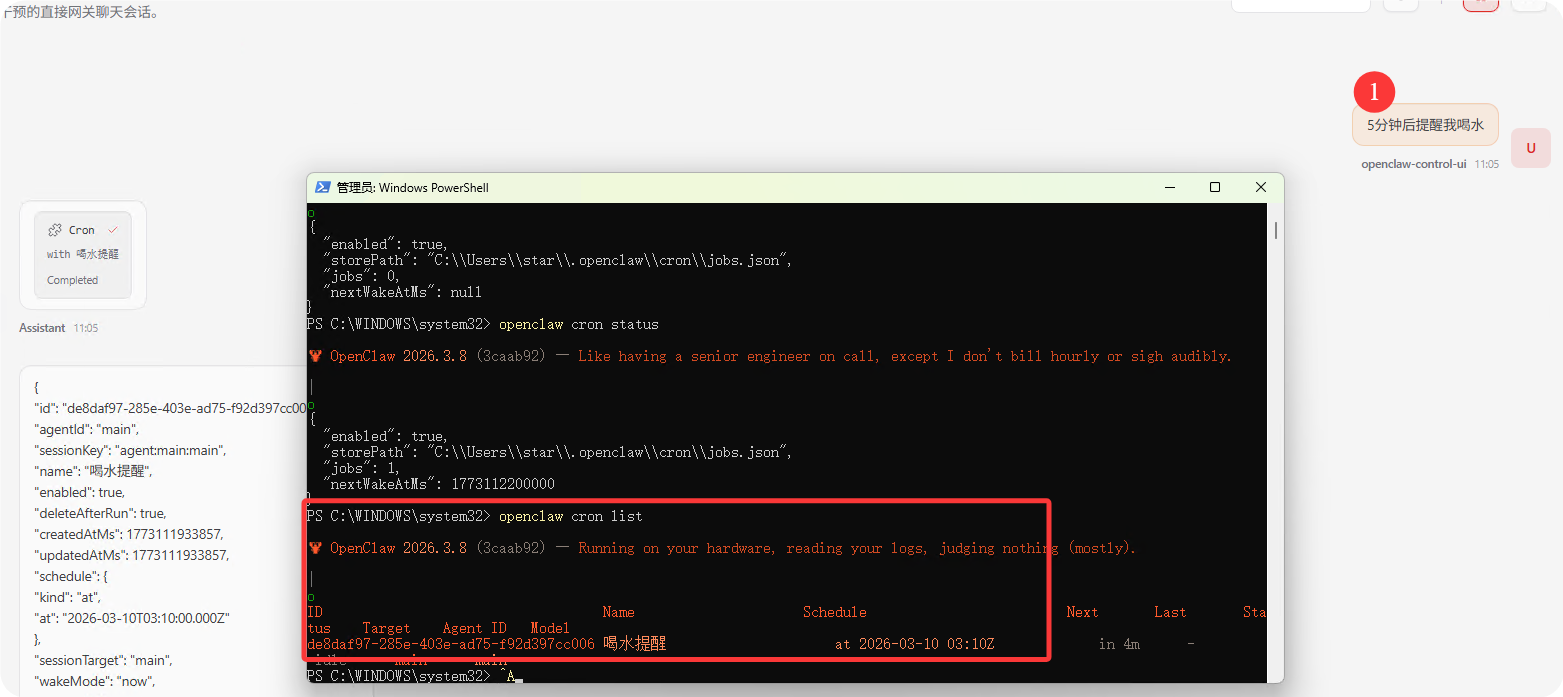
定时任务(Cron)
# 查看定时任务状态
openclaw cron status
openclaw cron list

# 添加定时任务
openclaw cron add --name "daily-report" --cron "0 9 * * *" --system-event "生成日报"

# 编辑 / 删除任务
openclaw cron edit <id>
openclaw cron rm <id>

# 启用 / 禁用
openclaw cron enable <id>
openclaw cron disable <id>

# 运行任务
openclaw cron run <id>
给它一个命令 ” 5 分钟之后,提醒我喝水 ”
诊断和维护
# 健康检查
openclaw doctor
openclaw doctor --deep
openclaw doctor --fix
openclaw doctor --yes

# 系统状态
openclaw status
openclaw status --deep
openclaw status --usage

# 健康检查
openclaw health

# 安全审计
openclaw security audit
openclaw security audit --deep
openclaw security audit --fix

# 重置配置
openclaw reset --scope config
openclaw reset --scope config+creds+sessions
openclaw reset --scope full --yes

# 卸载
openclaw uninstall --all --yes
终端 UI
openclaw tui

# 带参数启动
openclaw tui --session <key> --thinking medium
文档搜索
# 搜索文档
openclaw docs < 查询 >
openclaw docs "配置模型"
更换大模型
方式一:通过配置向导
openclaw configure选择模型配置选项,按提示完成。
方式二:直接设置模型
# 设置主模型
openclaw models set anthropic/claude-opus-4-6

# 设置图像模型
openclaw models set-image openai/gpt-4o
方式三:编辑配置文件
编辑 ~/.openclaw/openclaw.json:
    添加大模型"nvidia": {"baseUrl":"https://integrate.api.nvidia.com/v1","apiKey":" 你的 nvidia 的 APIKEY","api":"openai-completions","models": [
          {
            "id": "openai/gpt-oss-120b",
            "name": "gpt-oss-120b",
            "compat": {"supportsStore": false}
          }
        ]
      },


   修改
    "model": {"primary": "nvidia/openai/gpt-oss-120b"},
      "models": {
        "nvidia/openai/gpt-oss-120b": {"alias": "nvidia"}
      },
方式四:使用 onboard 非交互式配置
# 使用特定提供商
openclaw onboard --non-interactive --auth-choice openai-api-key --openai-api-key $OPENAI_API_KEY

# 使用 OpenRouter
openclaw onboard --non-interactive --auth-choice openrouter-api-key --openrouter-api-key $OPENROUTER_API_KEY

# 使用自定义 API
openclaw onboard --non-interactive \
  --auth-choice custom-api-key \
  --custom-base-url "https://api.example.com/v1" \
  --custom-model-id "gpt-4" \
  --custom-api-key $API_KEY
支持的模型提供商
- • OpenAI – GPT 系列(API + Codex)
- • Anthropic – Claude 系列(API + Claude Code CLI)
- • Moonshot AI – Kimi + Kimi Coding
- • Mistral – Mistral 系列
- • OpenRouter – 统一接口访问多个模型
- • Vercel AI Gateway – 统一网关
- • Cloudflare AI Gateway – 边缘 AI 网关
- • GLM – 智谱 AI 模型
- • MiniMax – MiniMax 模型
- • Qwen – 通义千问(OAuth)
- • Qianfan – 百度千帆
- • Venice – 隐私优先的 AI
- • Z.AI – 字节跳动
- • OpenCode Zen
- • Kilocode
- • Amazon Bedrock – AWS 托管模型
- • Together AI
- • Ollama – 本地模型
- • vLLM – 本地模型服务
- • NVIDIA
- • Hugging Face
- • Xiaomi
聊天中切换模型
在聊天中发送:
/model anthropic/claude-opus-4-6或使用别名(如果已配置):
/model Claude配置文件详解
配置文件位置:~/.openclaw/openclaw.json
OpenClaw 使用 JSON5 格式,支持注释和尾随逗号。
最小配置示例
{agents: { defaults: { workspace: "~/.openclaw/workspace"} },
  channels: {whatsapp: { allowFrom: ["+15555550123"] } },
}
完整配置示例
// ~/.openclaw/openclaw.json
{
  // 网关配置
  gateway: {
    port: 18789,
    bind: "loopback",  // loopback | lan | tailnet | auto | custom
    auth: "token",     // token | password
    token: "your-secure-token",
    mode: "local",
    reload: {
      mode: "hybrid",  // hybrid | hot | restart | off
      debounceMs: 300,
    },
  },

  // 智能体默认配置
  agents: {
    defaults: {
      workspace: "~/.openclaw/workspace",
      model: {
        primary: "anthropic/claude-opus-4-6",
        fallbacks: ["openai/gpt-5.2"],
      },
      imageModel: {primary: "openai/gpt-4o",},
      // 模型目录
      models: {"anthropic/claude-opus-4-6": { alias: "Claude"},
        "openai/gpt-5.2": {alias: "GPT"},
      },
      // 图像尺寸限制
      imageMaxDimensionPx: 1200,
      // 心跳配置
      heartbeat: {
        every: "30m",
        target: "last",
      },
      // 沙盒配置
      sandbox: {
        mode: "non-main",  // off | non-main | all
        scope: "agent",    // session | agent | shared
      },
      // 群组聊天配置
      groupChat: {mentionPatterns: ["@openclaw", "openclaw"],
      },
    },
    // 多智能体列表
    list: [{ id: "main", default: true, workspace: "~/.openclaw/workspace"},
      {id: "work", workspace: "~/.openclaw/workspace-work"},
    ],
  },

  // 频道配置
  channels: {
    whatsapp: {
      enabled: true,
      allowFrom: ["+15555550123", "+86138xxxxxxxx"],
      dmPolicy: "allowlist",  // pairing | allowlist | open | disabled
      groups: {"*": { requireMention: true},
        "group-id-xxx": {requireMention: false},
      },
    },
    telegram: {
      enabled: true,
      botToken: "123456:ABC-DEF1234ghIkl-zyx57W2v1u123ew11",
      dmPolicy: "pairing",
      allowFrom: ["tg:123456789"],
    },
    discord: {
      enabled: true,
      botToken: "YOUR_DISCORD_BOT_TOKEN",
      dmPolicy: "pairing",
    },
  },

  // 绑定规则(多智能体路由)bindings: [{ agentId: "main", match: { channel: "whatsapp", accountId: "personal"} },
    {agentId: "work", match: { channel: "discord", accountId: "work"} },
  ],

  // 会话配置
  session: {
    dmScope: "per-channel-peer",  // main | per-peer | per-channel-peer | per-account-channel-peer
    threadBindings: {
      enabled: true,
      idleHours: 24,
      maxAgeHours: 0,
    },
    reset: {
      mode: "daily",
      atHour: 4,
      idleMinutes: 120,
    },
  },

  // 工具配置
  tools: {
    web: {
      search: {
        enabled: true,
        // 搜索 API 配置
      },
    },
    browser: {enabled: true,},
  },

  // 定时任务配置
  cron: {
    enabled: true,
    maxConcurrentRuns: 2,
    sessionRetention: "24h",
    runLog: {
      maxBytes: "2mb",
      keepLines: 2000,
    },
  },

  // Webhooks 配置
  hooks: {
    enabled: true,
    token: "shared-secret",
    path: "/hooks",
    defaultSessionKey: "hook:ingress",
    mappings: [
      {match: { path: "gmail"},
        action: "agent",
        agentId: "main",
        deliver: true,
      },
    ],
  },

  // UI 配置
  ui: {enabled: true,},

  // 日志配置
  logging: {level: "info",  // debug | info | warn | error},

  // 环境变量(内联配置)env: {
    OPENAI_API_KEY: "sk-...",
    ANTHROPIC_API_KEY: "sk-ant-...",
  },
}
配置热重载
Gateway 会监听配置文件变化并自动应用,无需手动重启。
| 模式 | 行为 |
|---|---|
hybrid (默认) |
安全更改立即热应用,关键更改自动重启 |
hot |
仅热应用安全更改,需要重启时记录警告 |
restart |
任何配置更改都重启 Gateway |
off |
禁用文件监听,下次手动重启生效 |
使用 $include 拆分配置
// ~/.openclaw/openclaw.json
{gateway: { port: 18789},
  agents: {$include: "./agents.json5"},
  channels: {$include: ["./channels/whatsapp.json5", "./channels/telegram.json5"],
  },
}
环境变量替换
在配置中使用 ${VAR_NAME} 引用环境变量:
{gateway: { auth: { token: "${OPENCLAW_GATEWAY_TOKEN}" } },
  models: {providers: { openai: { apiKey: "${OPENAI_API_KEY}" } } },
}
SecretRef(高级)
支持从环境变量、文件或执行命令获取密钥:
{
  models: {
    providers: {
      openai: {apiKey: { source: "env", provider: "default", id: "OPENAI_API_KEY"}
      },
    },
  },
}
频道设置
DM 访问策略
每个频道通过 dmPolicy 控制 DM 访问:
- •
"pairing"(默认):未知发送者获得一次性配对码以批准 - •
"allowlist":仅允许allowFrom中的发送者 - •
"open":允许所有入站 DM(需要allowFrom: ["*"]) - •
"disabled":忽略所有 DM
群聊提及门控
{
  agents: {
    list: [
      {
        id: "main",
        groupChat: {mentionPatterns: ["@openclaw", "openclaw"],
        },
      },
    ],
  },
  channels: {
    whatsapp: {groups: { "*": { requireMention: true} },
    },
  },
}
故障排除
诊断命令
# 全面诊断
openclaw doctor

# 深度诊断
openclaw doctor --deep

# 自动修复
openclaw doctor --fix

# 状态检查
openclaw status --all

# 日志查看
openclaw logs --follow
安全检查
某个微信群中看到的,自己试试看看
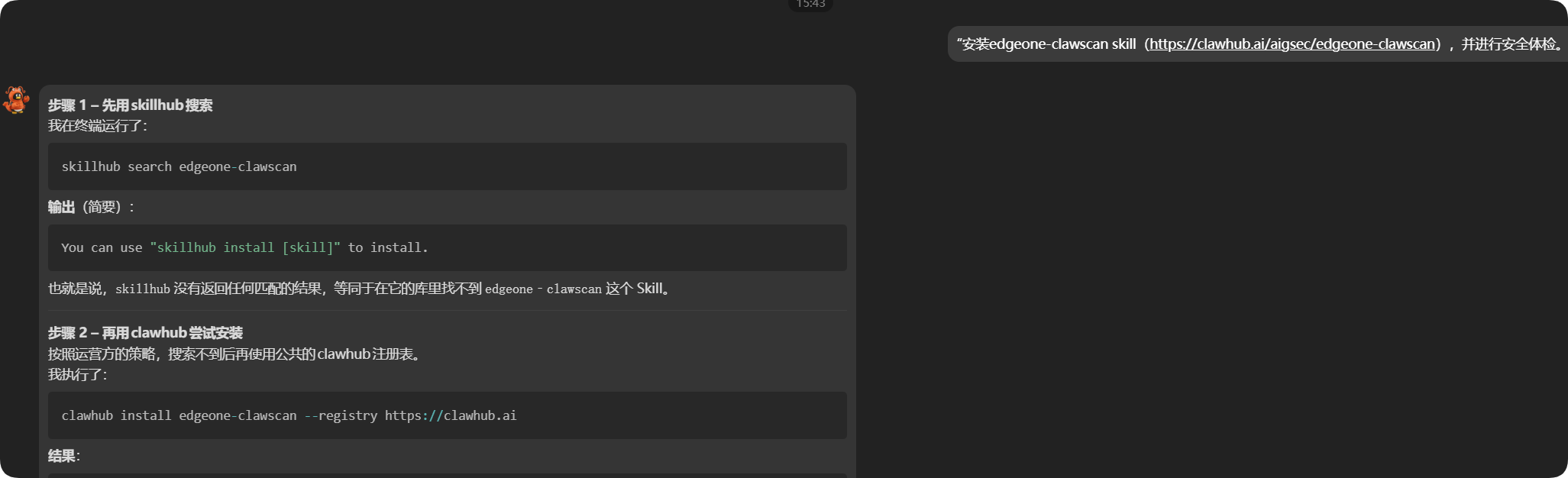
🛡给你的“龙虾”发条消息,就能给🦞做安全体检!直接对你的龙虾机器人说这句话:👉“安装 edgeone-clawscan skill(https://clawhub.ai/aigsec/edgeone-clawscan),并进行安全体检。”发送后,你的专属“龙虾”就会自动调用 EdgeOne ClawScan SKIll,安全检测 🔍并输出检测报告~

你还可以把 ClawScan 变成你 Agent 的长期安全管家。直接对你的小龙虾输入这句 Prompt:👉“以后每次安装新的 Skill 之前,都必须先用 edgeone-clawscan 进行安全风险扫描。”只需这一句设定,你的“小龙虾”后续接入的每一个新技能,都会自动进行安全性评估啦!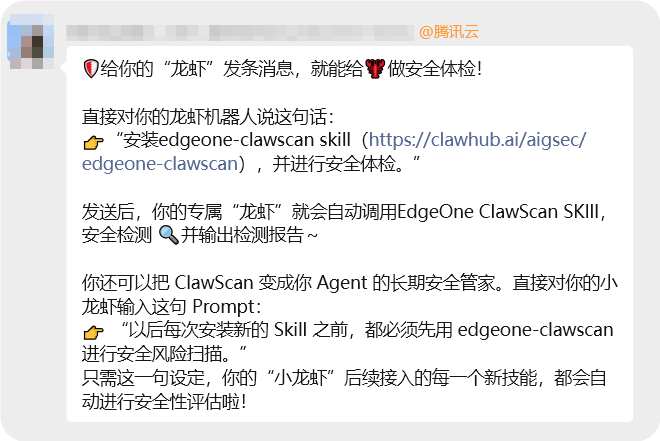
亲测如图:
常见问题
Gateway 无法启动
- • 检查配置验证:
openclaw config validate - • 查看日志:
openclaw logs - • 运行诊断:
openclaw doctor
频道连接问题
- • 检查频道状态:
openclaw channels status --probe - • 查看频道日志:
openclaw channels logs - • 重新登录:
openclaw channels login
模型问题
- • 检查模型状态:
openclaw models status --probe - • 验证认证:
openclaw models auth setup-token --provider anthropic
连接问题
- • 探测网关:
openclaw gateway probe - • 检查健康:
openclaw health - • 发现网关:
openclaw gateway discover
SSH 远程访问
# 通过 SSH 探测远程网关
openclaw gateway probe --ssh user@gateway-host

# 自动选择发现的网关
openclaw gateway probe --ssh-auto
卸载
打开终端(PowerShell 或 CMD),直接运行:
1. 命令:openclaw uninstall


2. 默认已经选中前三个(Windows 用户不用管 macOS app),直接回车即可。◆  Uninstall which components?
│  ◼ Gateway service (launchd / systemd / schtasks)
│  ◼ State + config (~/.openclaw)
│  ◼ Workspace (agent files)
│  ◻ macOS app

回车

3. 继续卸载?Proceed with uninstall?
│  ● Yes / ○ No

选择 yes 开始卸载。4. 卸载完成:✓ Gateway service removed
✓ State + config deleted
✓ Workspace cleaned
OpenClaw has been uninstalled.
npm 卸载
npm uninstall -g openclaw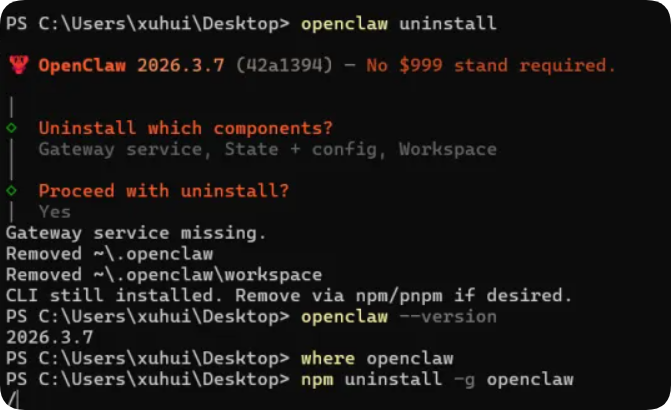
总结
本文是 OpenClaw 自托管多渠道 AI 智能体网关 的完整使用指南,覆盖从安装、基础使用到高级配置的全流程。文档详细说明官方、手动、国内镜像三种安装方式,整理网关、频道、模型、智能体等百余条常用命令,提供四种更换大模型的方法,并详解配置文件、频道权限、故障排查与卸载步骤。同时补充 QQ 等国内渠道配置、安全体检、定时任务等实用功能,适配新手快速上手与进阶用户定制需求,可直接作为部署与运维参考手册。
本文档基于 OpenClaw 最新版本整理,如有更新请参考官方文档。