共计 6753 个字符,预计需要花费 17 分钟才能阅读完成。
最近朋友问我一些 MySQL 用户的问题,就做了一些测试,记录如下:
一:用户的创建(两种方法):
方法一:CREATE USER ‘username’@’%’ IDENTIFIED BY ‘password’;
方法二:GRANT select ON databasename.tablename TO ‘username’@’%’ ;
二:mysql root 用户密码设置以及修改。
方法 1:用 SET PASSWORD 命令
mysql -u root
mysql> SET PASSWORD FOR ‘root’@’localhost’ = PASSWORD(‘newpass’);
方法 2:用 mysqladmin
mysqladmin -u root password “newpass”
如果 root 已经设置过密码,采用如下方法
mysqladmin -u root password oldpass “newpass”
方法 3:用 UPDATE 直接编辑 user 表
mysql -u root
mysql> use mysql;
mysql> UPDATE user SET Password = PASSWORD(‘newpass’) WHERE user = ‘root’;
mysql> FLUSH PRIVILEGES;
在丢失 root 密码的时候,可以这样
mysqld_safe –skip-grant-tables&
mysql -u root mysql
mysql> UPDATE user SET password=PASSWORD(“new password”) WHERE user=’root’;
mysql> FLUSH PRIVILEGES;
三:重点讲解创建 mysql 用户时,@后面的 ip 的意义 : 就是为了限制登陆 mysql 的 ip,具体有如下:
1)只允许在本地登录;
mysql> CREATE USER ‘liuwenhe’@’localhost’ IDENTIFIED BY ‘liuwenhelocal’;
Query OK, 0 rows affected (0.00 sec)
2)允许在 192.168.0 网段登陆 mysql;
mysql> CREATE USER ‘liuwenhe’@’192.168.0.%’ IDENTIFIED BY ‘liuwenhe0’;
Query OK, 0 rows affected (0.00 sec)
3)允许在 192.168.8 网段登陆 mysql;
mysql> CREATE USER ‘liuwenhe’@’192.168.8.%’ IDENTIFIED BY ‘liuwenhe8’;
Query OK, 0 rows affected (0.00 sec)
4)没有限制,也就是可以在任何网络段登陆(前提是网络得通);
mysql> CREATE USER ‘liuwenhe’@’%’ IDENTIFIED BY ‘liuwenheall’;
Query OK, 0 rows affected (0.00 sec)
针对上面这几个 liuwenhe 用户做了一些测试,结果如下:
1) ‘liuwenhe’@’192.168.0.%’ 这类的用户是不能在本地登录的,要想在本地登录,需要有 localhost 或者 127.0.0.1 的登陆权限;
需要注意的是,如果你只创建了用户 ‘liuwenhe’@’localhost’,
1.mysql> CREATE USER ‘liuwenhe’@’localhost’ IDENTIFIED BY ‘liuwenhelocal’;
Query OK, 0 rows affected (0.00 sec)
mysql> select host,user from mysql.user;
+————–+———-+
| host | user |
+————–+———-+
| % | ogg |
| % | root |
| 127.0.0.1 | root |
| 192.168.0.% | ncms |
| 192.168.0.13 | rep |
| localhost | liuwenhe |
| localhost | ncms |
| localhost | ogg |
| localhost | root |
| server01 | root |
+————–+———-+
10 rows in set (0.00 sec)
如下两种登陆方式都能成功:
[root@server02 ~]# mysql -uliuwenhe -pliuwenhelocal -hlocalhost
[root@server02 ~]# mysql -uliuwenhe -pliuwenhelocal -h127.0.0.1
2. 如果你只创建了 liuwenhe’@’l127.0.0.1’,
mysql> select host,user from mysql.user;
+————–+———-+
| host | user |
+————–+———-+
| % | ogg |
| % | root |
| 127.0.0.1 | liuwenhe |
| 127.0.0.1 | root |
| 192.168.0.% | ncms |
| 192.168.0.13 | rep |
| localhost | ncms |
| localhost | ogg |
| localhost | root |
| server01 | root |
+————–+———-+
10 rows in set (0.00 sec)
只能通过 mysql -uliuwenhe -pliuwenhelocal -h127.0.0.1 登陆,不能通过 mysql -uliuwenhe -pliuwenhelocal -hlocalhost 登陆;
[root@server02 ~]# mysql -uliuwenhe -pliuwenhelocal -h127.0.0.1
Warning: Using a password on the command line interface can be insecure.
Welcome to the MySQL monitor. Commands end with ; or \g.
Your MySQL connection id is 3628
Server version: 5.6.26-enterprise-commercial-advanced-log MySQL Enterprise Server – Advanced Edition (Commercial)
Copyright (c) 2000, 2015, Oracle and/or its affiliates. All rights reserved.
Oracle is a registered trademark of Oracle Corporation and/or its
affiliates. Other names may be trademarks of their respective
owners.
Type ‘help;’ or ‘\h’ for help. Type ‘\c’ to clear the current input statement.
mysql>
不能通过 localhost 登陆,如下报错:
[root@server02 ~]# mysql -uliuwenhe -pliuwenhelocal -hlocalhost
Warning: Using a password on the command line interface can be insecure.
ERROR 1045 (28000): Access denied for user ‘liuwenhe’@’localhost’ (using password: YES)
2)如果你同时创建了 ’liuwenhe’@’192.168.0.%’ 和 ’liuwenhe’@’%’ 这两个用户,那么当你从 192.168.0 网段去登陆数据库的时候,’liuwenhe’@’%’ 用户是不能登陆数据库的,只能通过 ’liuwenhe’@’192.168.0.%’ 登陆,但是当你删除 ’liuwenhe’@’192.168.0.%’ 用户的时候,’liuwenhe’@’%’ 用户就可以登陆了,可以理解为 mysql 优先并且只会验证匹配度高的用户,
具体验证过程如下:
mysql> select host,user from mysql.user;
+————–+———-+
| host | user |
+————–+———-+
| % | liuwenhe |
| % | ogg |
| % | root |
| 127.0.0.1 | root |
| 192.168.0.% | liuwenhe |
| 192.168.0.% | ncms |
| 192.168.0.13 | rep |
| localhost | ncms |
| localhost | ogg |
| localhost | root |
| server01 | root |
+————–+———-+
11 rows in set (0.00 sec)
在另一台机器 S244(192.168.0.244)尝试登陆 mysql:
使用 ’liuwenhe’@’%’ 用户登录失败:如下
[root@S244 ~]# mysql -uliuwenhe -pliuwenheall -h192.168.0.12
Warning: Using a password on the command line interface can be insecure.
ERROR 1045 (28000): Access denied for user ‘liuwenhe’@’192.168.0.244’ (using password: YES)
使用 ’liuwenhe’@’192.168.0.%’ 用户登录成功,如下:
[root@S244 ~]# mysql -uliuwenhe -pliuwenhe0 -h192.168.0.12
Warning: Using a password on the command line interface can be insecure.
Welcome to the MySQL monitor. Commands end with ; or \g.
Your MySQL connection id is 3679
Server version: 5.6.26-enterprise-commercial-advanced-log MySQL Enterprise Server – Advanced Edition (Commercial)
Copyright (c) 2000, 2014, Oracle and/or its affiliates. All rights reserved.
Oracle is a registered trademark of Oracle Corporation and/or its
affiliates. Other names may be trademarks of their respective
owners.
Type ‘help;’ or ‘\h’ for help. Type ‘\c’ to clear the current input statement.
mysql>
当你删除 ’liuwenhe’@’192.168.0.%’ 用户的时候,’liuwenhe’@’%’ 用户就可以登陆了,如下:
mysql> delete from mysql.user where user=’liuwenhe’ and host=’192.168.0.%’;
Query OK, 1 row affected (0.00 sec)
mysql> flush privileges;
Query OK, 0 rows affected (0.00 sec)
依旧在另一台机器 S244(192.168.0.244)尝试使用 ’liuwenhe’@’%’ 用户登陆 mysql,成功了:
[root@S244 ~]# mysql -uliuwenhe -pliuwenheall -h192.168.0.12
Warning: Using a password on the command line interface can be insecure.
Welcome to the MySQL monitor. Commands end with ; or \g.
Your MySQL connection id is 3681
Server version: 5.6.26-enterprise-commercial-advanced-log MySQL Enterprise Server – Advanced Edition (Commercial)
Copyright (c) 2000, 2014, Oracle and/or its affiliates. All rights reserved.
Oracle is a registered trademark of Oracle Corporation and/or its
affiliates. Other names may be trademarks of their respective
owners.
Type ‘help;’ or ‘\h’ for help. Type ‘\c’ to clear the current input statement.
mysql>
3)我的这台 mysql 所在的服务器上面有两个 ip, 如下:

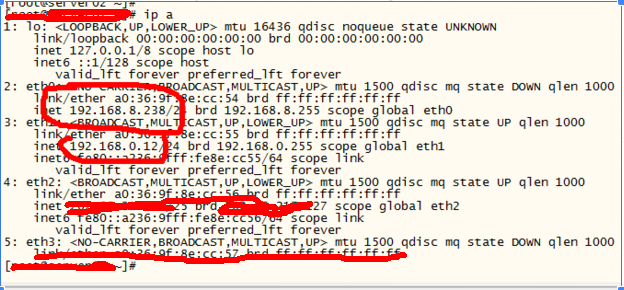
现在我创建了一个 ‘liuwenhe’@’192.168.8.%’,
那么只能通过
mysql -uliuwenhe -pliuwenhe8 -h192.168.8.238 登陆,不能通过 mysql -uliuwenhe -pliuwenhe8 -h192.168.0.12 登陆,同理创建了一个 ‘liuwenhe’@’192.168.0.%’,只能通过
mysql -uliuwenhe -pliuwenhe0 -h192.168.0.12 登陆,不能通过 mysql -uliuwenhe -pliuwenhe0 -h192.168.8.238 登陆
验证如下:
mysql> CREATE USER ‘liuwenhe’@’192.168.0.%’ IDENTIFIED BY ‘liuwenhe0’;
Query OK, 0 rows affected (0.00 sec)
mysql> flush privileges;
Query OK, 0 rows affected (0.00 sec)
mysql> exit
Bye
[root@server02 ~]# mysql -uliuwenhe -pliuwenhe0 -h192.168.0.12
Warning: Using a password on the command line interface can be insecure.
Welcome to the MySQL monitor. Commands end with ; or \g.
Your MySQL connection id is 3704
Server version: 5.6.26-enterprise-commercial-advanced-log MySQL Enterprise Server – Advanced Edition (Commercial)
Copyright (c) 2000, 2015, Oracle and/or its affiliates. All rights reserved.
Oracle is a registered trademark of Oracle Corporation and/or its
affiliates. Other names may be trademarks of their respective
owners.
Type ‘help;’ or ‘\h’ for help. Type ‘\c’ to clear the current input statement.
mysql> exit
Bye
[root@server02 ~]# mysql -uliuwenhe -pliuwenhe0 -h192.168.8.238
Warning: Using a password on the command line interface can be insecure.
ERROR 1045 (28000): Access denied for user ‘liuwenhe’@’192.168.8.238’ (using password: YES)
小结:192.168.0.12 和 192.168.8.268 是不同的两个网段,需要网关才能互联,但是 mysql 你创建的用户 CREATE USER ‘liuwenhe’@’192.168.8.%’ IDENTIFIED BY ‘liuwenhe8’; 允许从 8 网段的 ip 登录 mysql,然后你 mysql -uliuwenhe -pliuwenhe8 -h192.168.0.12 是登录不上的,因为这俩网段是不通的,但是你 mysql -uliuwenhe -pliuwenhe8 -h192.168.8.238 就可以;
本文永久更新链接地址:http://www.linuxidc.com/Linux/2017-07/145687.htm
正文完
星哥玩云-微信公众号