共计 25618 个字符,预计需要花费 65 分钟才能阅读完成。
Nginx Lua 集成 Kafka
第一步:进入 opresty 目录
[root@node03 openresty]# cd /export/servers/openresty/
[root@node03 openresty]# ll
total 356
drwxr-xr-x  2 root root   4096 Jul 26 11:33 bin
drwxrwxr-x 44 1000 1000   4096 Jul 26 11:31 build
drwxrwxr-x 43 1000 1000   4096 Nov 13  2017 bundle
-rwxrwxr-x  1 1000 1000  45908 Nov 13  2017 configure
-rw-rw-r--  1 1000 1000  22924 Nov 13  2017 COPYRIGHT
drwxr-xr-x  6 root root   4096 Jul 26 11:33 luajit
drwxr-xr-x  6 root root   4096 Aug  1 08:14 lualib
-rw-r--r--  1 root root   5413 Jul 26 11:32 Makefile
drwxr-xr-x 11 root root   4096 Jul 26 11:35 nginx
drwxrwxr-x  2 1000 1000   4096 Nov 13  2017 patches
drwxr-xr-x 44 root root   4096 Jul 26 11:33 pod
-rw-rw-r--  1 1000 1000   3689 Nov 13  2017 README.markdown
-rw-rw-r--  1 1000 1000   8690 Nov 13  2017 README-win32.txt
-rw-r--r--  1 root root 218352 Jul 26 11:33 resty.index
drwxr-xr-x  5 root root   4096 Jul 26 11:33 site
drwxr-xr-x  2 root root   4096 Aug  1 10:54 testlua
drwxrwxr-x  2 1000 1000   4096 Nov 13  2017 util
[root@node03 openresty]#
说明:接下来我们关注两个目录 lualib 和 nginx
1.lualib: 是存放 opresty 所需要的集成软件包的
2.nginx:是 nginx 服务目录
接下来,我们进入 lualib 目录一看究竟:
[root@node03 openresty]# cd lualib/
[root@node03 lualib]# ll
total 116
-rwxr-xr-x 1 root root 101809 Jul 26 11:33 cjson.so
drwxr-xr-x 3 root root   4096 Jul 26 11:33 ngx
drwxr-xr-x 2 root root   4096 Jul 26 11:33 rds
drwxr-xr-x 2 root root   4096 Jul 26 11:33 Redis
drwxr-xr-x 9 root root   4096 Aug  1 10:34 resty
这里我们看到了 redis 和 ngx 集成软件包,说明我们可以之间使用 nginx 和 redis 而无需导入任何依赖包!!!!
下面看看 resty 里面有些说明呢????
[root@node03 lualib]# cd resty/
[root@node03 resty]# ll
total 152
-rw-r--r-- 1 root root  6409 Jul 26 11:33 aes.lua
drwxr-xr-x 2 root root  4096 Jul 26 11:33 core
-rw-r--r-- 1 root root   596 Jul 26 11:33 core.lua
drwxr-xr-x 2 root root  4096 Jul 26 11:33 dns
drwxr-xr-x 2 root root  4096 Aug  1 10:42 kafka   # 这是我们自己导入的
drwxr-xr-x 2 root root  4096 Jul 26 11:33 limit
-rw-r--r-- 1 root root  4616 Jul 26 11:33 lock.lua
drwxr-xr-x 2 root root  4096 Jul 26 11:33 lrucache
-rw-r--r-- 1 root root  4620 Jul 26 11:33 lrucache.lua
-rw-r--r-- 1 root root  1211 Jul 26 11:33 md5.lua
-rw-r--r-- 1 root root 14544 Jul 26 11:33 memcached.lua
-rw-r--r-- 1 root root 21577 Jul 26 11:33 MySQL.lua
-rw-r--r-- 1 root root   616 Jul 26 11:33 random.lua
-rw-r--r-- 1 root root  9227 Jul 26 11:33 redis.lua
-rw-r--r-- 1 root root  1192 Jul 26 11:33 sha1.lua
-rw-r--r-- 1 root root  1045 Jul 26 11:33 sha224.lua
-rw-r--r-- 1 root root  1221 Jul 26 11:33 sha256.lua
-rw-r--r-- 1 root root  1045 Jul 26 11:33 sha384.lua
-rw-r--r-- 1 root root  1359 Jul 26 11:33 sha512.lua
-rw-r--r-- 1 root root   236 Jul 26 11:33 sha.lua
-rw-r--r-- 1 root root   698 Jul 26 11:33 string.lua
-rw-r--r-- 1 root root  5178 Jul 26 11:33 upload.lua
drwxr-xr-x 2 root root  4096 Jul 26 11:33 upstream
drwxr-xr-x 2 root root  406 Jul 26 11:33 websocket
这里我们看到了熟悉的 mysql.lua 和 redis.lua,好了其他的先不要管
注意:这里的 kafka这个包是没有的, 说明 opnresty 么有集成 kafka。此处我已经提前导入啦 kafka 集成包
我们看看 kafka 里面多有哪些包:
[root@node03 resty]# cd kafka
[root@node03 kafka]# ll
total 48
-rw-r--r-- 1 root root  1369 Aug  1 10:42 broker.lua
-rw-r--r-- 1 root root  5537 Aug  1 10:42 client.lua
-rw-r--r-- 1 root root   710 Aug  1 10:42 errors.lua
-rw-r--r-- 1 root root 10718 Aug  1 10:42 producer.lua
-rw-r--r-- 1 root root  4072 Aug  1 10:42 request.lua
-rw-r--r-- 1 root root  2118 Aug  1 10:42 response.lua
-rw-r--r-- 1 root root  1494 Aug  1 10:42 ringbuffer.lua
-rw-r--r-- 1 root root  4845 Aug  1 10:42 sendbuffer.lua
附上 kafka 集成包:
链接:https://pan.baidu.com/s/1pFLhz3E_txb3ZWIRWxfQYg
提取码:0umg
第二步:创建 kafka 测试 lua 文件
1. 退回到 openresty
[root@node03 kafka]# cd /export/servers/openresty/2. 创建测试文件
[root@node03 openresty]# mkdir -r testlua
# 这里文件名自己取,文件位置自己定,但必须找得到
这里文件名自己取,文件位置自己定,但必须找得到!!!!!!!!!!! 下面会用到!!!!!!!!!!
3. 进入刚刚创建的文件夹并创建 kafkalua.lua 脚本文件
创建文件:vim kafkalua.lua 或者 touch kafkalua.lua
[root@node03 openresty]# cd testlua/
[root@node03 testlua]# ll
total 8
-rw-r--r-- 1 root root 3288 Aug  1 10:54 kafkalua.lua
kafkalua.lua:
-- 测试语句可以不用
ngx.say('hello kafka file configuration successful!!!!!!')

-- 数据采集阈值限制,如果 lua 采集超过阈值,则不采集
local DEFAULT_THRESHOLD = 100000
-- kafka 分区数
local PARTITION_NUM = 6
-- kafka 主题名称
local TOPIC = 'B2CDATA_COLLECTION1'
-- 轮询器共享变量 KEY 值
local POLLING_KEY = "POLLING_KEY"
-- kafka 集群(定义 kafka broker 地址,ip 需要和 kafka 的 host.name 配置一致)
local function partitioner(key, num, correlation_id)
    return tonumber(key)
end
--kafka broker 列表
local BROKER_LIST = {{host="192.168.52.100",port=9092},{host="192.168.52.110",port=9092},{host="192.168.52.120",port=9092}}
--kafka 参数,
local CONNECT_PARAMS = {producer_type = "async", socket_timeout = 30000, flush_time = 10000, request_timeout = 20000, partitioner = partitioner }
-- 共享内存计数器,用于 kafka 轮询使用
local shared_data = ngx.shared.shared_data
local pollingVal = shared_data:get(POLLING_KEY)
if not pollingVal then
    pollingVal = 1
    shared_data:set(POLLING_KEY, pollingVal)
end
-- 获取每一条消息的计数器,对 PARTITION_NUM 取余数,均衡分区
local partitions = '' .. (tonumber(pollingVal) % PARTITION_NUM)
shared_data:incr(POLLING_KEY, 1)

-- 并发控制
local isGone = true
-- 获取 ngx.var.connections_active 进行过载保护,即如果当前活跃连接数超过阈值进行限流保护
if tonumber(ngx.var.connections_active) > tonumber(DEFAULT_THRESHOLD) then
    isGone = false
end
-- 数据采集
if isGone then

    local time_local = ngx.var.time_local
    if time_local == nil then
        time_local = ""
    end

    local request = ngx.var.request
    if request == nil then
        request = ""
    end

    local request_method = ngx.var.request_method
    if request_method == nil then
        request_method = ""
    end

    local content_type = ngx.var.content_type
    if content_type == nil then
        content_type = ""
    end
    ngx.req.read_body()
    local request_body = ngx.var.request_body
    if request_body == nil then
        request_body = ""
    end

    local http_referer = ngx.var.http_referer
    if http_referer == nil then
        http_referer = ""
    end

    local remote_addr = ngx.var.remote_addr
    if remote_addr == nil then
        remote_addr = ""
    end

    local http_user_agent = ngx.var.http_user_agent
    if http_user_agent == nil then
        http_user_agent = ""
    end

    local time_iso8601 = ngx.var.time_iso8601
    if time_iso8601 == nil then
        time_iso8601 = ""
    end

    local server_addr = ngx.var.server_addr
    if server_addr == nil then
        server_addr = ""
    end

    local http_cookie = ngx.var.http_cookie
    if http_cookie == nil then
        http_cookie = ""
    end
-- 封装数据
    local message = time_local .."#CS#".. request .."#CS#".. request_method .."#CS#".. content_type .."#CS#".. request_body .."#CS#".. http_referer .."#CS#".. remote_addr .."#CS#".. http_user_agent .."#CS#".. time_iso8601 .."#CS#".. server_addr .."#CS#".. http_cookie;
-- 引入 kafka 的 producer
local producer = require "resty.kafka.producer"
-- 创建 producer
local bp = producer:new(BROKER_LIST, CONNECT_PARAMS)
-- 发送数据
local ok, err = bp:send(TOPIC, partitions, message)
-- 打印错误日志
    if not ok then
        ngx.log(ngx.ERR, "kafka send err:", err)
        return
    end
end
第三步:修改 nginx 配置文件 nginx.conf
1. 进入 ngin/conf 目录
[root@node03 openresty]# cd /export/servers/openresty/nginx/conf/
[root@node03 conf]# ll
total 76
-rw-r--r-- 1 root root 1077 Jul 26 11:33 fastcgi.conf
-rw-r--r-- 1 root root 1077 Jul 26 11:33 fastcgi.conf.default
-rw-r--r-- 1 root root 1007 Jul 26 11:33 fastcgi_params
-rw-r--r-- 1 root root 1007 Jul 26 11:33 fastcgi_params.default
-rw-r--r-- 1 root root 2837 Jul 26 11:33 koi-utf
-rw-r--r-- 1 root root 2223 Jul 26 11:33 koi-win
-rw-r--r-- 1 root root 5170 Jul 26 11:33 mime.types
-rw-r--r-- 1 root root 5170 Jul 26 11:33 mime.types.default
-rw-r--r-- 1 root root 3191 Aug  1 10:52 nginx.conf
-rw-r--r-- 1 root root 2656 Jul 26 11:33 nginx.conf.default
-rw-r--r-- 1 root root  636 Jul 26 11:33 scgi_params
-rw-r--r-- 1 root root  636 Jul 26 11:33 scgi_params.default
-rw-r--r-- 1 root root  664 Jul 26 11:33 uwsgi_params
-rw-r--r-- 1 root root  664 Jul 26 11:33 uwsgi_params.default
-rw-r--r-- 1 root root 3610 Jul 26 11:33 win-utf
2. 修改 nginx.conf
[root@node03 conf]# vim nginx.conf

        #1. 说明找到第一个 server
        #2. 在 server 上面添加两行代码如下
        #3. 在 server 里面添加 kafka 相关的代码如下


#------------------ 添加的代码 ---------------------------------------
 # 开启共享字典,设置内存大小为 10M,供每个 nginx 的线程消费
 lua_shared_dict shared_data 10m;
 # 配置本地域名解析
 resolver 127.0.0.1;
#------------------ 添加的代码 ---------------------------------------

server {
        listen       80;
        server_name  localhost;

        #charset koi8-r;

        #access_log  logs/host.access.log  main;
        location / {
            root   html;
            index  index.html index.htm;
        }

        #------------------ 添加的代码 ---------------------------------------
        location /kafkalua {# 这里的 kafkalua 就是工程名字,不加默认为空
            # 开启 nginx 监控
            stub_status on;
            # 加载 lua 文件
            default_type text/html;
            # 指定 kafka 的 lua 文件位置,就是我们刚才创建的 kafkalua.lua(前面已经强调要记住的!!!!)
            content_by_lua_file /export/servers/openresty/testlua/kafkalua.lua;
        }
        #------------------ 添加的代码 ---------------------------------------
}
说明:location /kafkalua{…}这里的 kafkalua 是工程名,可以随意取也可以不取,但是必须要记住!!!
看到我们上面配置了两个 location,第一个为 location /{…}第二个为 location /kafkalua{…}那么他们有什么区别呢???先向下看,迷雾将会慢慢揭开。
第四步:启动 nginx
1. 进入 nginx/sbin
[root@node03 sbin]# cd /export/servers/openresty/nginx/sbin/
[root@node03 sbin]# ll
total 16356
-rwxr-xr-x 1 root root 16745834 Jul 26 11:33 nginx
2. 测试配置文件是否正确
[root@node03 sbin]# nginx -t
nginx: the configuration file /export/servers/openresty/nginx/conf/nginx.conf syntax is ok
nginx: configuration file /export/servers/openresty/nginx/conf/nginx.conf test is successful
# 看到已经成功啦
3. 启动 nginx
[root@node03 sbin]# nginx
# 不显示任何东西一般是成功啦
4. 查看 nginx 是否启动成功
[root@node03 sbin]# ps -ef | grep nginx
root       3730      1  0 09:24 ?        00:00:00 nginx: master process nginx
nobody     3731   3730  0 09:24 ?        00:00:20 nginx: worker process is shutting down
nobody     5766   3730  0 12:17 ?        00:00:00 nginx: worker process
root       5824   3708  0 12:24 pts/1    00:00:00 grep nginx
# 看到有两个 nginx 进程,表示成功 le
5. 浏览器访问 nginx
在浏览器输入:node03/kafkalua
说明:如何么有配置 hosts 则输入 openresty 所在设备的地址如:192.168.52.120/kafkalua
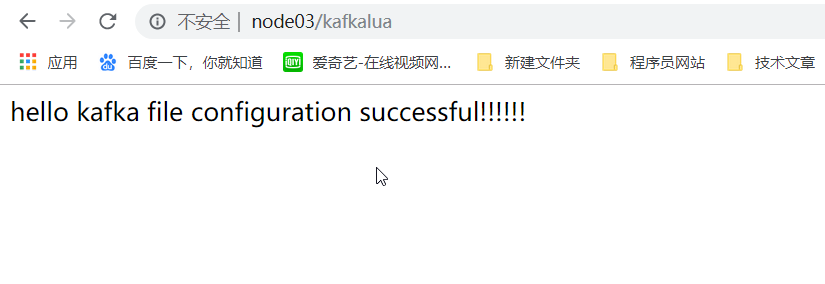
在浏览器输入:node03/ 或者 192.168.52.120/
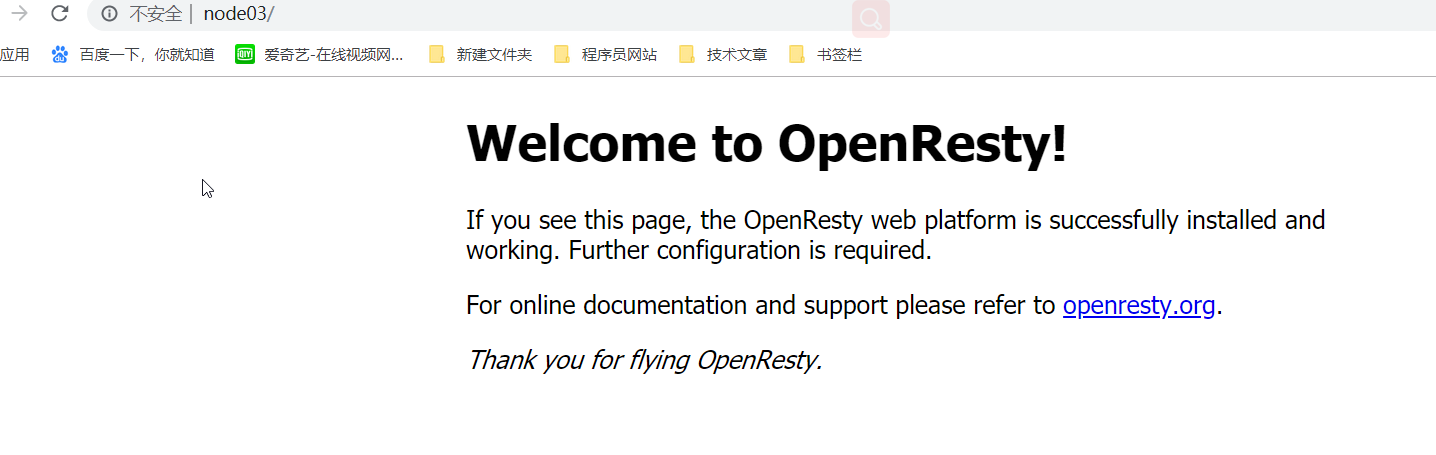
再在浏览器输入:node03:80/kafkalua 和 node03:80/ 试试
搬来 nginx.conf 来看看:
node03:80/kafkalua 这里的 nide03 是服务器的别名或者之间写文服务器地址,80 是【listen 80;】配置的监听端口,80 端口可以省略不写,如果这写成【listen 8088;】那么浏览器需输入 node03:8088/kafkalua(这里不能省略 8088),kafkalua 是工程名。
server {
        listen       80;
        server_name  localhost;

        #charset koi8-r;

        #access_log  logs/host.access.log  main;
        location / {
            root   html;
            index  index.html index.htm;
        }

        #------------------ 添加的代码 ---------------------------------------
        location /kafkalua {# 这里的 kafkalua 就是工程名字,不加默认为空
            # 开启 nginx 监控
            stub_status on;
            # 加载 lua 文件
            default_type text/html;
            # 指定 kafka 的 lua 文件位置,就是我们刚才创建的 kafkalua.lua(前面已经强调要记住的!!!!)
            content_by_lua_file /export/servers/openresty/testlua/kafkalua.lua;
        }
第五步:创建测试爬虫程序
1. 创建 maven 工程导入依赖
<dependencies>
        <dependency>
            <groupId>org.jsoup</groupId>
            <artifactId>jsoup</artifactId>
            <version>1.11.3</version>
        </dependency>
        <dependency>
            <groupId>org.apache.httpcomponents</groupId>
            <artifactId>httpclient</artifactId>
            <version>4.5.4</version>
        </dependency>
    </dependencies>
2. 伪爬虫程序
public class SpiderGoAirCN {private static String basePath = "http://node03/kafkalua";
    public static void main(String[] args) throws Exception {for (int i = 0; i < 50000; i++) {// 请求查询信息
            spiderQueryao();
            // 请求 html
            spiderHtml();
            // 请求 js
            spiderJs();
            // 请求 css
            spiderCss();
            // 请求 png
            spiderPng();
            // 请求 jpg
            spiderJpg();
            Thread.sleep(100);
        }
    }

    /**
     *
     * @throws Exception
     */
    public static void spiderQueryao() throws Exception {// 1. 指定目标网站      ^.*/B2C40/query/jaxb/direct/query.ao.*$
        String url = basePath + "/B2C40/query/jaxb/direct/query.ao";
        // 2. 发起请求
        HttpPost httpPost = new HttpPost(url);
        // 3. 设置请求参数
        httpPost.setHeader("Time-Local", getLocalDateTime());
        httpPost.setHeader("Requst",
                    "POST /B2C40/query/jaxb/direct/query.ao HTTP/1.1");
        httpPost.setHeader("Request Method", "POST");
        httpPost.setHeader("Content-Type",
                "application/x-www-form-urlencoded; charset=UTF-8");
        httpPost.setHeader("Referer",
                "http://b2c.csair.com/B2C40/modules/bookingnew/main/flightSelectDirect.html?t=S&c1=CAN&c2=WUH&d1="
                        + getGoTime() + "&at=1&ct=0&it=0");
        httpPost.setHeader("Remote Address", "192.168.56.80");
        httpPost.setHeader("User-Agent",
                "Mozilla/5.0 (Windows NT 10.0; Win64; x64) AppleWebKit/537.36 (KHTML, like Gecko) Chrome/63.0.3239.132 Safari/537.36");
        httpPost.setHeader("Time-Iso8601", getISO8601Timestamp());
        httpPost.setHeader("Server Address", "243.45.78.132");
        httpPost.setHeader("Cookie",
                "JSESSIONID=782121159357B98CA6112554CF44321E; sid=b5cc11e02e154ac5b0f3609332f86803; aid=8ae8768760927e280160bb348bef3e12; identifyStatus=N; userType4logCookie=M; userId4logCookie=13818791413; useridCookie=13818791413; userCodeCookie=13818791413; temp_zh=cou%3D0%3Bsegt%3D%E5%8D%95%E7%A8%8B%3Btime%3D2018-01-13%3B%E5%B9%BF%E5%B7%9E-%E5%8C%97%E4%BA%AC%3B1%2C0%2C0%3B%26cou%3D1%3Bsegt%3D%E5%8D%95%E7%A8%8B%3Btime%3D"
                        + getGoTime()
                        + "%3B%E5%B9%BF%E5%B7%9E-%E6%88%90%E9%83%BD%3B1%2C0%2C0%3B%26; JSESSIONID=782121159357B98CA6112554CF44321E; WT-FPC=id=211.103.142.26-608782688.30635197:lv=1516170718655:ss=1516170709449:fs=1513243317440:pn=2:vn=10; language=zh_CN; WT.al_flight=WT.al_hctype(S)%3AWT.al_adultnum(1)%3AWT.al_childnum(0)%3AWT.al_infantnum(0)%3AWT.al_orgcity1(CAN)%3AWT.al_dstcity1(CTU)%3AWT.al_orgdate1("
                        + getGoTime() + ")");
        // 4. 设置请求参数
        ArrayList<BasicNameValuePair> parameters = new ArrayList<BasicNameValuePair>();
        parameters
                .add(new BasicNameValuePair("json",
                        "{\"depcity\":\"CAN\", \"arrcity\":\"WUH\", \"flightdate\":\"20180220\", \"adultnum\":\"1\", \"childnum\":\"0\", \"infantnum\":\"0\", \"cabinorder\":\"0\", \"airline\":\"1\", \"flytype\":\"0\", \"international\":\"0\", \"action\":\"0\", \"segtype\":\"1\", \"cache\":\"0\", \"preUrl\":\"\", \"isMember\":\"\"}"));
        httpPost.setEntity(new UrlEncodedFormEntity(parameters));
        // 5. 发起请求
        CloseableHttpClient httpClient = HttpClients.createDefault();
        CloseableHttpResponse response = httpClient.execute(httpPost);
        // 6. 获取返回值
        System.out.println(response != null);
    }

    public static void spiderHtml() throws Exception {// 1. 指定目标网站         ^.*html.*$
        String url = basePath + "/B2C40/modules/bookingnew/main/flightSelectDirect.html?t=S&c1=CAN&c2=CTU&d1=2018-01-17&at=1&ct=0&it=0";
        // 2. 发起请求
        HttpPost httpPost = new HttpPost(url);
        // 3. 设置请求参数
        httpPost.setHeader("Time-Local", getLocalDateTime());
        httpPost.setHeader("Requst",
                "POST /B2C40/query/jaxb/direct/query.ao HTTP/1.1");
        httpPost.setHeader("Request Method", "POST");
        httpPost.setHeader("Content-Type",
                "application/x-www-form-urlencoded; charset=UTF-8");
        httpPost.setHeader("Referer",
                "http://b2c.csair.com/B2C40/modules/bookingnew/main/flightSelectDirect.html?t=S&c1=CAN&c2=WUH&d1=2018-02-20&at=1&ct=0&it=0");
        httpPost.setHeader("Remote Address", "192.168.56.1");
        httpPost.setHeader("User-Agent",
                "Mozilla/5.0 (Windows NT 10.0; Win64; x64) AppleWebKit/537.36 (KHTML, like Gecko) Chrome/63.0.3239.132 Safari/537.36");
        httpPost.setHeader("Time-Iso8601", getISO8601Timestamp());
        httpPost.setHeader("Server Address", "192.168.56.80");
        httpPost.setHeader("Cookie",
                "JSESSIONID=782121159357B98CA6112554CF44321E; sid=b5cc11e02e154ac5b0f3609332f86803; aid=8ae8768760927e280160bb348bef3e12; identifyStatus=N; userType4logCookie=M; userId4logCookie=13818791413; useridCookie=13818791413; userCodeCookie=13818791413; temp_zh=cou%3D0%3Bsegt%3D%E5%8D%95%E7%A8%8B%3Btime%3D2018-01-13%3B%E5%B9%BF%E5%B7%9E-%E5%8C%97%E4%BA%AC%3B1%2C0%2C0%3B%26cou%3D1%3Bsegt%3D%E5%8D%95%E7%A8%8B%3Btime%3D2018-01-17%3B%E5%B9%BF%E5%B7%9E-%E6%88%90%E9%83%BD%3B1%2C0%2C0%3B%26; JSESSIONID=782121159357B98CA6112554CF44321E; WT-FPC=id=211.103.142.26-608782688.30635197:lv=1516170718655:ss=1516170709449:fs=1513243317440:pn=2:vn=10; language=zh_CN; WT.al_flight=WT.al_hctype(S)%3AWT.al_adultnum(1)%3AWT.al_childnum(0)%3AWT.al_infantnum(0)%3AWT.al_orgcity1(CAN)%3AWT.al_dstcity1(CTU)%3AWT.al_orgdate1(2018-01-17)");
        // 4. 设置请求参数
        // httpPost.setEntity(new StringEntity(
        // "depcity=CAN&arrcity=WUH&flightdate=20180220&adultnum=1&childnum=0&infantnum=0&cabinorder=0&airline=1&flytype=0&international=0&action=0&segtype=1&cache=0&preUrl=&isMember="));
        ArrayList<BasicNameValuePair> parameters = new ArrayList<BasicNameValuePair>();
        parameters
                .add(new BasicNameValuePair("json",
                        "{\"depcity\":\"CAN\", \"arrcity\":\"WUH\", \"flightdate\":\"20180220\", \"adultnum\":\"1\", \"childnum\":\"0\", \"infantnum\":\"0\", \"cabinorder\":\"0\", \"airline\":\"1\", \"flytype\":\"0\", \"international\":\"0\", \"action\":\"0\", \"segtype\":\"1\", \"cache\":\"0\", \"preUrl\":\"\", \"isMember\":\"\"}"));
        httpPost.setEntity(new UrlEncodedFormEntity(parameters));
        // 5. 发起请求
        CloseableHttpClient httpClient = HttpClients.createDefault();
        CloseableHttpResponse response = httpClient.execute(httpPost);
        // 6. 获取返回值
        System.out.println(response != null);
    }

    public static void spiderJs() throws Exception {// 1. 指定目标网站
        String url = basePath +"/B2C40/dist/main/modules/common/requireConfig.js";
        // 2. 发起请求
        HttpPost httpPost = new HttpPost(url);
        // 3. 设置请求参数
        httpPost.setHeader("Time-Local", getLocalDateTime());
        httpPost.setHeader("Requst",
                "POST /B2C40/query/jaxb/direct/query.ao HTTP/1.1");
        httpPost.setHeader("Request Method", "POST");
        httpPost.setHeader("Content-Type",
                "application/x-www-form-urlencoded; charset=UTF-8");
        httpPost.setHeader("Referer",
                "http://b2c.csair.com/B2C40/modules/bookingnew/main/flightSelectDirect.html?t=S&c1=CAN&c2=WUH&d1=2018-02-20&at=1&ct=0&it=0");
        httpPost.setHeader("Remote Address", "192.168.56.1");
        httpPost.setHeader("User-Agent",
                "Mozilla/5.0 (Windows NT 10.0; Win64; x64) AppleWebKit/537.36 (KHTML, like Gecko) Chrome/63.0.3239.132 Safari/537.36");
        httpPost.setHeader("Time-Iso8601", getISO8601Timestamp());
        httpPost.setHeader("Server Address", "192.168.56.80");
        httpPost.setHeader("Cookie",
                "JSESSIONID=782121159357B98CA6112554CF44321E; sid=b5cc11e02e154ac5b0f3609332f86803; aid=8ae8768760927e280160bb348bef3e12; identifyStatus=N; userType4logCookie=M; userId4logCookie=13818791413; useridCookie=13818791413; userCodeCookie=13818791413; temp_zh=cou%3D0%3Bsegt%3D%E5%8D%95%E7%A8%8B%3Btime%3D2018-01-13%3B%E5%B9%BF%E5%B7%9E-%E5%8C%97%E4%BA%AC%3B1%2C0%2C0%3B%26cou%3D1%3Bsegt%3D%E5%8D%95%E7%A8%8B%3Btime%3D2018-01-17%3B%E5%B9%BF%E5%B7%9E-%E6%88%90%E9%83%BD%3B1%2C0%2C0%3B%26; JSESSIONID=782121159357B98CA6112554CF44321E; WT-FPC=id=211.103.142.26-608782688.30635197:lv=1516170718655:ss=1516170709449:fs=1513243317440:pn=2:vn=10; language=zh_CN; WT.al_flight=WT.al_hctype(S)%3AWT.al_adultnum(1)%3AWT.al_childnum(0)%3AWT.al_infantnum(0)%3AWT.al_orgcity1(CAN)%3AWT.al_dstcity1(CTU)%3AWT.al_orgdate1(2018-01-17)");
        // 4. 设置请求参数
        ArrayList<BasicNameValuePair> parameters = new ArrayList<BasicNameValuePair>();
        parameters
                .add(new BasicNameValuePair("json",
                        "{\"depcity\":\"CAN\", \"arrcity\":\"WUH\", \"flightdate\":\"20180220\", \"adultnum\":\"1\", \"childnum\":\"0\", \"infantnum\":\"0\", \"cabinorder\":\"0\", \"airline\":\"1\", \"flytype\":\"0\", \"international\":\"0\", \"action\":\"0\", \"segtype\":\"1\", \"cache\":\"0\", \"preUrl\":\"\", \"isMember\":\"\"}"));
        httpPost.setEntity(new UrlEncodedFormEntity(parameters));
        // 5. 发起请求
        CloseableHttpClient httpClient = HttpClients.createDefault();
        CloseableHttpResponse response = httpClient.execute(httpPost);
        // 6. 获取返回值
        System.out.println(response != null);
    }

    public static void spiderCss() throws Exception {// 1. 指定目标网站
        String url = basePath +"/B2C40/dist/main/css/flight.css";
        // 2. 发起请求
        HttpPost httpPost = new HttpPost(url);
        // 3. 设置请求参数
        httpPost.setHeader("Time-Local", getLocalDateTime());
        httpPost.setHeader("Requst",
                "POST /B2C40/query/jaxb/direct/query.ao HTTP/1.1");
        httpPost.setHeader("Request Method", "POST");
        httpPost.setHeader("Content-Type",
                "application/x-www-form-urlencoded; charset=UTF-8");
        httpPost.setHeader("Referer",
                "http://b2c.csair.com/B2C40/modules/bookingnew/main/flightSelectDirect.html");
        httpPost.setHeader("Remote Address", "192.168.56.1");
        httpPost.setHeader("User-Agent",
                "Mozilla/5.0 (Windows NT 10.0; Win64; x64) AppleWebKit/537.36 (KHTML, like Gecko) Chrome/63.0.3239.132 Safari/537.36");
        httpPost.setHeader("Time-Iso8601", getISO8601Timestamp());
        httpPost.setHeader("Server Address", "192.168.56.80");
        httpPost.setHeader("Cookie",
                "JSESSIONID=782121159357B98CA6112554CF44321E; sid=b5cc11e02e154ac5b0f3609332f86803; aid=8ae8768760927e280160bb348bef3e12; identifyStatus=N; userType4logCookie=M; userId4logCookie=13818791413; useridCookie=13818791413; userCodeCookie=13818791413; temp_zh=cou%3D0%3Bsegt%3D%E5%8D%95%E7%A8%8B%3Btime%3D2018-01-13%3B%E5%B9%BF%E5%B7%9E-%E5%8C%97%E4%BA%AC%3B1%2C0%2C0%3B%26cou%3D1%3Bsegt%3D%E5%8D%95%E7%A8%8B%3Btime%3D2018-01-17%3B%E5%B9%BF%E5%B7%9E-%E6%88%90%E9%83%BD%3B1%2C0%2C0%3B%26; JSESSIONID=782121159357B98CA6112554CF44321E; WT-FPC=id=211.103.142.26-608782688.30635197:lv=1516170718655:ss=1516170709449:fs=1513243317440:pn=2:vn=10; language=zh_CN; WT.al_flight=WT.al_hctype(S)%3AWT.al_adultnum(1)%3AWT.al_childnum(0)%3AWT.al_infantnum(0)%3AWT.al_orgcity1(CAN)%3AWT.al_dstcity1(CTU)%3AWT.al_orgdate1(2018-01-17)");
        // 4. 设置请求参数
        ArrayList<BasicNameValuePair> parameters = new ArrayList<BasicNameValuePair>();
        parameters
                .add(new BasicNameValuePair("json",
                        "{\"depcity\":\"CAN\", \"arrcity\":\"WUH\", \"flightdate\":\"20180220\", \"adultnum\":\"1\", \"childnum\":\"0\", \"infantnum\":\"0\", \"cabinorder\":\"0\", \"airline\":\"1\", \"flytype\":\"0\", \"international\":\"0\", \"action\":\"0\", \"segtype\":\"1\", \"cache\":\"0\", \"preUrl\":\"\", \"isMember\":\"\"}"));
        httpPost.setEntity(new UrlEncodedFormEntity(parameters));
        // 5. 发起请求
        CloseableHttpClient httpClient = HttpClients.createDefault();
        CloseableHttpResponse response = httpClient.execute(httpPost);
        // 6. 获取返回值
        System.out.println(response != null);
    }

    public static void spiderPng() throws Exception {// 1. 指定目标网站
        String url =basePath + "/B2C40/dist/main/images/common.png";
        // 2. 发起请求
        HttpPost httpPost = new HttpPost(url);
        // 3. 设置请求参数
        httpPost.setHeader("Time-Local", getLocalDateTime());
        httpPost.setHeader("Requst",
                "POST /B2C40/query/jaxb/direct/query.ao HTTP/1.1");
        httpPost.setHeader("Request Method", "POST");
        httpPost.setHeader("Content-Type",
                "application/x-www-form-urlencoded; charset=UTF-8");
        httpPost.setHeader("Referer",
                "http://b2c.csair.com/B2C40/modules/bookingnew/main/flightSelectDirect.html?t=S&c1=CAN&c2=WUH&d1=2018-02-20&at=1&ct=0&it=0");
        httpPost.setHeader("Remote Address", "192.168.56.1");
        httpPost.setHeader("User-Agent",
                "Mozilla/5.0 (Windows NT 10.0; Win64; x64) AppleWebKit/537.36 (KHTML, like Gecko) Chrome/63.0.3239.132 Safari/537.36");
        httpPost.setHeader("Time-Iso8601", getISO8601Timestamp());
        httpPost.setHeader("Server Address", "192.168.56.80");
        httpPost.setHeader("Cookie",
                "JSESSIONID=782121159357B98CA6112554CF44321E; sid=b5cc11e02e154ac5b0f3609332f86803; aid=8ae8768760927e280160bb348bef3e12; identifyStatus=N; userType4logCookie=M; userId4logCookie=13818791413; useridCookie=13818791413; userCodeCookie=13818791413; temp_zh=cou%3D0%3Bsegt%3D%E5%8D%95%E7%A8%8B%3Btime%3D2018-01-13%3B%E5%B9%BF%E5%B7%9E-%E5%8C%97%E4%BA%AC%3B1%2C0%2C0%3B%26cou%3D1%3Bsegt%3D%E5%8D%95%E7%A8%8B%3Btime%3D2018-01-17%3B%E5%B9%BF%E5%B7%9E-%E6%88%90%E9%83%BD%3B1%2C0%2C0%3B%26; JSESSIONID=782121159357B98CA6112554CF44321E; WT-FPC=id=211.103.142.26-608782688.30635197:lv=1516170718655:ss=1516170709449:fs=1513243317440:pn=2:vn=10; language=zh_CN; WT.al_flight=WT.al_hctype(S)%3AWT.al_adultnum(1)%3AWT.al_childnum(0)%3AWT.al_infantnum(0)%3AWT.al_orgcity1(CAN)%3AWT.al_dstcity1(CTU)%3AWT.al_orgdate1(2018-01-17)");
        // 4. 设置请求参数
        ArrayList<BasicNameValuePair> parameters = new ArrayList<BasicNameValuePair>();
        parameters
                .add(new BasicNameValuePair("json",
                        "{\"depcity\":\"CAN\", \"arrcity\":\"WUH\", \"flightdate\":\"20180220\", \"adultnum\":\"1\", \"childnum\":\"0\", \"infantnum\":\"0\", \"cabinorder\":\"0\", \"airline\":\"1\", \"flytype\":\"0\", \"international\":\"0\", \"action\":\"0\", \"segtype\":\"1\", \"cache\":\"0\", \"preUrl\":\"\", \"isMember\":\"\"}"));
        httpPost.setEntity(new UrlEncodedFormEntity(parameters));
        // 5. 发起请求
        CloseableHttpClient httpClient = HttpClients.createDefault();
        CloseableHttpResponse response = httpClient.execute(httpPost);
        // 6. 获取返回值
        System.out.println(response != null);
    }

    public static void spiderJpg() throws Exception {// 1. 指定目标网站
        String url = basePath +"/B2C40/dist/main/images/loadingimg.jpg";
        // 2. 发起请求
        HttpPost httpPost = new HttpPost(url);
        // 3. 设置请求参数
        httpPost.setHeader("Time-Local", getLocalDateTime());
        httpPost.setHeader("Requst",
                "POST /B2C40/query/jaxb/direct/query.ao HTTP/1.1");
        httpPost.setHeader("Request Method", "POST");
        httpPost.setHeader("Content-Type",
                "application/x-www-form-urlencoded; charset=UTF-8");
        httpPost.setHeader("Referer",
                "http://b2c.csair.com/B2C40/modules/bookingnew/main/flightSelectDirect.html?t=S&c1=CAN&c2=WUH&d1=2018-02-20&at=1&ct=0&it=0");
        httpPost.setHeader("Remote Address", "192.168.56.1");
        httpPost.setHeader("User-Agent",
                "Mozilla/5.0 (Windows NT 10.0; Win64; x64) AppleWebKit/537.36 (KHTML, like Gecko) Chrome/63.0.3239.132 Safari/537.36");
        httpPost.setHeader("Time-Iso8601", getISO8601Timestamp());
        httpPost.setHeader("Server Address", "192.168.56.80");
        httpPost.setHeader("Cookie",
                "JSESSIONID=782121159357B98CA6112554CF44321E; sid=b5cc11e02e154ac5b0f3609332f86803; aid=8ae8768760927e280160bb348bef3e12; identifyStatus=N; userType4logCookie=M; userId4logCookie=13818791413; useridCookie=13818791413; userCodeCookie=13818791413; temp_zh=cou%3D0%3Bsegt%3D%E5%8D%95%E7%A8%8B%3Btime%3D2018-01-13%3B%E5%B9%BF%E5%B7%9E-%E5%8C%97%E4%BA%AC%3B1%2C0%2C0%3B%26cou%3D1%3Bsegt%3D%E5%8D%95%E7%A8%8B%3Btime%3D2018-01-17%3B%E5%B9%BF%E5%B7%9E-%E6%88%90%E9%83%BD%3B1%2C0%2C0%3B%26; JSESSIONID=782121159357B98CA6112554CF44321E; WT-FPC=id=211.103.142.26-608782688.30635197:lv=1516170718655:ss=1516170709449:fs=1513243317440:pn=2:vn=10; language=zh_CN; WT.al_flight=WT.al_hctype(S)%3AWT.al_adultnum(1)%3AWT.al_childnum(0)%3AWT.al_infantnum(0)%3AWT.al_orgcity1(CAN)%3AWT.al_dstcity1(CTU)%3AWT.al_orgdate1(2018-01-17)");
        // 4. 设置请求参数
        ArrayList<BasicNameValuePair> parameters = new ArrayList<BasicNameValuePair>();
        parameters
                .add(new BasicNameValuePair("json",
                        "{\"depcity\":\"CAN\", \"arrcity\":\"WUH\", \"flightdate\":\"20180220\", \"adultnum\":\"1\", \"childnum\":\"0\", \"infantnum\":\"0\", \"cabinorder\":\"0\", \"airline\":\"1\", \"flytype\":\"0\", \"international\":\"0\", \"action\":\"0\", \"segtype\":\"1\", \"cache\":\"0\", \"preUrl\":\"\", \"isMember\":\"\"}"));
        httpPost.setEntity(new UrlEncodedFormEntity(parameters));
        // 5. 发起请求
        CloseableHttpClient httpClient = HttpClients.createDefault();
        CloseableHttpResponse response = httpClient.execute(httpPost);
        // 6. 获取返回值
        System.out.println(response != null);
    }

    public static String getLocalDateTime() {DateFormat df = new SimpleDateFormat("dd/MMM/yyyy'T'HH:mm:ss +08:00",
                Locale.ENGLISH);
        String nowAsISO = df.format(new Date());
        return nowAsISO;

    }

    public static String getISO8601Timestamp() {DateFormat df = new SimpleDateFormat("yyyy-MM-dd'T'HH:mm:ss+08:00");
        String nowAsISO = df.format(new Date());
        return nowAsISO;
    }

    public static String getGoTime() {DateFormat df = new SimpleDateFormat("yyyy-MM-dd");
        String nowAsISO = df.format(new Date());
        return nowAsISO;
    }

    public static String getBackTime() {Date date = new Date();// 取时间
        Calendar calendar = new GregorianCalendar();
        calendar.setTime(date);
        calendar.add(calendar.DATE, +1);// 把日期往前减少一天,若想把日期向后推一天则将负数改为正数
        date = calendar.getTime();
        SimpleDateFormat formatter = new SimpleDateFormat("yyyy-MM-dd");
        String dateString = formatter.format(date);
        return dateString;
    }
}
第六步:启动 kafka
1. 创建主题 topic
[root@node01 bin]# kafka-topics.sh --zookeeper node01:2181 --partitions 3
--replication-factor 3 --create --topic B2CDATA_COLLECTION1
2. 开启 kafka 消费者
[root@node01 bin]# kafka-console-consumer.sh --bootstrap-server node01:9092,node02:9092,node03:9092
--topic B2CDATA_COLLECTION1
第七步:开启爬虫程序并观察结果
1. 启动爬虫程序
2. 观察消费者窗口如下
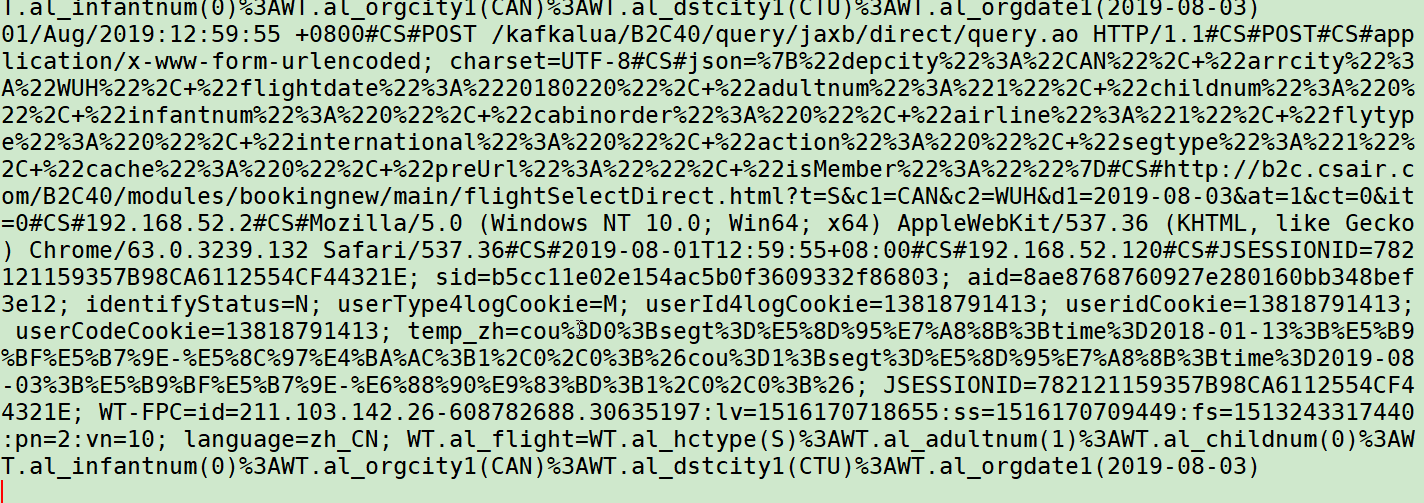
第八步:启动 kafka-manager 观察
1. 启动 kafka-manager
[root@node01 conf]# cd /export/servers/kafka-manager-1.3.3.23/bin/
[root@node01 bin]# ll
total 36
-rwxr-xr-x 1 root root 13747 May  1 06:27 kafka-manager
-rw-r--r-- 1 root root  9975 May  1 06:27 kafka-manager.bat
-rwxr-xr-x 1 root root  1383 May  1 06:27 log-config
-rw-r--r-- 1 root root   105 May  1 06:27 log-config.bat
[root@node01 bin]#

# 启动
[root@node01 bin]# ./kafka-manager
启动后的窗口:
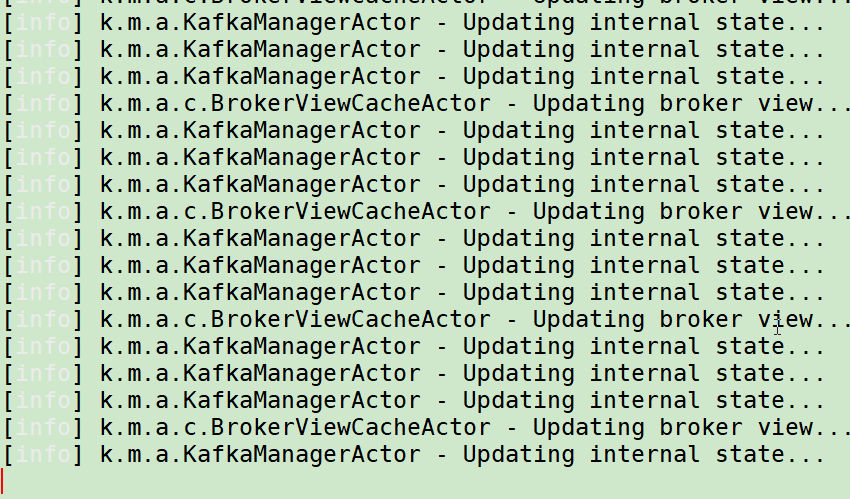
2. 浏览器访问
浏览器输入:node01:9000
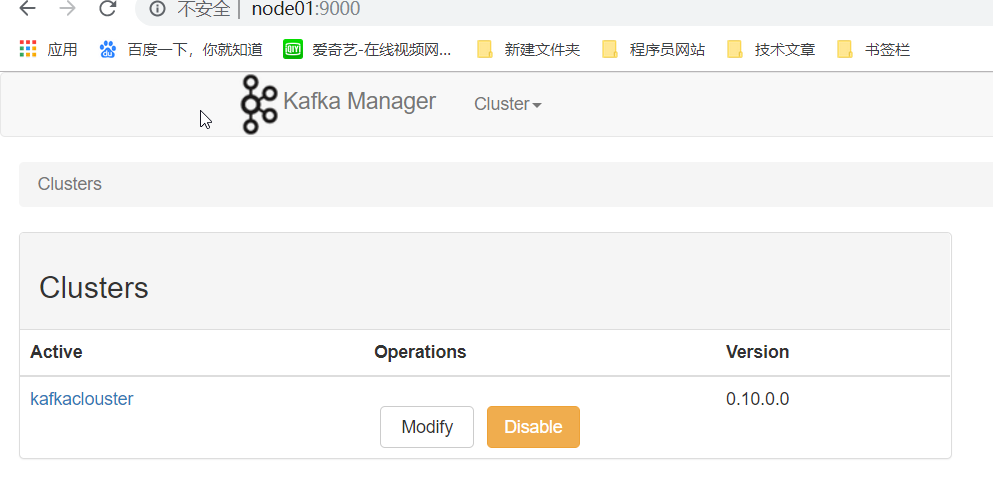
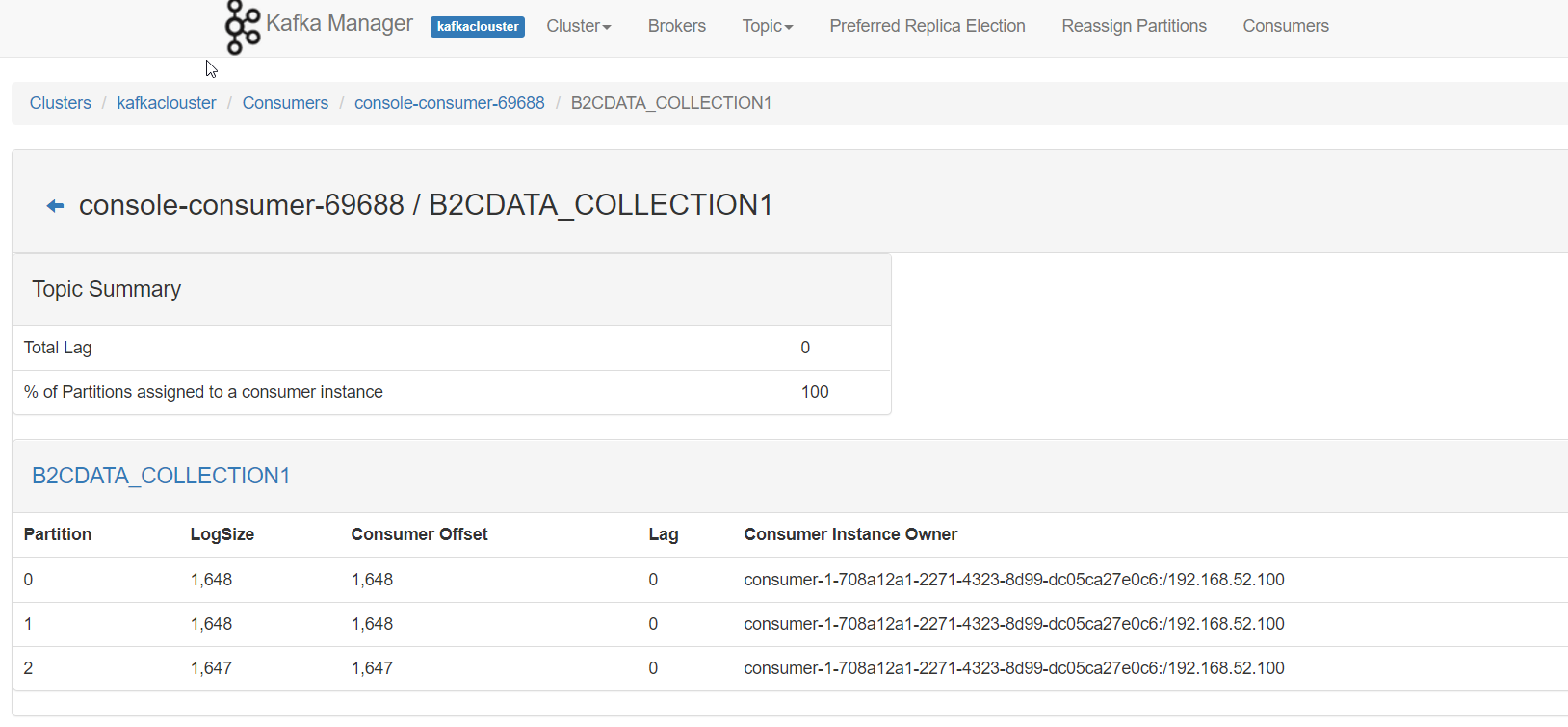
kafka manager 使用不做讲解,观察 B2CDATA_COLLECTION1 主题消费情况:
有三个分区,每个分区消费的消息差多说明成功啦,
如果不一样,则是 kafkalua.lua 脚本中没有配置分区策略,默认分区会导致 数据倾斜 我们需配置自己的分区策略!
完毕!
: