共计 17141 个字符,预计需要花费 43 分钟才能阅读完成。
本文目录:
1. 简介
2. 安装 heartbeat
2.1 编译安装 Heartbeat
3.heartbeat 相关配置文件
3.1 配置文件 ha.cf
3.2 配置文件 authkeys
3.3 配置文件 haresources
4. 示例:heartbeat 为 httpd 提供高可用服务
1. 简介
heartbeat 是人所众知高可用软件。但是在以前,heartbeat 是 Linux-ha 项目里一大堆提供高可用组件的集合体:
Messaging Layer(消息传递层)
local resource manager(LRM, 本地资源管理,cluster glue 的一个功能)
stonith(爆头,cluster glue 的一个功能)
Resource Agent(RA, 资源代理)、
cluster resource manager(CRM, 集群资源管理器,现在独立出去的 pacemaker)。
现在,由于 linux-ha 将很多这些组件都分离为一个个单独的软件,heartbeat 已经只代表消息层(取代它的是 corosync)。而且 linux-ha 项目团队已经不再维护 heartbeat,目前能从官方获取到的最新版本是 Heartbeat 3.0.6,在 epel 中可获取到 ”Heartbeat 3.0.4″ 版本的 rpm 包。
虽然 Heartbeat 只代表高可用集群的消息传递层,但它结合 cluster glue 和 resource agent 也可以提供高可用服务,这正是本文的内容。相比于 corosync+pacemaker,heartbeat 要轻量级的多,配置起来也简单许多。相应的,它的功能和完整性要简陋的多,它只支持两个 heartbeat 节点(结合 pacemaker 可多于两节点),且加载资源的速度比较慢。
当然,既然 heartbeat 是消息传递层,它也能配合 pacemaker,但是不建议如此。而且这样搭配时,各个组件的版本要求很严格。
2. 安装 heartbeat
如果使用 yum 安装,可以配置 epel 源。注意,在 CentOS7 的 epel 上,已经没有 heartbeat 了。
release=`grep -o “[0-9]” /etc/RedHat-release | head -1`
cat <<eof>/etc/yum.repos.d/epel.repo
[epel]
name=epelrepo
baseurl=https://mirrors.aliyun.com/epel/${release}Server/\$basearch
gpgcheck=0
enable=1
eof
yum -y install heartbeat
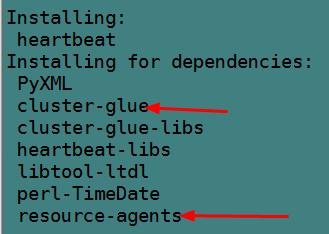
可以看到,安装 heartbeat 的时候,同时还会安装 cluster-glue 和 resource-agent。
然后提供配置文件。
cp -a /usr/share/doc/heartbeat-3.0.4/{ha.cf,haresources,authkeys} /etc/ha.d/
chmod 600 /etc/ha.d/authkeys
2.1 编译安装 heartbeat
不建议编译安装 heartbeat,heartbeat 这个程序本身附带的很多脚本在路径指定上很混乱,安装后很可能需要到处修改脚本中关于路径的变量。
如果要编译安装 heartbeat,则必须先安装 cluster-glue 和 resource-agent,建议这 3 个程序安装在同一路径下。
(1). 安装依赖包。
yum -y install gcc gcc-c++ autoconf automake libtool glib2-devel libxml2-devel bzip2 bzip2-devel e2fsprogs-devel libxslt-devel libtool-ltdl-devel asciidoc
创建好所需组和所有者,在编译 cluster-glue 会设置一些文件的属组和属主分别为 haclient、hacluster,因此名称必须为这两个。
groupadd -g 65 haclient
useradd -g 65 -u 17 hacluster
(2). 编译 cluster-glue。
tar xf Cluster\ Glue\ 1.0.12.bz2
cd Reusable-Cluster-Components-glue–0a7add1d9996/
./autogen.sh
./configure –prefix=/usr/local/heartbeat LIBS=/lib64/libuuid.so.1
make
make install
如果 make 时有如下错误:
./.libs/libplumb.so: undefined reference to `uuid_parse’
./.libs/libplumb.so: undefined reference to `uuid_generate’
./.libs/libplumb.so: undefined reference to `uuid_copy’
./.libs/libplumb.so: undefined reference to `uuid_is_null’
./.libs/libplumb.so: undefined reference to `uuid_unparse’
./.libs/libplumb.so: undefined reference to `uuid_clear’
./.libs/libplumb.so: undefined reference to `uuid_compare’
collect2: ld returned 1 exit status
gmake[2]: *** [ipctest] Error 1
gmake[2]: Leaving directory `/root/Reusable-Cluster-Components-glue–0a7add1d9996/lib/clplumbing’
gmake[1]: *** [all-recursive] Error 1
gmake[1]: Leaving directory `/root/Reusable-Cluster-Components-glue–0a7add1d9996/lib’
make: *** [all-recursive] Error 1
解决方法:在 configure 中使用 LIBS 指向正确的库文件,64 位使用 /lib64,32 位使用 /lib
./configure LIBS=/lib64/libuuid.so.1
如果是如下错误:
gmake[2]: a2x: Command not found
解决方法:yum install asciidoc
可以看下 cluster-glue 提供了哪些命令。
[root@xuexi ~]# ls /usr/local/heartbeat/sbin/
cibsecret ha_logger hb_report lrmadmin meatclient stonith
从此不难看出,cluster-glue 是整个 ha 的核心组件,除了 crm、messageing layer、resource agent,所有的功能包括最基本的功能都是它提供的。例如,日志记录,stonith,lrm 等。
(3). 编译 resource-agent。
tar xf resource-agents-3.9.6.tar.gz
cd resource-agents-3.9.6
./autogen.sh
./configure –prefix=/usr/local/heartbeat
make
make install
(4). 编译 heartbeat。
tar xf heartbeat\ 3.0.6.bz2
cd Heartbeat-3-0-958e11be8686/
./bootstrap
export CFLAGS=”$CFLAGS -I/usr/local/heartbeat/include -L/usr/local/heartbeat/lib”
./configure –prefix=/usr/local/heartbeat –with-daemon-user=hacluster –with-daemon-group=haclient LIBS=/lib64/libuuid.so.1
make
make install
如果出现如下错误:
【configure 时错误:】
configure: error: in `/root/Heartbeat-3-0-958e11be8686′:
configure: error: Core development headers were not found
解决方法:
export CFLAGS=”$CFLAGS -I/usr/local/heartbeat/include -L/usr/local/heartbeat/lib”
【make 时错误:】
/usr/local/heartbeat/include/heartbeat/glue_config.h:105:1: error: “HA_HBCONF_DIR” redefined
In file included from ../include/lha_internal.h:38,
from strlcpy.c:1:
../include/config.h:390:1: error: this is the location of the previous definition
gmake[1]: *** [strlcpy.lo] Error 1
gmake[1]: Leaving directory `/root/Heartbeat-3-0-958e11be8686/replace’
make: *** [all-recursive] Error 1
解决方法 1:
删除 /usr/local/heartbeat/include/heartbeat/glue_config.h 中的第 105 行
#define HA_HBCONF_DIR “/etc/ha.d/”
sed -i ‘105d’ /usr/local/heartbeat/include/heartbeat/glue_config.h
解决方法 2:configure 上加上忽略错误选项
./configure –prefix=/usr/local/heartbeat –with-daemon-user=hacluster –with-daemon-group=haclient LIBS=/lib64/libuuid.so.1 –enable-fatal-warnings=no
(5). 编译后配置。
mkdir -p /usr/local/heartbeat/usr/lib/ocf/lib/heartbeat
cp -a /usr/lib/ocf/lib/heartbeat/ocf-* /usr/local/heartbeat/usr/lib/ocf/lib/heartbeat/
ln -s /usr/local/heartbeat/lib64/heartbeat/plugins/RAExec/* /usr/local/heartbeat/lib/heartbeat/plugins/RAExec/
ln -s /usr/local/heartbeat/lib64/heartbeat/plugins/* /usr/local/heartbeat/lib/heartbeat/plugins/
ln -s /usr/local/heartbeat/share/heartbeat /usr/share/heartbeat
提供配置文件:
cd /usr/local/heartbeat
cp -a share/doc/heartbeat/{ha.cf,haresources,authkeys} etc/ha.d/
chmod 600 etc/ha.d/authkeys
加入服务器启动列表:
chkconfig –add heartbeat
chkconfig –level 2345 heartbeat on
设置环境变量 PATH:
echo ‘export PATH=/usr/local/heartbeat/sbin:/usr/local/heartbeat/bin:$PATH’ >/etc/profile.d/ha.sh
chmod +x /etc/profile.d/ha.sh
source /etc/profile.d/ha.sh
设置 man PATH:
echo ‘MANPATH /usr/local/heartbeat/share/man’ >>/etc/man.config
3.heartbeat 相关配置文件
heartbeat 配置文件有 3 个:
密钥文件 authkeys,用在 messaging layer 下各节点之间的认证,防止外界主机随意加入节点(600 权限);
heartbeat 核心配置文件,ha.cf;
资源管理配置文件:haresources;
它们的生效位置在 /etc/ha.d/ 目录下,但是初始时在此目录下并没有这 3 个文件,它们的样例配置文件在 /usr/share/docs/heartbeat-$$version/ 目录下,可以将它们复制到 /etc/ha.d 目录下。
# 以下是 yum 安装,非编译安装的操作
cp /usr/share/doc/heartbeat-3.0.4/{authkeys,ha.cf,haresources} /etc/ha.d/
3.1 配置文件 ha.cf
ha.cf 的部分内容如下。该文件看起来很多,但如果不结合 pacemaker,其实要修改的就几项,包括 node 和 bcast/mcast 以及 auto_failback,有时还配置下 ping 和 log。注意该文件从上往下读取,指令的配置位置很重要,因此一般不要修改它们的出现顺序。
# 如果 logfile/debugfile/logfacility 都没有设置,则等价于设置了 ”use_logd yes”
# 且 use_logd 设置为 yes 后,logfile/debugfile/logfacility 的设置都失效
#
# Note on logging:
# If all of debugfile, logfile and logfacility are not defined,
# logging is the same as use_logd yes. In other case, they are
# respectively effective. if detering the logging to syslog,
# logfacility must be “none”.
#
# File to write debug messages to
#debugfile /var/log/ha-debug
#
#
# File to write other messages to
#
#logfile /var/log/ha-log
#
#
# Facility to use for syslog()/logger
#
logfacility local0
#
#
# A note on specifying “how long” times below…
#
# The default time unit is seconds
# 10 means ten seconds
#
# You can also specify them in milliseconds
# 1500ms means 1.5 seconds
#
#
# keepalive: how long between heartbeats?
# 发送心跳信息的时间间隔,默认每两秒发送一次心跳信息
#keepalive 2
#
# deadtime: how long-to-declare-host-dead?
#
# If you set this too low you will get the problematic
# split-brain (or cluster partition) problem.
# See the FAQ for how to use warntime to tune deadtime.
# 指定若备节点在 30 秒内未收到主节点心跳信号, 则判定主节点死亡,并接管主服务器资源
#deadtime 30
#
# warntime: how long before issuing “late heartbeat” warning?
# See the FAQ for how to use warntime to tune deadtime.
# 指定心跳延迟的时间为 10 秒,10 秒内备节点不能接收主节点心跳信号,即往日志写入警告日志,但不会切换服务
#warntime 10
#
#
# Very first dead time (initdead)
#
# On some machines/OSes, etc. the network takes a while to come up
# and start working right after you’ve been rebooted. As a result
# we have a separate dead time for when things first come up.
# It should be at least twice the normal dead time.
# 定义第一次死亡判定时间,即第一个 heartbeat 启动后等待第二个 heartbeat 启动,
# 第二个启动后才会启动高可用服务、启动 VIP 等。若在此时间内第二个节点未启动则
# 判定其 dead,然后才启动高可用服务和 VIP,这是双方为形成高可用群集的等待时间。
# 此时间至少要是 deadtime 的两倍
#initdead 120
#
#
# What UDP port to use for bcast/ucast communication?
# 心跳信息端口
#udpport 694
#
# Baud rate for serial ports…
# 支持两种方式发送心跳信息,一是以太网(广播组播单播),一是串行线,在 heartbeat3 中,baud 已经废弃
#baud 19200
#
# serial serialportname …
#serial /dev/ttyS0 # Linux
#serial /dev/cuaa0 # FreeBSD
#serial /dev/cuad0 # FreeBSD 6.x
#serial /dev/cua/a # Solaris
#
#
# What interfaces to broadcast heartbeats over?
#
#bcast eth0 # Linux
#bcast eth1 eth2 # Linux
#bcast le0 # Solaris
#bcast le1 le2 # Solaris
#
# Set up a multicast heartbeat medium
# mcast [dev] [mcast group] [port] [ttl] [loop]
#
# [dev] device to send/rcv heartbeats on
# [mcast group] multicast group to join (class D multicast address
# 224.0.0.0 – 239.255.255.255)
# [port] udp port to sendto/rcvfrom (set this value to the
# same value as “udpport” above)
# [ttl] the ttl value for outbound heartbeats. this effects
# how far the multicast packet will propagate. (0-255)
# Must be greater than zero.
# [loop] toggles loopback for outbound multicast heartbeats.
# if enabled, an outbound packet will be looped back and
# received by the interface it was sent on. (0 or 1)
# Set this value to zero.
#
#
#mcast eth0 225.0.0.1 694 1 0
#
# Set up a unicast / udp heartbeat medium
# ucast [dev] [peer-ip-addr]
#
# [dev] device to send/rcv heartbeats on
# [peer-ip-addr] IP address of peer to send packets to
#
# 单播心跳,需指定对方心跳接口地址
#ucast eth0 192.168.1.2
#
#
# About boolean values…
#
# Any of the following case-insensitive values will work for true:
# true, on, yes, y, 1
# Any of the following case-insensitive values will work for false:
# false, off, no, n, 0
#
#
#
# auto_failback: determines whether a resource will
# automatically fail back to its “primary” node, or remain
# on whatever node is serving it until that node fails, or
# an administrator intervenes.
#
# The possible values for auto_failback are:
# on – enable automatic failbacks
# off – disable automatic failbacks
# legacy – enable automatic failbacks in systems
# where all nodes do not yet support
# the auto_failback option.
#
# auto_failback “on” and “off” are backwards compatible with the old
# “nice_failback on” setting.
#
# See the FAQ for information on how to convert
# from “legacy” to “on” without a flash cut.
# (i.e., using a “rolling upgrade” process)
#
# The default value for auto_failback is “legacy”, which
# will issue a warning at startup. So, make sure you put
# an auto_failback directive in your ha.cf file.
# (note: auto_failback can be any boolean or “legacy”)
# 主节点恢复重新上线后,是否自动接管服务
auto_failback on
#
# 以下是 fence 设备相关
# Basic STONITH support
# Using this directive assumes that there is one stonith
# device in the cluster. Parameters to this device are
# read from a configuration file. The format of this line is:
#
# stonith <stonith_type> <configfile>
#
# NOTE: it is up to you to maintain this file on each node in the
# cluster!
#
#stonith baytech /etc/ha.d/conf/stonith.baytech
#
# STONITH support
# You can configure multiple stonith devices using this directive.
# The format of the line is:
# stonith_host <hostfrom> <stonith_type> <params…>
# <hostfrom> is the machine the stonith device is attached
# to or * to mean it is accessible from any host.
# <stonith_type> is the type of stonith device (a list of
# supported drives is in /usr/lib/stonith.)
# <params…> are driver specific parameters. To see the
# format for a particular device, run:
# stonith -l -t <stonith_type>
#
#
# Note that if you put your stonith device access information in
# here, and you make this file publically readable, you’re asking
# for a denial of service attack ;-)
#
# To get a list of supported stonith devices, run
# stonith -L
# For detailed information on which stonith devices are supported
# and their detailed configuration options, run this command:
# stonith -h
#
#stonith_host * baytech 10.0.0.3 mylogin mysecretpassword
#stonith_host ken3 rps10 /dev/ttyS1 kathy 0
#stonith_host kathy rps10 /dev/ttyS1 ken3 0
#
#
# 看门狗是一个计时器。如果自身 60 秒不心跳了,则本节点会重启
# Watchdog is the watchdog timer. If our own heart doesn’t beat for
# a minute, then our machine will reboot.
# NOTE: If you are using the software watchdog, you very likely
# wish to load the module with the parameter “nowayout=0” or
# compile it without CONFIG_WATCHDOG_NOWAYOUT set. Otherwise even
# an orderly shutdown of heartbeat will trigger a reboot, which is
# very likely NOT what you want.
#
#watchdog /dev/watchdog #看门狗 fence 设备,Linux 自带的软 watchdog
#
# Tell what machines are in the cluster
# node nodename … — must match uname -n
# 必须配置的 node,必须和 uname - n 的结果一致
#node ken3
#node kathy
#
# Less common options…
#
# Treats 10.10.10.254 as a psuedo-cluster-member
# Used together with ipfail below…
# note: don’t use a cluster node as ping node
#
# 通过 ping 参考 ip 检测本节点对外的网络连通性,需要配合 ipfail 进程。当 ping 不通时将 down 掉本节点
# ping_group 是通过 ping 一组 ip 来检查 ip 的连通性,防止因对方节点故障而误以为自己坏了。
# 只有当组中所有节点都 ping 不通才认为自己坏了。和 ping 只能使用二选一
# 不要使用集群节点作为 ping 的参考 ip,一般 ping 的对象都是网关
#ping 10.10.10.254
#ping_group group1 172.16.103.254 172.16.103.212
# 随 heartbeat 启动、停止而启动停止的进程,它是 pacemaker 在 heartbeat 中的实现
#respawn hacluster /usr/local/lib/heartbeat/ipfail
# 指定哪个用户、组可以连通使用某进程,此处为 ipfail
#apiauth ipfail gid=haclient uid=hacluster
综上,必须要配置的就是三项:node、bcast/mcast、auto_failback。它们在文件中的位置顺序是先 bcast/mcast/ucast,再 auto_failback,最后才是 node。偶尔还需配置 ping 来检测自身网络。
例如,以下是两个 heartbeat 节点,分别两个网卡,使用广播方式从 eth0 发送心跳信息的配置。
logfile /var/log/ha-log
logfacility local0
bcast eth0
#mcast eth1 225.0.0.193 694 1 0
auto_failback yes
node node1.longshuai.com
node node2.longshuai.com
ping 192.168.100.1
respawn hacluster /usr/local/lib/heartbeat/ipfail
apiauth ipfail gid=haclient uid=hacluster
因为使用的是广播,两台服务器上的 ha.cf 文件是完全一样的。如果是通过多播或单播的方式发送心跳信息,则两台服务器的 ha.cf 在 mcast/ucast 指令配置参数上是不一样的。
另外需注意,heartbeat 主节点重启 heartbeat 或重启系统,当前正运行的 heartbeat 会发出通告给备节点,使其快速接管资源,而不是按照配置文件中定义的 deadtime 来获取资源的。同理,当再次启动的时候,如果设置了 failback,会发送通告迅速收回资源。
3.2 配置文件 authkeys
chmod 600 authkeys
以下为 authkeys 的内容。两个节点上该文件的内容一致。
#auth 1
#1 crc
#2 sha1 HI!
#3 md5 Hello!
auth 3
3 md5 6hy6Y6NCdVInax1PlGlvFyIMm/k
使用的是 md5 格式,使用 sha1 更安全。后面的是一段随机数,这里用随机数来做 md5 加密。随机数的生成方式有很多种。如:
openssl rand -base64 20
3.3 配置文件 haresources
在此配置文件内配置资源代理 (resource agent) 参数。heartbeat 自身支持两种风格的 RA:一种是 LSB 类型的程序,它的路径在 /etc/init.d/ 下;一种是 heartbeat 自带的 haresource,它的路径在 ha.d/resource.d/ 目录下。
以下是 heartbeat 自带的 RA。
[root@xuexi ~]# ls /etc/ha.d/resource.d/
apache db2 Filesystem ICP IPaddr IPsrcaddr LinuxSCSI MailTo portblock SendArp WAS Xinetd
AudibleAlarm Delay hto-mapfuncs ids IPaddr2 IPv6addr LVM OCF Raid1 ServeRAID WinPopup
需要记住其中几个:
apache:管理 httpd,需指定 httpd 配置文件作为该 RA 的参数。
IPaddr 和 IPaddr2:设置 IP 别名 (注意,是别名),IPaddr2 是 IPaddr 的升级版,但两者可以通用。
Filesystem:挂载文件系统。
自带的 RA 类似于 LSB,只是它能接受参数(如 start/stop/status),而 LSB 不能,LSB 的 start、stop 和 status 参数由 heartbeat 自行发送。
它们都必须能接受 start/stop/status 参数,且必须具有幂等性。例如 running 状态的再次 start,返回状态码为 0,还是继续 running,stop 状态的再次 stop 不会报错,且状态码为 0。除了对 stop 状态的资源进行 status 时返回状态码 3,其他任意参数的状态码都必须为 0。
如果结合 pacemaker,则还支持 ocf 风格的程序来管理资源。
通过以下 5 行来说明该配置文件的配置方法。
#node-name resource1 resource2 … resourceN
#IPaddr::135.9.8.7/24/eth0
#just.linux-ha.org 135.9.216.110 httpd
#node1 10.0.0.170 Filesystem::/dev/sda1::/data1::ext2
#node1 10.0.0.170 apache::/etc/apache/httpd.conf
第一行是配置语法说明,首先指定节点名,节点名必须和 uname - n 一致。后面指定在此节点上运行的资源,多个资源使用空格隔开。
第二行中的 ”IPaddr” 是资源代理程序,该程序在 /etc/ha.d/resource.d/ 目录下,如果该目录下找不到就会去找 /etc/init.d/ 目录下的程序。IPaddr 后面的双冒号 ”::” 是参数分隔符,多个参数之间使用双冒号分割,参数是传递给资源代理程序的。这一行说明的是设置在某节点上设置 ip 为 135.9.8.7,掩码为 24 位,配置在 eth0 的别名上。它实现的是 resource.d/IPaddr 135.9.8.7/24/eth0 start|stop|status。
第三行说明在节点 just.linux-ha.org 上启用 ip 135.9.216.110(IPaddr 程序可省略)和 httpd 服务。
第四行说明节点 node1 上启用 IP 10.0.0.170,成功后运行资源代理程序 Filesystem,向其传入运行 3 个参数 ”/dev/sda1″、”/data1″、”ext2″。
如果不知道某个 RA 接什么样的参数实现怎样的功能,可以去查看 ha.d/resource.d/ 下对应 RA 的程序用法(一般都是 shell 脚本,前几行就会写 Usage)。例如,IPaddr2 的前几行:
[root@xuexi ~]# vim /etc/ha.d/resource.d/IPaddr2
#!/bin/sh
#
#
# Description: wrapper of OCF RA IPaddr2, based on original heartbeat RA.
# See OCF RA IPaddr2 for more information.
#
# Author: Xun Sun <xunsun@cn.ibm.com>
# Support: linux-ha@lists.linux-ha.org
# License: GNU General Public License (GPL)
# Copyright: (C) 2005 International Business Machines
#
# This script manages IP alias IP addresses
#
# It can add an IP alias, or remove one.
#
# usage: $0 ip-address[/netmaskbits[/interface[:label][/broadcast]]] \
# {start|stop|status|monitor}
#
# The “start” arg adds an IP alias.
#
# Surprisingly, the “stop” arg removes one. :-)
例如,以下是只管理两个节点 VIP 资源的 haresources 文件内容。两个服务器上的内容相同时表示:这是一个主主模型,节点 1 初始时只设置 20.16 这个 IP,节点 2 初始时只设置 20.14 这个 IP,当某节点故障后,另一节点接管其上 VIP。
node1.longshuai.com IPaddr2::192.168.20.16/24/eth0
node2.longshuai.com IPaddr2::192.168.20.14/24/eth0
注意:
heartbeat 只支持两个节点,没有主从之分,只能根据 haresources 中的节点名称来决定是否设置某资源。
VIP 这种配置在别名接口上的地址,必须要和它所在接口同网段,否则它没有对应的路由。即使它通过默认路由出去了,如果它的下一跳是 Linux 主机,由于 Linux 主机默认设置了 rp_filter= 1 的源地址严格检查,会直接丢弃这样的数据包。如果真这样,将其设置为 2(也可以设置为 0,但不推荐)。
如果采用广播发送心跳信息,建议心跳接口地址不要和 VIP 所在接口主地址同网段,否则心跳信息会被各节点的对外通信接口接收,从而影响性能。
4. 示例:heartbeat 为 httpd 提供高可用
这是一个没有实际意义的示例,只是为了演示 heartbeat 提供高可用时需要配置哪些必要的东西,以及如何提供 VIP 漂移(即 IP 资源高可用)。
环境如下:
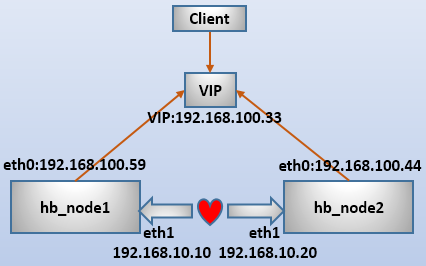
需要说明的是,httpd 有两种管理方式:
heartbeat 只管理 vip 的漂移,不管理 httpd 的启动。这种情况要求 httpd 要事先在两节点启动好。
heartbeat 同时管理 VIP 和 httpd,这时 httpd 不能事先启动,也不能设置开机自启动。
本文测试采用第二种方案。
(1). 配置节点主机名。
# node1 上执行
hostname node1.longshuai.com
sed -i “/HOSTNAME/Is/=.*$/=node1\.longshuai\.com/” /etc/sysconfig/network
# node2 上执行
hostname node2.longshuai.com
sed -i “/HOSTNAME/Is/=.*$/=node2\.longshuai\.com/” /etc/sysconfig/network
(2). 配置主机名解析。
# 两节点都执行
cat >>/etc/hosts<<eof
192.168.100.59 node1.longshuai.com node1
192.168.100.44 node2.longshuai.com node2
eof
(3). 为心跳线接口配置主机路由。
# 在 node 上执行:
route add -host 192.168.10.20 dev eth1
route -n
# 在 node2 上执行:
route add -host 192.168.10.10 dev eth1
route -n
(4). 将两节点进行时间同步。
# 两节点都执行
ntpdate ntp1.aliyun.com
(5). 两节点安装 httpd,并设置不同页面内容以方便测试。
# node1 上执行:
yum -y install httpd
echo “response from node1” >/var/www/html/index.html
# node2 上执行:
yum -y install httpd
echo “response from node2” >/var/www/html/index.html
(6). 提供配置文件 ha.cf。由于此处采用广播方式,两节点 ha.cf 内容完全一致。
cp /etc/ha.d/ha.cf /etc/ha.d/ha.cf.bak
cat <<eof>/etc/ha.d/ha.cf
logfile /var/log/ha-log
logfacility local0
keepalive 2
deadtime 30
warntime 10
initdead 120
udpport 694
bcast eth1
auto_failback on
node node1.longshuai.com
node node2.longshuai.com
ping 192.168.100.1 # 虚拟机网关
respawn hacluster /usr/local/lib/heartbeat/ipfail
apiauth ipfail gid=haclient uid=hacluster
eof
(7). 提供配置文件 authkeys。两节点 authkeys 内容完全一致。
# 在 node1 上执行:
chmod 600 /etc/ha.d/authkeys
echo -e “auth 3\n3 md5 `openssl rand -base64 20`” >>/etc/ha.d/authkeys
scp /etc/ha.d/authkeys node2:/etc/ha.d/
(8). 提供配置文件 haresources,两节点内容一致。
# 在 node1 上执行:
cp /etc/ha.d/haresources /etc/ha.d/haresources.bak
echo “node1.longshuai.com IPaddr2::192.168.100.33/24/eth0 httpd” >/etc/ha.d/haresources
scp /etc/ha.d/haresources node2:/etc/ha.d/
最后,启动两端 heartbeat 节点,并通过访问 VIP 的 web 页面进行测试。可以查看日志 /var/log/ha-log,看看 heartbeat 节点之间是如何等待对方并工作的。





![Codex卡在手机号验证?终极解法免费号也能搞定[被wx制裁]](https://www.xgss.net/timthumb/w_120/h_80/q_90/zc_1/a_c/aHR0cHM6Ly9pbWdvc3MueGdzcy5uZXQvcGljZ28tdHgyMDI2L1FRXzE3ODAxNjQwODI5NjcucG5nP3R4.png)