共计 3182 个字符,预计需要花费 8 分钟才能阅读完成。
很多玩飞牛 NAS 的朋友都有一个共同感受:自带应用商店里的软件太少,想装个小游戏、实用工具或者影视类应用,要么找不到,要么需要折腾 Docker 半天装不上。

其实想要拓展飞牛 NAS 的软件生态并不难,只需要安装一个第三方应用商店 ——fndepot,就能一键安装各类扩展应用、小游戏、视频工具、运维脚本等,让你的 NAS 可玩性直接拉满。
一、你需要安装 fndepot
飞牛 NAS 官方应用商店虽然稳定,但数量有限,更新也偏保守。而 fndepot 作为第三方应用仓库,优势非常明显:
-
应用数量更多,覆盖工具、娱乐、影音、运维等多个类别
-
支持一键安装、升级、卸载,不用手动敲命令
-
内置小游戏、轻量服务、实用插件,大幅提升 NAS 可玩性
-
适配飞牛 NAS 系统,安装简单,对新手友好
不管是想给 NAS 装个轻量小游戏打发时间,还是需要一些专业小工具提升效率,fndepot 都能满足。
FnDepot 商店截图:

二、安装前准备
-
确保你的飞牛 NAS 正常开机、联网
-
记录好 NAS 的 IP 地址、登录账号密码
-
下载
-
记录商店源
整个安装过程只需要几条简单命令,全程几分钟即可完成。
fndepot 项目的官方 github:https://github.com/EWEDLCM/FnDepot(去 releases 下载 fpk 文件)
商店源,等下要用的
https://github.com/yuexps/FnDepot
https://github.com/IMGZCQ/FnDepot
https://github.com/yaya918/FnDepot
https://github.com/EWEDLCM/FnDepot
https://github.com/hbestm/FnDepot
https://github.com/Hxido-RXM/FnDepot
https://github.com/710850609/FnDepot
https://github.com/jianzhichu/FnDepot
https://github.com/RROrg/fn-apps
https://github.com/ctllo-bit/FnDepot
https://github.com/htnanako/FnDepot
https://github.com/KKKK987/FnDepot
https://github.com/mac1256/FnDepot
https://github.com/mah1618/FnDepot
https://github.com/snltty/FnDepot
https://github.com/upchr/FnDepot
https://github.com/wanjianmojun/FnDepot
https://github.com/zyp1690/FnDepot
三、fndepot 安装详细步骤
1. 首先打开应用中心、手动安装
从电脑上上传
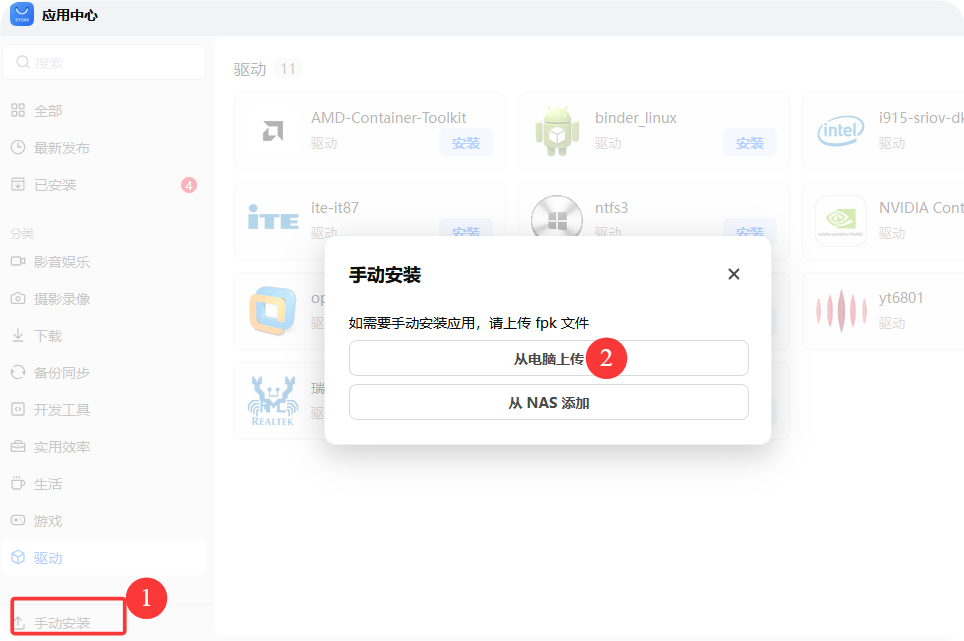
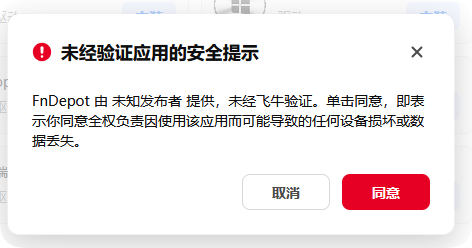
2. 上传 fndepot.fpk、安装
点击同意
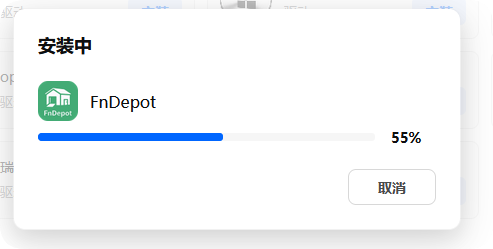
选择存储空间
3. 打开 FnDepot
点击已安装,选择 FnDepot,点击打开。
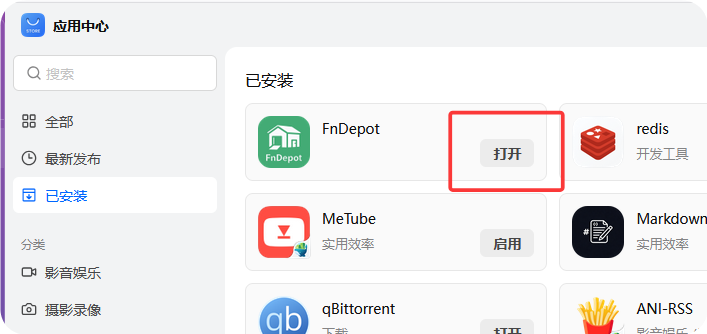
4. 添加源
依次点击,源管理、添加源
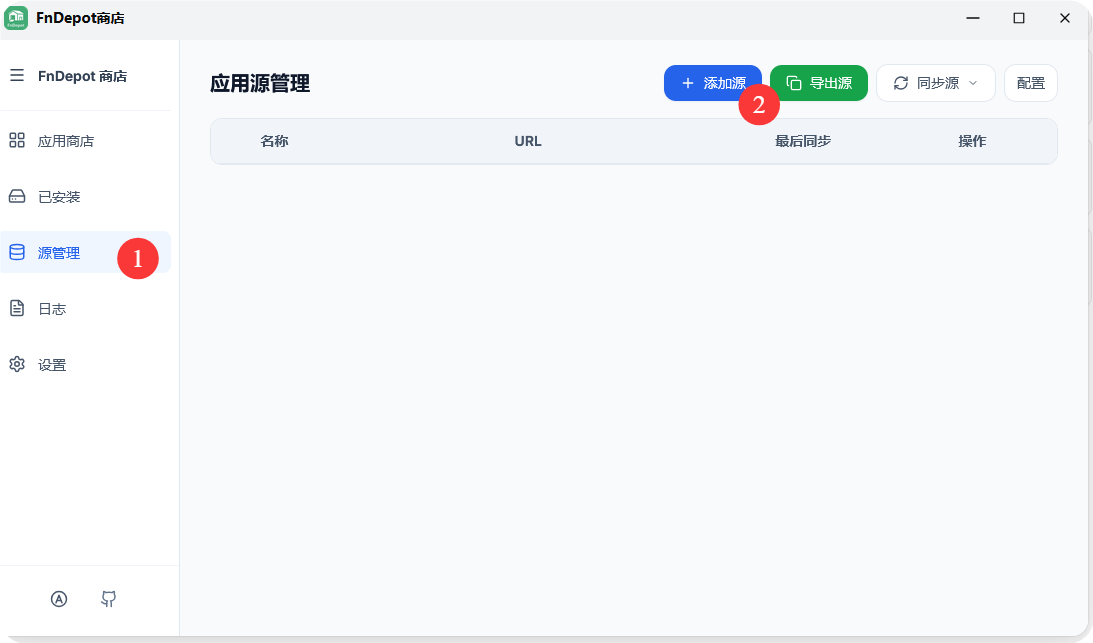
填写源
https://github.com/yuexps/FnDepot
https://github.com/IMGZCQ/FnDepot
https://github.com/yaya918/FnDepot
https://github.com/EWEDLCM/FnDepot
https://github.com/hbestm/FnDepot
https://github.com/Hxido-RXM/FnDepot
https://github.com/710850609/FnDepot
https://github.com/jianzhichu/FnDepot
https://github.com/RROrg/fn-apps
https://github.com/ctllo-bit/FnDepot
https://github.com/htnanako/FnDepot
https://github.com/KKKK987/FnDepot
https://github.com/mac1256/FnDepot
https://github.com/mah1618/FnDepot
https://github.com/snltty/FnDepot
https://github.com/upchr/FnDepot
https://github.com/wanjianmojun/FnDepot
https://github.com/zyp1690/FnDepot
同步完成之后,点击应用商店,就可以下载第三方的应用了

注意,先下载,后安装。
安装成功后,你会看到一个全新的应用商店界面,里面分类清晰,包括:
-
常用工具类
-
影音视频类
-
小游戏娱乐类
-
系统运维类
-
第三方插件扩展
点击对应应用,选择“安装”,系统就会自动部署,无需额外配置。
四、安装后能玩些什么?
装上 fndepot 之后:
-
安装各类影视聚合、刮削工具,打造家庭影音中心
-
运行轻量级小游戏,空闲时直接在浏览器玩
-
部署内网穿透、定时任务、监控脚本等实用工具
-
安装下载工具、网盘同步工具,提升使用效率
大部分应用都是开箱即用,不用像手动部署 Docker 那样反复配置端口、卷挂载。
五、注意事项与小建议
-
fndepot 为第三方应用商店,安装前建议重要数据做好备份
-
不要同时安装过多冲突应用,避免占用系统资源
-
如遇到应用启动失败,可尝试重启 NAS 或重新安装
-
定期更新 fndepot 本身,获取更多新应用和修复
往期回顾
总结
对于飞牛 NAS 用户来说,fndepot 相当于一个“生态外挂”,完美弥补了官方商店应用不足的问题,
从简单工具到娱乐应用,全都可以一键安装,既适合新手快速拓展功能,也适合老玩家折腾更多玩法。