共计 18382 个字符,预计需要花费 46 分钟才能阅读完成。
一, 节点环境
[root@node1 ~]# cat /etc/hosts
127.0.0.1 localhost localhost.localdomain localhost4 localhost4.localdomain4
::1 localhost localhost.localdomain localhost6 localhost6.localdomain6
192.168.0.194 node2
192.168.0.193 node1
192.168.0.183 node1vip
192.168.0.182 node2vip
172.168.0.194 node2prv
172.168.0.193 node1prv
192.168.0.176 dbscan
192.168.0.16 standby
二, 操作实例
01,dbca 删除节点 host02
登入 Oracle 用户运行 dbca–> 进行删除数据库 –>delete databases 下一步
!!!—————————- 注意 ————————–!!!
选择数据库请认真核对. 确定数据安全性!!, 删除前再三思考!! 选项是英文, 请看懂英文再选择!!
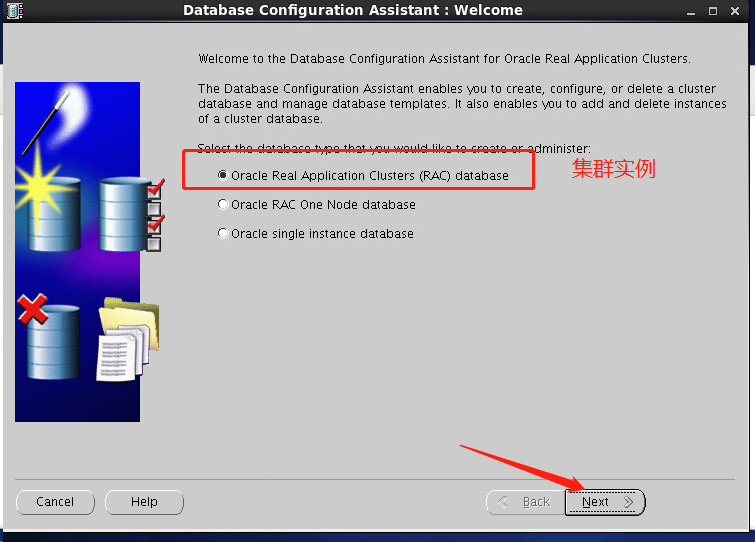
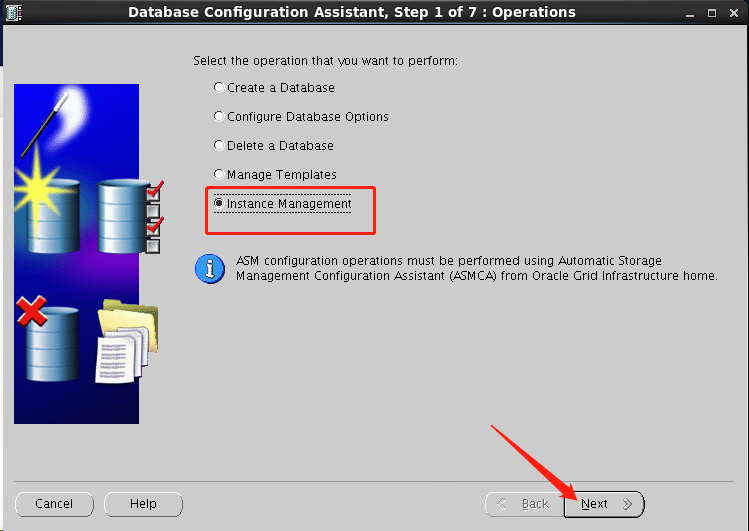
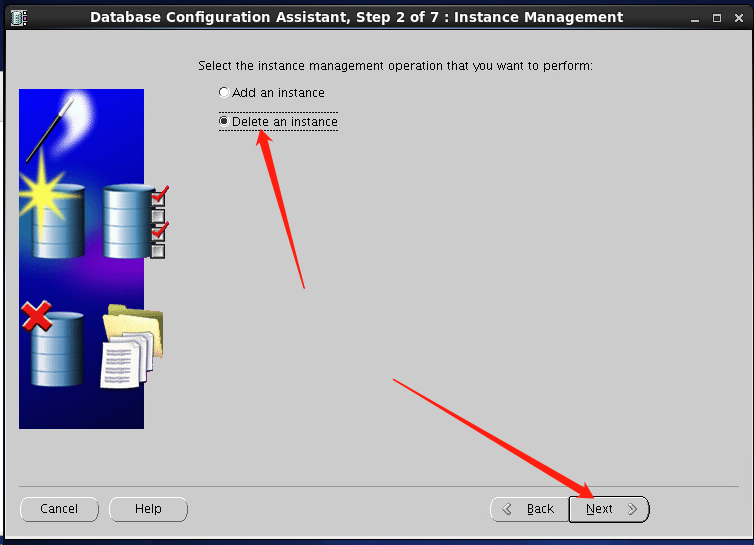
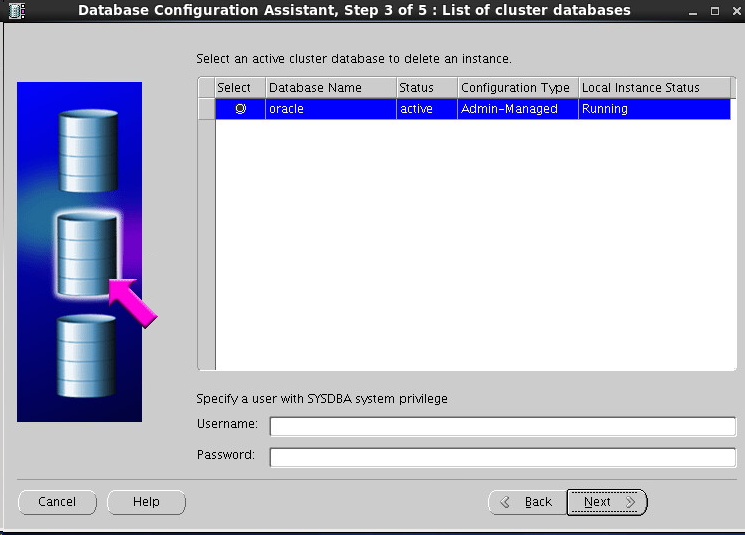
输入用户 sys, 密码 123456, 具体根据自己的来填写
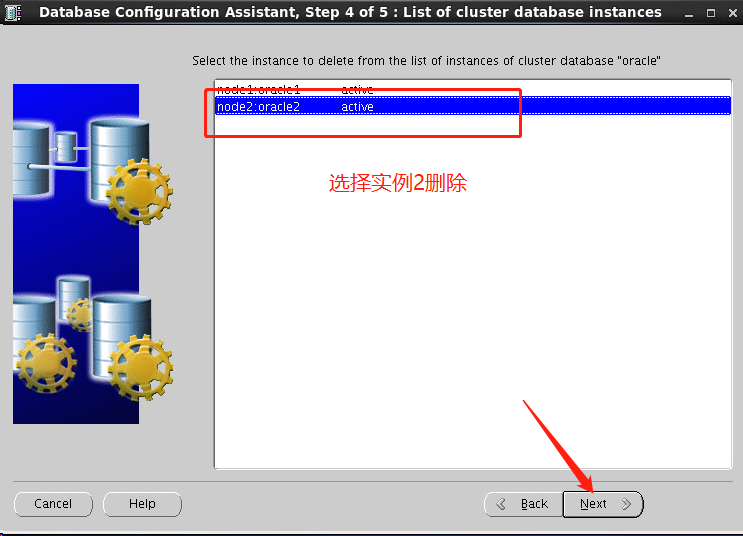
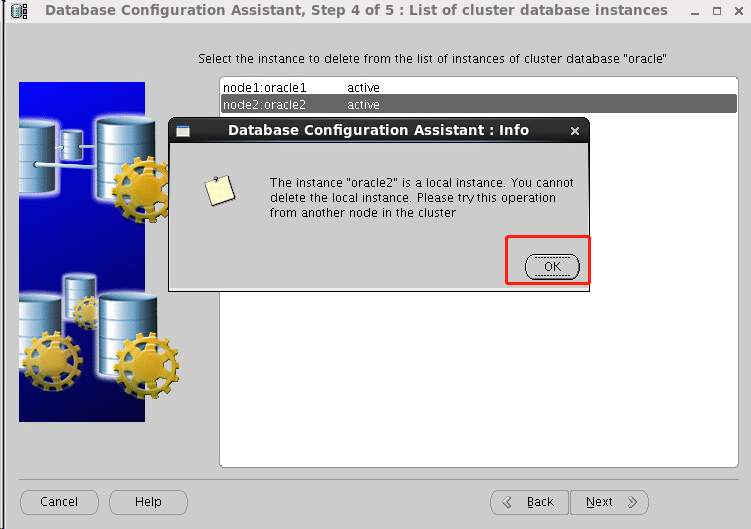
为啥到这一步出问题了呢, 因为我在 node2 节点删除 node2 节点, 自己删自己当然不允许啦, 现在我换个节点 node1 操作把
到了 node1 删除的时候会发现自动选择 node2 节点
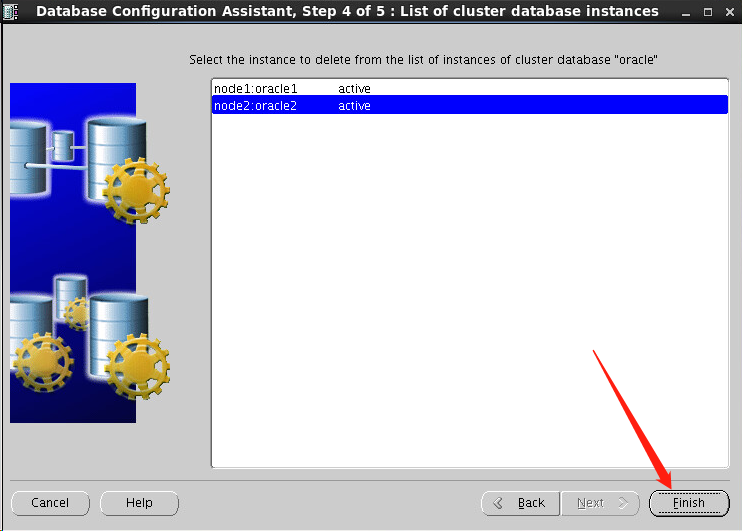
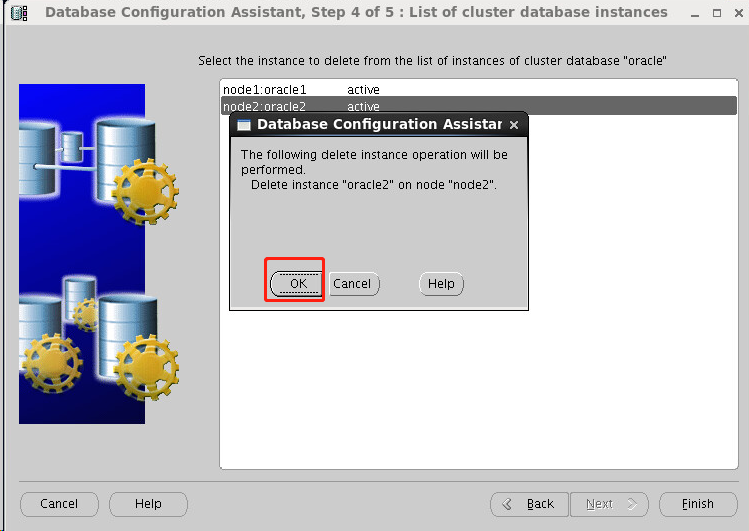
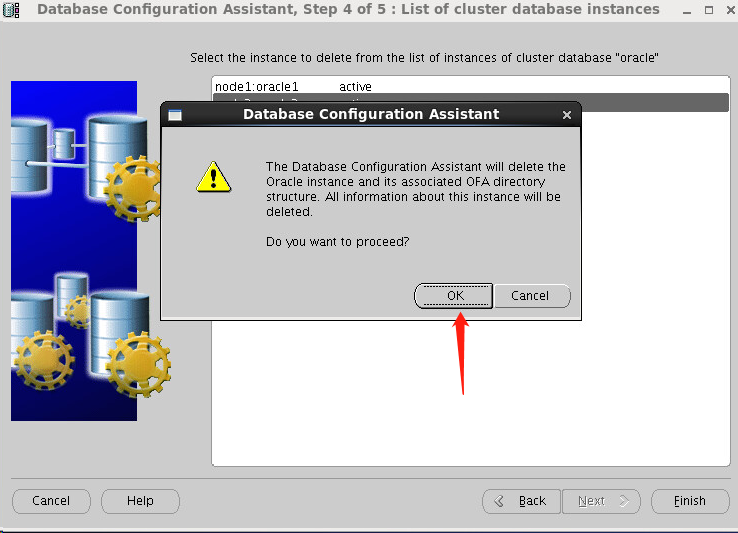
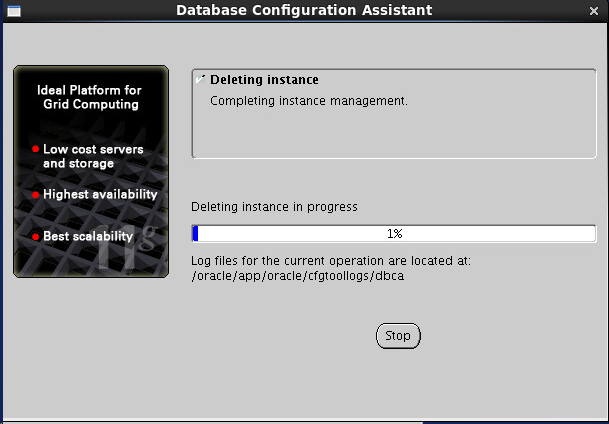
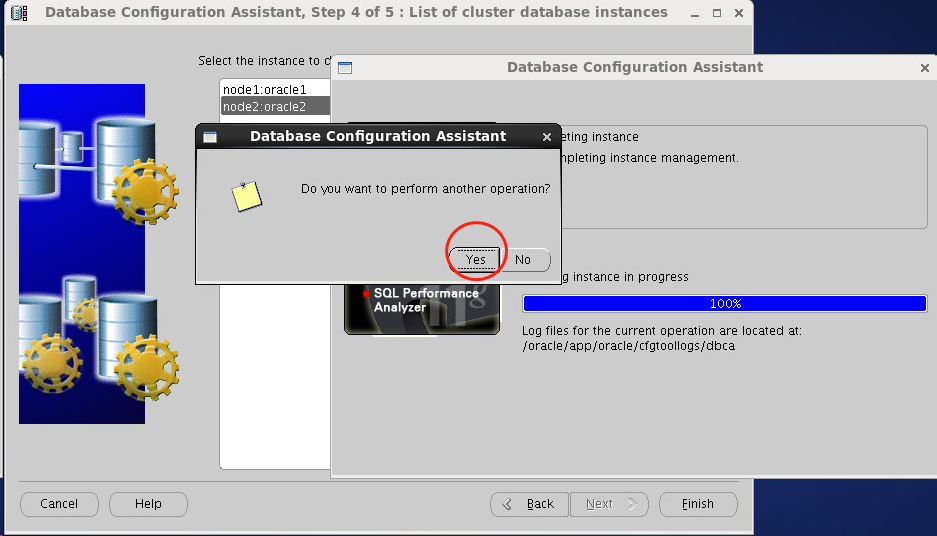
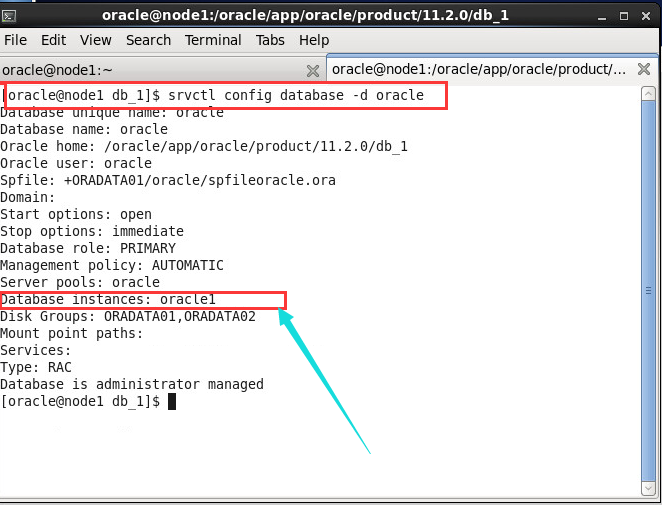
node1 上查看节点是否存在
—————————————————-
三, 清理
01, 发现节点还在, 资源也还在

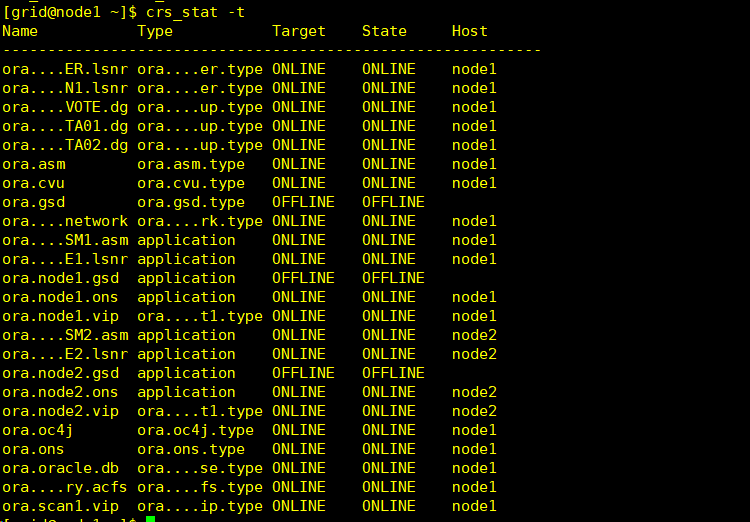
[grid@node1 ~]$ crsctl status resource -t
——————————————————————————–
NAME TARGET STATE SERVER STATE_DETAILS
——————————————————————————–
Local Resources
——————————————————————————–
ora.LISTENER.lsnr
ONLINE ONLINE node1
ONLINE ONLINE node2
ora.OCR_VOTE.dg
ONLINE ONLINE node1
ONLINE ONLINE node2
ora.ORADATA01.dg
ONLINE ONLINE node1
ONLINE ONLINE node2
ora.ORADATA02.dg
ONLINE ONLINE node1
ONLINE ONLINE node2
ora.asm
ONLINE ONLINE node1 Started
ONLINE ONLINE node2 Started
ora.gsd
OFFLINE OFFLINE node1
OFFLINE OFFLINE node2
ora.net1.network
ONLINE ONLINE node1
ONLINE ONLINE node2
ora.ons
ONLINE ONLINE node1
ONLINE ONLINE node2
ora.registry.acfs
ONLINE ONLINE node1
ONLINE ONLINE node2
——————————————————————————–
Cluster Resources
——————————————————————————–
ora.LISTENER_SCAN1.lsnr
1 ONLINE ONLINE node1
ora.cvu
1 ONLINE ONLINE node1
ora.node1.vip
1 ONLINE ONLINE node1
ora.node2.vip
1 ONLINE ONLINE node2
ora.oc4j
1 ONLINE ONLINE node1
ora.oracle.db
1 ONLINE ONLINE node1 Open
ora.scan1.vip
1 ONLINE ONLINE node1
[grid@node1 ~]$
02, 停掉监听
格式:
srvctl disable listener -l listener_name -n name_of_node_to_delete
srvctl stop listener -l listener_name -n name_of_node_to_delete
操作:
srvctl disable listener -l listener -n node2
srvctl stop listener -l listener -n node2
查看:
[grid@node1 ~]$ crsctl status resource -t
——————————————————————————–
NAME TARGET STATE SERVER STATE_DETAILS
——————————————————————————–
Local Resources
——————————————————————————–
ora.LISTENER.lsnr
ONLINE ONLINE node1
OFFLINE OFFLINE node2 —– 停了
ora.OCR_VOTE.dg
ONLINE ONLINE node1
ONLINE ONLINE node2
ora.ORADATA01.dg
ONLINE ONLINE node1
ONLINE ONLINE node2
ora.ORADATA02.dg
ONLINE ONLINE node1
ONLINE ONLINE node2
ora.asm
ONLINE ONLINE node1 Started
ONLINE ONLINE node2 Started
ora.gsd
OFFLINE OFFLINE node1
OFFLINE OFFLINE node2
ora.net1.network
ONLINE ONLINE node1
ONLINE ONLINE node2
ora.ons
ONLINE ONLINE node1
ONLINE ONLINE node2
ora.registry.acfs
ONLINE ONLINE node1
ONLINE ONLINE node2
——————————————————————————–
Cluster Resources
——————————————————————————–
ora.LISTENER_SCAN1.lsnr
1 ONLINE ONLINE node1
ora.cvu
1 ONLINE ONLINE node1
ora.node1.vip
1 ONLINE ONLINE node1
ora.node2.vip
1 ONLINE ONLINE node2
ora.oc4j
1 ONLINE ONLINE node1
ora.oracle.db
1 ONLINE ONLINE node1 Open
ora.scan1.vip
1 ONLINE ONLINE node1
03, 删除 Oracle software
操作如下:
[oracle@node2 bin]$ cd $ORACLE_HOME/deinstall/
[oracle@node2 deinstall]$ ls
bootstrap.pl deinstall.pl jlib response
deinstall deinstall.xml readme.txt sshUserSetup.sh
[oracle@node2 deinstall]$ ./deinstall -local
Checking for required files and bootstrapping …
Please wait …
Location of logs /oracle/app/oraInventory/logs/
############ ORACLE DEINSTALL & DECONFIG TOOL START ############
######################### CHECK OPERATION START #########################
## [START] Install check configuration ##
Checking for existence of the Oracle home location /oracle/app/oracle/product/11.2.0/db_1
Oracle Home type selected for deinstall is: Oracle Real Application Cluster Database
Oracle Base selected for deinstall is: /oracle/app/oracle
Checking for existence of central inventory location /oracle/app/oraInventory
Checking for existence of the Oracle Grid Infrastructure home /oracle/11.2.0/grid/crs
The following nodes are part of this cluster: node1,node2
Checking for sufficient temp space availability on node(s) : ‘node1,node2’
## [END] Install check configuration ##
Network Configuration check config START
Network de-configuration trace file location: /oracle/app/oraInventory/logs/netdc_check2019-03-14_04-04-21-PM.log
Network Configuration check config END
Database Check Configuration START
Database de-configuration trace file location: /oracle/app/oraInventory/logs/databasedc_check2019-03-14_04-04-23-PM.log
Database Check Configuration END
Enterprise Manager Configuration Assistant START
EMCA de-configuration trace file location: /oracle/app/oraInventory/logs/emcadc_check2019-03-14_04-04-25-PM.log
Enterprise Manager Configuration Assistant END
Oracle Configuration Manager check START
OCM check log file location : /oracle/app/oraInventory/logs//ocm_check4254.log
Oracle Configuration Manager check END
######################### CHECK OPERATION END #########################
####################### CHECK OPERATION SUMMARY #######################
Oracle Grid Infrastructure Home is: /oracle/11.2.0/grid/crs
The cluster node(s) on which the Oracle home deinstallation will be performed are:node1,node2
Since -local option has been specified, the Oracle home will be deinstalled only on thelocal node, ‘node2’, and the global configuration will be removed.
Oracle Home selected for deinstall is: /oracle/app/oracle/product/11.2.0/db_1
Inventory Location where the Oracle home registered is: /oracle/app/oraInventory
The option -local will not modify any database configuration for this Oracle home.
No Enterprise Manager configuration to be updated for any database(s)
No Enterprise Manager ASM targets to update
No Enterprise Manager listener targets to migrate
Checking the config status for CCR
node1 : Oracle Home exists with CCR directory, but CCR is not configured
node2 : Oracle Home exists with CCR directory, but CCR is not configured
CCR check is finished
Do you want to continue (y – yes, n – no)? [n]: y
A log of this session will be written to: ‘/oracle/app/oraInventory/logs/deinstall_deconfig2019-03-14_04-04-17-PM.out’
Any error messages from this session will be written to: ‘/oracle/app/oraInventory/logs/deinstall_deconfig2019-03-14_04-04-17-PM.err’
######################## CLEAN OPERATION START ########################
Enterprise Manager Configuration Assistant START
EMCA de-configuration trace file location: /oracle/app/oraInventory/logs/emcadc_clean2019-03-14_04-04-25-PM.log
Updating Enterprise Manager ASM targets (if any)
Updating Enterprise Manager listener targets (if any)
Enterprise Manager Configuration Assistant END
Database de-configuration trace file location: /oracle/app/oraInventory/logs/databasedc_clean2019-03-14_04-04-37-PM.log
Network Configuration clean config START
Network de-configuration trace file location: /oracle/app/oraInventory/logs/netdc_clean2019-03-14_04-04-37-PM.log
De-configuring Local Net Service Names configuration file…
Local Net Service Names configuration file de-configured successfully.
De-configuring backup files…
Backup files de-configured successfully.
The network configuration has been cleaned up successfully.
Network Configuration clean config END
Oracle Configuration Manager clean START
OCM clean log file location : /oracle/app/oraInventory/logs//ocm_clean4254.log
Oracle Configuration Manager clean END
Setting the force flag to false
Setting the force flag to cleanup the Oracle Base
Oracle Universal Installer clean START
Detach Oracle home ‘/oracle/app/oracle/product/11.2.0/db_1’ from the central inventory on the local node : Done
Failed to delete the directory ‘/oracle/app/oracle/product/11.2.0/db_1’. The directory is in use.
Delete directory ‘/oracle/app/oracle/product/11.2.0/db_1’ on the local node : Failed <<<<
Failed to delete the directory ‘/oracle/app/oracle/product/11.2.0/db_1’. The directory is in use.
Failed to delete the directory ‘/oracle/app/oracle/product/11.2.0/db_1’. The directory is in use.
Failed to delete the directory ‘/oracle/app/oracle/product/11.2.0’. The directory is not empty.
Failed to delete the directory ‘/oracle/app/oracle/product’. The directory is not empty.
Failed to delete the directory ‘/oracle/app/oracle’. The directory is not empty.
Delete directory ‘/oracle/app/oracle’ on the local node : Failed <<<<
Oracle Universal Installer cleanup completed with errors.
Oracle Universal Installer clean END
## [START] Oracle install clean ##
Clean install operation removing temporary directory ‘/tmp/deinstall2019-03-14_04-04-11PM’ on node ‘node2’
## [END] Oracle install clean ##
######################### CLEAN OPERATION END #########################
####################### CLEAN OPERATION SUMMARY #######################
Cleaning the config for CCR
As CCR is not configured, so skipping the cleaning of CCR configuration
CCR clean is finished
Successfully detached Oracle home ‘/oracle/app/oracle/product/11.2.0/db_1’ from the central inventory on the local node.
Failed to delete directory ‘/oracle/app/oracle/product/11.2.0/db_1’ on the local node.
Failed to delete directory ‘/oracle/app/oracle’ on the local node.
Oracle Universal Installer cleanup completed with errors.
Oracle deinstall tool successfully cleaned up temporary directories.
#######################################################################
############# ORACLE DEINSTALL & DECONFIG TOOL END #############
04, 删除 Grid soft
[grid@node2 ~]$ cd $ORACLE_HOME/deinstall
[grid@node2 deinstall]$ ls
bootstrap.pl deinstall.pl jlib response
deinstall deinstall.xml readme.txt sshUserSetup.sh
[grid@node2 deinstall]$ ./deinstall -local
Checking for required files and bootstrapping …
Please wait …
Location of logs /tmp/deinstall2019-03-14_04-08-22PM/logs/
############ ORACLE DEINSTALL & DECONFIG TOOL START ############
######################### CHECK OPERATION START #########################
## [START] Install check configuration ##
Checking for existence of the Oracle home location /oracle/11.2.0/grid/crs
Oracle Home type selected for deinstall is: Oracle Grid Infrastructure for a Cluster
Oracle Base selected for deinstall is: /oracle/11.2.0/11.2.0
Checking for existence of central inventory location /oracle/app/oraInventory
Checking for existence of the Oracle Grid Infrastructure home /oracle/11.2.0/grid/crs
The following nodes are part of this cluster: node1,node2
Checking for sufficient temp space availability on node(s) : ‘node1,node2’
## [END] Install check configuration ##
Traces log file: /tmp/deinstall2019-03-14_04-08-22PM/logs//crsdc.log
Network Configuration check config START
Network de-configuration trace file location: /tmp/deinstall2019-03-14_04-08-22PM/logs/netdc_check2019-03-14_04-08-36-PM.log
Specify all RAC listeners (do not include SCAN listener) that are to be de-configured [LISTENER]:^C[grid@node2 deinstall]$ ./deinstall -local
Checking for required files and bootstrapping …
Please wait …
Location of logs /tmp/deinstall2019-03-14_04-14-58PM/logs/
############ ORACLE DEINSTALL & DECONFIG TOOL START ############
######################### CHECK OPERATION START #########################
## [START] Install check configuration ##
Checking for existence of the Oracle home location /oracle/11.2.0/grid/crs
Oracle Home type selected for deinstall is: Oracle Grid Infrastructure for a Cluster
Oracle Base selected for deinstall is: /oracle/11.2.0/11.2.0
Checking for existence of central inventory location /oracle/app/oraInventory
Checking for existence of the Oracle Grid Infrastructure home /oracle/11.2.0/grid/crs
The following nodes are part of this cluster: node1,node2
Checking for sufficient temp space availability on node(s) : ‘node1,node2’
## [END] Install check configuration ##
Traces log file: /tmp/deinstall2019-03-14_04-14-58PM/logs//crsdc.log
Network Configuration check config START
Network de-configuration trace file location: /tmp/deinstall2019-03-14_04-14-58PM/logs/netdc_check2019-03-14_04-15-07-PM.log
Specify all RAC listeners (do not include SCAN listener) that are to be de-configured [LISTENER]:
Network Configuration check config END
Asm Check Configuration START
ASM de-configuration trace file location: /tmp/deinstall2019-03-14_04-14-58PM/logs/asmcadc_check2019-03-14_04-15-09-PM.log
######################### CHECK OPERATION END #########################
####################### CHECK OPERATION SUMMARY #######################
Oracle Grid Infrastructure Home is: /oracle/11.2.0/grid/crs
The cluster node(s) on which the Oracle home deinstallation will be performed are:node1,node2
Since -local option has been specified, the Oracle home will be deinstalled only on thelocal node, ‘node2’, and the global configuration will be removed.
Oracle Home selected for deinstall is: /oracle/11.2.0/grid/crs
Inventory Location where the Oracle home registered is: /oracle/app/oraInventory
Following RAC listener(s) will be de-configured: LISTENER
Option -local will not modify any ASM configuration.
Do you want to continue (y – yes, n – no)? [n]: y
A log of this session will be written to: ‘/tmp/deinstall2019-03-14_04-14-58PM/logs/deinstall_deconfig2019-03-14_04-15-03-PM.out’
Any error messages from this session will be written to: ‘/tmp/deinstall2019-03-14_04-14-58PM/logs/deinstall_deconfig2019-03-14_04-15-03-PM.err’
######################## CLEAN OPERATION START ########################
ASM de-configuration trace file location: /tmp/deinstall2019-03-14_04-14-58PM/logs/asmcadc_clean2019-03-14_04-15-22-PM.log
ASM Clean Configuration END
Network Configuration clean config START
Network de-configuration trace file location: /tmp/deinstall2019-03-14_04-14-58PM/logs/netdc_clean2019-03-14_04-15-22-PM.log
De-configuring RAC listener(s): LISTENER
De-configuring listener: LISTENER
Stopping listener on node “node2”: LISTENER
Warning: Failed to stop listener. Listener may not be running.
Listener de-configured successfully.
De-configuring Naming Methods configuration file…
Naming Methods configuration file de-configured successfully.
De-configuring backup files…
Backup files de-configured successfully.
The network configuration has been cleaned up successfully.
Network Configuration clean config END
—————————————->
The deconfig command below can be executed in parallel on all the remote nodes. Executethe command on the local node after the execution completes on all the remote nodes.
Run the following command as the root user or the administrator on node “node1”.
/tmp/deinstall2019-03-14_04-14-58PM/perl/bin/perl -I/tmp/deinstall2019-03-14_04-14-58PM/perl/lib -I/tmp/deinstall2019-03-14_04-14-58PM/crs/install /tmp/deinstall2019-03-14_04-14-58PM/crs/install/rootcrs.pl -force -deconfig -paramfile “/tmp/deinstall2019-03-14_04-14-58PM/response/deinstall_Ora11g_gridinfrahome1.rsp”
Run the following command as the root user or the administrator on node “node2”.
/tmp/deinstall2019-03-14_04-14-58PM/perl/bin/perl -I/tmp/deinstall2019-03-14_04-14-58PM/perl/lib -I/tmp/deinstall2019-03-14_04-14-58PM/crs/install /tmp/deinstall2019-03-14_04-14-58PM/crs/install/rootcrs.pl -force -deconfig -paramfile “/tmp/deinstall2019-03-14_04-14-58PM/response/deinstall_Ora11g_gridinfrahome1.rsp”
Press Enter after you finish running the above commands
<—————————————- 提示运行脚本, 删除哪个运行哪个不要搞错了
[root@node2 ~]# /tmp/deinstall2019-03-14_04-14-58PM/perl/bin/perl -I/tmp/deinstall2019-03-14_04-14-58PM/perl/lib -I/tmp/deinstall2019-03-14_04-14-58PM/crs/install /tmp/deinstall2019-03-14_04-14-58PM/crs/install/rootcrs.pl -force -deconfig -paramfile “/tmp/deinstall2019-03-14_04-14-58PM/response/deinstall_Ora11g_gridinfrahome1.rsp”
Using configuration parameter file: /tmp/deinstall2019-03-14_04-14-58PM/response/deinstall_Ora11g_gridinfrahome1.rsp
Network exists: 1/192.168.0.0/255.255.255.0/eth0, type static
VIP exists: /node1vip/192.168.0.183/192.168.0.0/255.255.255.0/eth0, hosting node node1
VIP exists: /node2vip/192.168.0.182/192.168.0.0/255.255.255.0/eth0, hosting node node2
GSD exists
ONS exists: Local port 6100, remote port 6200, EM port 2016
CRS-2673: Attempting to stop ‘ora.registry.acfs’ on ‘node2’
CRS-2677: Stop of ‘ora.registry.acfs’ on ‘node2’ succeeded
CRS-2791: Starting shutdown of Oracle High Availability Services-managed resources on ‘node2’
CRS-2673: Attempting to stop ‘ora.crsd’ on ‘node2’
CRS-2790: Starting shutdown of Cluster Ready Services-managed resources on ‘node2’
CRS-2673: Attempting to stop ‘ora.OCR_VOTE.dg’ on ‘node2’
CRS-2673: Attempting to stop ‘ora.ORADATA01.dg’ on ‘node2’
CRS-2673: Attempting to stop ‘ora.ORADATA02.dg’ on ‘node2’
CRS-2677: Stop of ‘ora.ORADATA02.dg’ on ‘node2’ succeeded
CRS-2677: Stop of ‘ora.ORADATA01.dg’ on ‘node2’ succeeded
CRS-2677: Stop of ‘ora.OCR_VOTE.dg’ on ‘node2’ succeeded
CRS-2673: Attempting to stop ‘ora.asm’ on ‘node2’
CRS-2677: Stop of ‘ora.asm’ on ‘node2’ succeeded
CRS-2792: Shutdown of Cluster Ready Services-managed resources on ‘node2’ has completed
CRS-2677: Stop of ‘ora.crsd’ on ‘node2’ succeeded
CRS-2673: Attempting to stop ‘ora.ctssd’ on ‘node2’
CRS-2673: Attempting to stop ‘ora.evmd’ on ‘node2’
CRS-2673: Attempting to stop ‘ora.asm’ on ‘node2’
CRS-2673: Attempting to stop ‘ora.drivers.acfs’ on ‘node2’
CRS-2673: Attempting to stop ‘ora.mdnsd’ on ‘node2’
CRS-2677: Stop of ‘ora.evmd’ on ‘node2’ succeeded
CRS-2677: Stop of ‘ora.mdnsd’ on ‘node2’ succeeded
CRS-2677: Stop of ‘ora.ctssd’ on ‘node2’ succeeded
CRS-2677: Stop of ‘ora.asm’ on ‘node2’ succeeded
CRS-2673: Attempting to stop ‘ora.cluster_interconnect.haip’ on ‘node2’
CRS-2677: Stop of ‘ora.cluster_interconnect.haip’ on ‘node2’ succeeded
CRS-2673: Attempting to stop ‘ora.cssd’ on ‘node2’
CRS-2677: Stop of ‘ora.cssd’ on ‘node2’ succeeded
CRS-2673: Attempting to stop ‘ora.crf’ on ‘node2’
CRS-2677: Stop of ‘ora.drivers.acfs’ on ‘node2’ succeeded
CRS-2677: Stop of ‘ora.crf’ on ‘node2’ succeeded
CRS-2673: Attempting to stop ‘ora.gipcd’ on ‘node2’
CRS-2677: Stop of ‘ora.gipcd’ on ‘node2’ succeeded
CRS-2673: Attempting to stop ‘ora.gpnpd’ on ‘node2’
CRS-2677: Stop of ‘ora.gpnpd’ on ‘node2’ succeeded
CRS-2793: Shutdown of Oracle High Availability Services-managed resources on ‘node2’ has completed
CRS-4133: Oracle High Availability Services has been stopped.
05, 删除相关信息
[root@node2 db_1]# rm -rf /etc/oraInst.loc
[root@node2 db_1]# rm -rf /opt/ORCLfmap
[root@node2 db_1]# rm -rf /etc/oratab
06, 更新 dbms inventory
[oracle@node1 ~]$ $ORACLE_HOME/oui/bin/runInstaller -updateNodeList ORACLE_HOME=$ORACLE_HOME CLUSTER_NODES=node1
Starting Oracle Universal Installer…
Checking swap space: must be greater than 500 MB. Actual 1948 MB Passed
The inventory pointer is located at /etc/oraInst.loc
The inventory is located at /oracle/app/oraInventory
‘UpdateNodeList’ was successful.
更新
[oracle@node1 ~]$ $ORACLE_HOME/oui/bin/runInstaller -updateNodeList -local ORACLE_HOME=$ORACLE_HOME CLUSTER_NODES=node1
Starting Oracle Universal Installer…
Checking swap space: must be greater than 500 MB. Actual 1948 MB Passed
The inventory pointer is located at /etc/oraInst.loc
The inventory is located at /oracle/app/oraInventory
‘UpdateNodeList’ was successful.
更多 Oracle 相关信息见 Oracle 专题页面 https://www.linuxidc.com/topicnews.aspx?tid=12
: