共计 8158 个字符,预计需要花费 21 分钟才能阅读完成。
由于 Python 易学、开源、面向对象、可移植性高、库丰富的特点,近期开始学习 Python。百度了解了各款 Python IDE 后,还是认为 Eric 比较适合我,所以踏上了安装 Eric 坎坷之路,从选定工具到安装成功一共花费了 8 天时间,从 Windows 到 Linux 再到 Mac,挨个折腾了一遍,Windows 的搭建比较简单,下载好相应版本直接运行 exe 就行了,Linux 和 Mac 下我都是用源码包安装的,所以遇到了不少问题最后,终于在 Mac 上研究明白了。把搭建的整个过程写下来,和与我一样的小白分享。
PS:Mac 与 Linux 的搭建没什么区别,Linux 下的也可参考本文,由于我安装过 xcode 所以 gcc 我没有再单独去安装,没有的请根据提示自行安装。
一、准备文件
- Python3.4
- Qt5.5.1
- SIP4.17
- QScintilla2.9.1
- PyQt5.5.1
二、安装过程
1. 安装 Python3.4
从官网(https://www.python.org/download)下载相应平台的版本安装即可
注意!!
-
如果您是 iOS 开发者, 请不要删除 python2.7, 因为 Xcode 使用的 2.7 的脚本, 不支持 3 以上版本!!!
2. 安装 Qt5.5.1
从官网(http://qt-project.org/downloads)下载相应平台的版本安装即可,路径设成默认(/Users/*/Qt5.5.1)即可
安装完成需要将 Qt5 添加到环境变量~/.bash_profile
1 vim ~/.bash_profile将下面两行添加进去
1 PATH="/Users/*/Qt5.5.1/5.5/clang_64/bin:${PATH}"
2 export PATH
3. 安装 SIP4.14
下载地址:http://www.riverbankcomputing.com/software/sip/download
1 tar -zxvf sip-4.17.tar.gz
2 cd sip-4.17
3 python3 configure.py
4 make  && date # 加 &&date 是个人习惯,make 成功会显示时间
5 sudo make install  && date # 一定要加 sudo
4. 安装 QScintilla/Qt4Qt5
下载地址:http://www.riverbankcomputing.com/software/qscintilla/download
QScintilla2 文件中有 3 个文件夹的内容要分别安装:Qt4Qt5,designer-Qt4Qt5 和 Python。
Qt4Qt5 文件夹要在 PyQt 之前安装,designer-Qt4Qt5 和 Python 要在 PyQt 之后安装,顺序一定要注意!!
1 cd ./QScintilla-gpl-2.9.1/Qt4Qt5
2 qmake qscintilla.pro
3 make && date
4 sudo make install && date
5. 安装 PyQt5.5.1
下载地址:https://www.riverbankcomputing.com/software/pyqt/download5
由于是安装在 Python 的 site-packages 里,所以要首先确定包的位置
1 python3
2 Python3.4.4(v3.4.4:737efcadf5a6,Dec192015,20:38:52)
3 [GCC 4.2.1(AppleInc. build 5666)(dot 3)] on darwin
4 Type"help","copyright","credits" or "license"for more information.
5 >>> import site
6 >>> site.getsitepackages()
7 ['/Library/Frameworks/Python.framework/Versions/3.4/lib/python3.4/site-packages','/Library/Frameworks/Python.framework/Versions/3.4/lib/site-python','/Library/Python/3.4/site-packages']
知道了位置开始编译
1 cd PyQt-gpl-5.5.1
2 $python3 configure.py -q /Users/**/Qt5.5.1/5.5/clang_64/bin/qmake -d /Library/Python/3.4/site-packages/ #-q 后面的是 qmake 的位置,-d 后面是 Python 包的位置
3 make && date
注意!!
我在执行 make 的时候出了一个这样的错误
1 /Users/Kallan/Documents/Python 开发 /PyQt-gpl-5.5.1/sip/QtPositioning/qgeolocation.sip:28:10: fatal error:
2          'qgeolocation.h' file not found
3     #include <qgeolocation.h>
4             ^
5     1 error generated.
6 make[1]:***[sipQtPositioningcmodule.o]Error1
7 make:***[sub-QtPositioning-make_first-ordered]Error2
解决方法:
在/PyQt-gpl-5.5.1/QtPositioning 文件夹下创建一个头文件 qgeolocation.h,把下面的内容复制进去
 1     /****************************************************************************
 2     **
 3     **Copyright(C)2015TheQtCompanyLtd.
 4     **Contact: http://www.qt.io/licensing/
 5     **
 6     **This file is part of the QtPositioning module of the QtToolkit.
 7     **
 8     ** $QT_BEGIN_LICENSE:LGPL21$
 9     **CommercialLicenseUsage
10     **Licensees holding valid commercial Qt licenses may use this file in
11     ** accordance with the commercial license agreement provided with the
12     **Softwareor, alternatively,in accordance with the terms contained in
13     ** a written agreement between you andTheQtCompany.For licensing terms
14     **and conditions see http://www.qt.io/terms-conditions.For further
15     ** information use the contact form at http://www.qt.io/contact-us.
16     **
17     ** GNU LesserGeneralPublicLicenseUsage
18     **Alternatively, this file may be used under the terms of the GNU Lesser
19     **GeneralPublicLicense version 2.1or version 3as published by the Free
20     **SoftwareFoundationand appearing in the file LICENSE.LGPLv21and
21     ** LICENSE.LGPLv3 included in the packaging of this file.Please review the
22     ** following information to ensure the GNU LesserGeneralPublicLicense
23     ** requirements will be met: https://www.gnu.org/licenses/lgpl.html and
24     ** http://www.gnu.org/licenses/old-licenses/lgpl-2.1.html.
25     **
26     **As a special exception,TheQtCompany gives you certain additional
27     ** rights.These rights are described inTheQtCompany LGPL Exception
28     ** version 1.1, included in the file LGPL_EXCEPTION.txt in this package.
29     **
30     ** $QT_END_LICENSE$
31     **
32     ****************************************************************************/
33     #ifndef QGEOLOCATION_H
34     #define QGEOLOCATION_H
35     #include <QtCore/QSharedDataPointer>
36     #include <QtCore/QMetaType>
37     #include <QtPositioning/qpositioningglobal.h>
38     QT_BEGIN_NAMESPACE
39     classQGeoAddress;
40     classQGeoCoordinate;
41     classQGeoRectangle;
42     classQGeoLocationPrivate;
43     class Q_POSITIONING_EXPORT QGeoLocation
44     {45     public:
46        QGeoLocation();
47        QGeoLocation(const QGeoLocation&other);
48        ~QGeoLocation();
49        QGeoLocation&operator=(const QGeoLocation&other);
50        bool operator==(const QGeoLocation&other) const;
51        bool operator!=(const QGeoLocation&other) const {52            return!(other ==*this);
53        }
54        QGeoAddress address() const;
55        void setAddress(const QGeoAddress&address);
56        QGeoCoordinate coordinate() const;
57        void setCoordinate(const QGeoCoordinate&position);
58        QGeoRectangle boundingBox() const;
59        void setBoundingBox(const QGeoRectangle&box);
60        bool isEmpty() const;
61     private:
62        QSharedDataPointer<QGeoLocationPrivate> d;
63     };
64     Q_DECLARE_TYPEINFO(QGeoLocation, Q_MOVABLE_TYPE);
65     QT_END_NAMESPACE
66     Q_DECLARE_METATYPE(QGeoLocation)
67     #endif
继续!
1 make && date
2 sudo make install && date
6. 安装 QScintilla/Python
1 cd /QScintilla-gpl-2.9.1/Python
2 python3 configure.py --pyqt=PyQt5-d /Library/Frameworks/Python.framework/Versions/3.4/lib/python3.4/site-packages/PyQt5--pyqt-sipdir=/Library/Frameworks/Python.framework/Versions/3.4/share/sip/PyQt5-v /Library/Frameworks/Python.framework/Versions/3.4/share/sip/PyQt5
3 make && date
4 sudo make install && date
如果在 Python 里 import 不会报错,即代表安装成功,可继续往下进行
1 python3
2 Python3.4.4(v3.4.4:737efcadf5a6,Dec192015,20:38:52)
3 [GCC 4.2.1(AppleInc. build 5666)(dot 3)] on darwin
4 Type"help","copyright","credits" or "license"for more information.
5 >>> import PyQt5.Qsci
6 >>> exit()
7. 安装 QScintilla/designer-Qt4Qt5
1 cd /QScintilla-gpl-2.9.1/designer-Qt4Qt5
2 qmake designer.pro
3 make && date
4 sudo make install && date
8. 安装 Eric6
下载地址:http://sourceforge.net/projects/eric-ide/files/eric6/stable/
下载其中的 eric6-6.1.1.tar 主文件和 eric6-i18n-zh_CN.GB2312-6.1.1.tar 中文语言包。
将两个文件提取出来,将中文语音包的 eric 复制到主文件内合并
1 cd eric6-6.1.1
2 sudo python3 install.py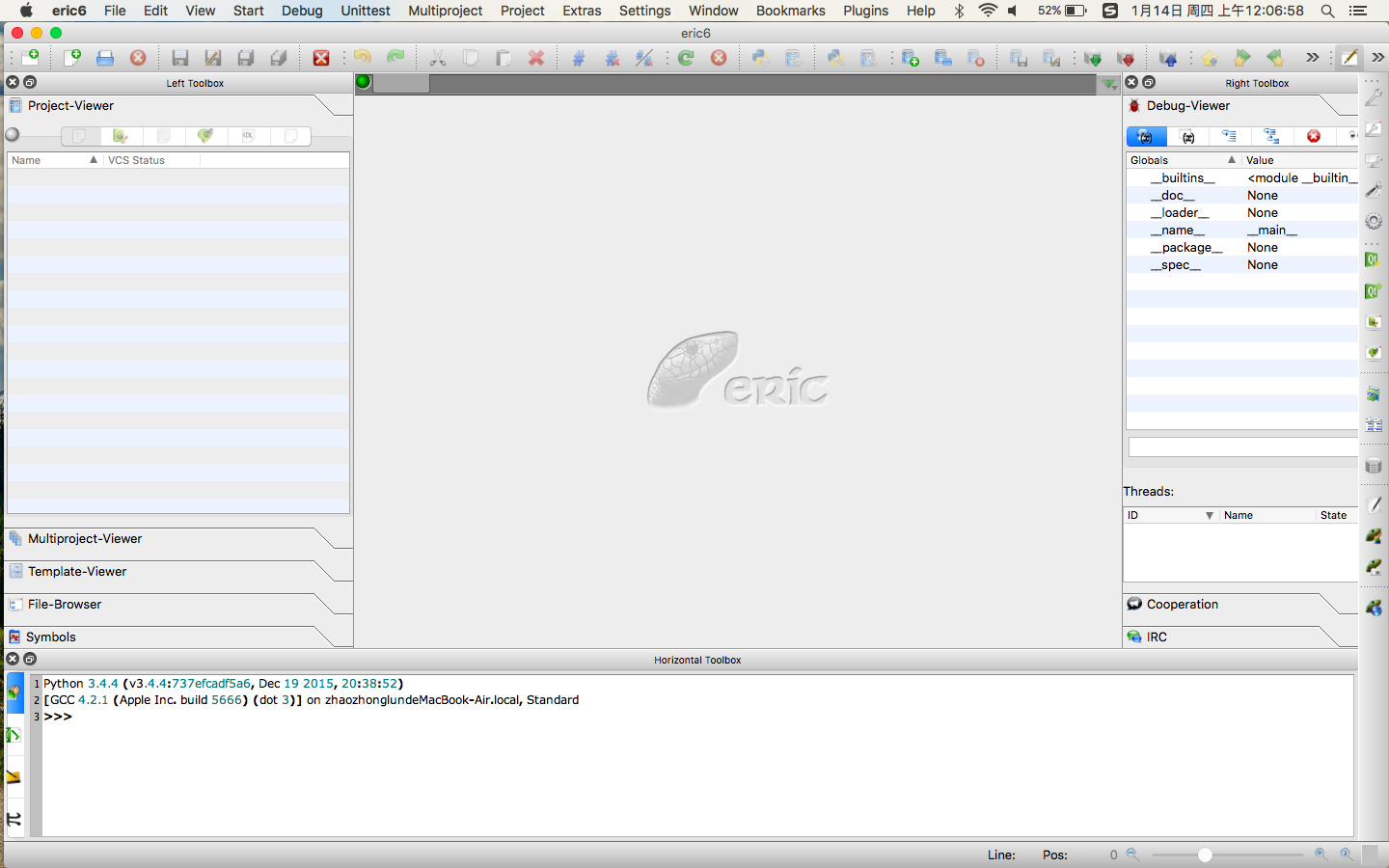
配置 Eric6
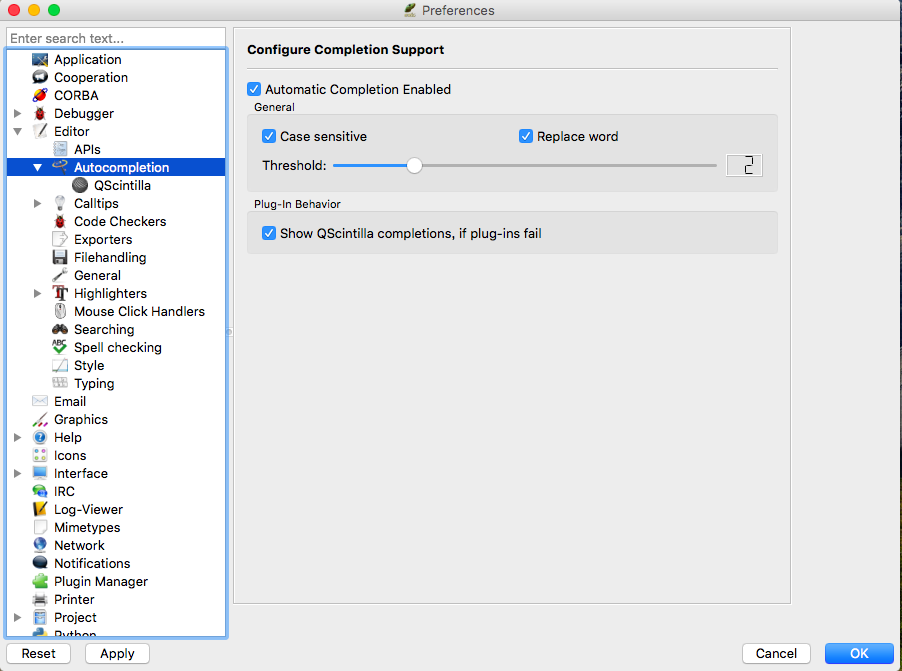
1、选择 Eric6-> preference -> Editor -> Autocompation。勾选所有选框;
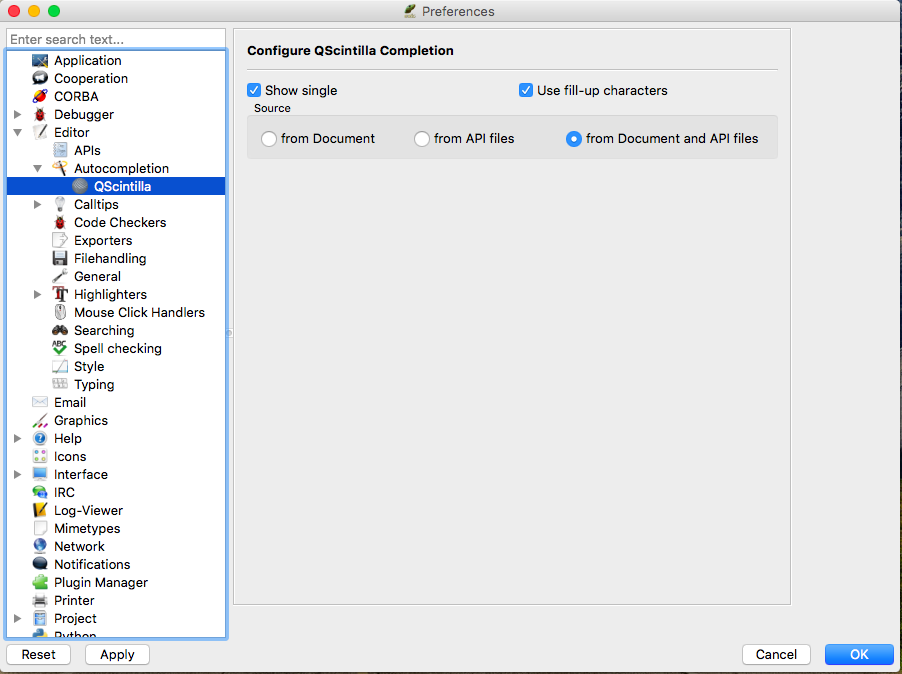
2.Editor -> QScintilla。勾上左右的两个选框,然后在下面 source 中,选择 from Document and API files;
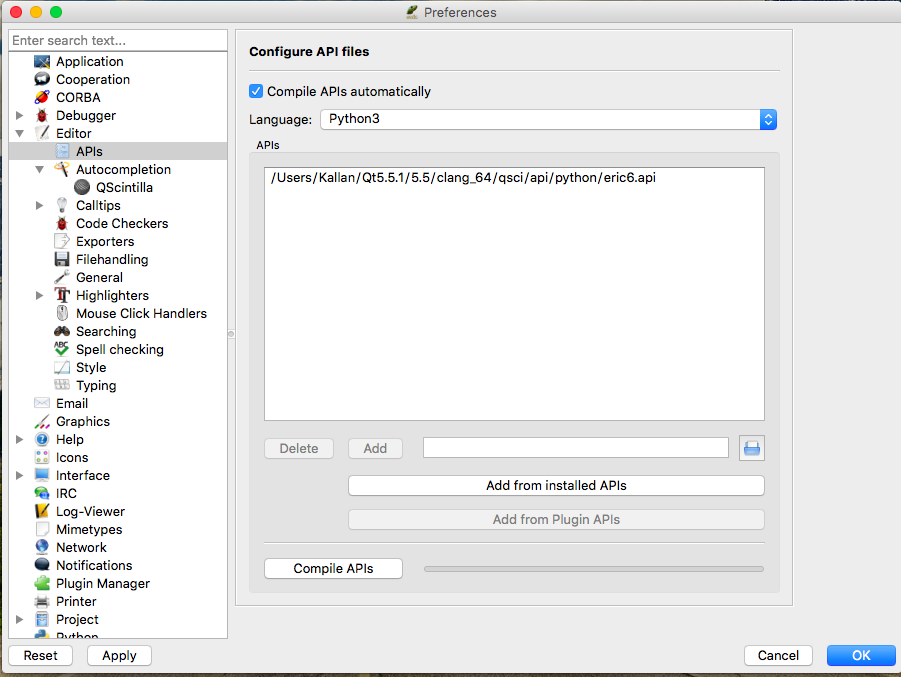
3.Editor -> APIs。勾选 Complie APIs Autocompation,在 Language 中,选择 python3。点面下面的 Add from installed APIs 按钮, 选择住需要的.api 文件。最后点击 Compile APIs;
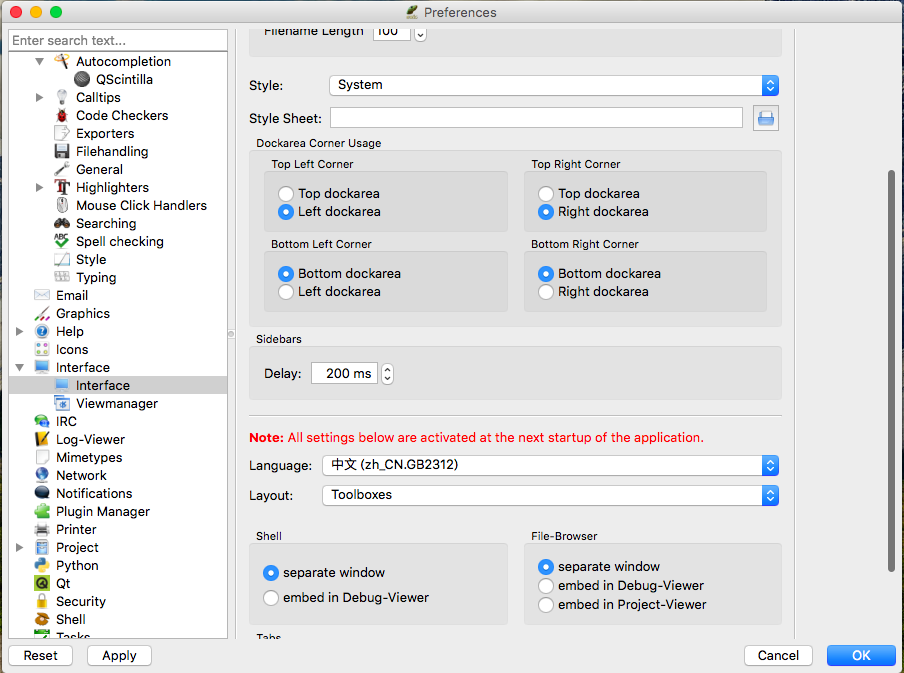
4、Interface -> Interface。Language 选择中文, 重启生效。
大功告成!
三、曾经遇到的问题
1.安装 QScintilla designer-Qt4Qt5 时 报错!
1 root@kallan:/media/kallan/ D 盘 / 编程学习 /python/QScintilla-gpl-2.9.1/designer-Qt4Qt5# qmake -qt5 designer.pro Project ERROR: Unknown module(s) in QT: designer原因:Qt 没有安装好
2.安装 QScintilla Python 时 报错!
1 python3 configure.py --pyqt=PyQt5-d /Library/Frameworks/Python.framework/Versions/3.4/lib/python3.4/site-packages/PyQt5--pyqt-sipdir=/Library/Frameworks/Python.framework/Versions/3.4/share/sip/PyQt5--qsci-sipdir=/Library/Frameworks/Python.framework/Versions/3.4/share/sip/PyQt5
2 Error:Make sure you have a working sip on your PATH or use the --sip argument
3 to explicitly specify a working sip.
原因:没有安装 SIP
3.安装 QScintilla Python 时 报错!
 1 python3 configure.py --pyqt=PyQt5
 2 ConfiguringQScintilla2.9.1...
 3 QScintilla2.9.1 is being used.
 4 TheQScintilla.sip files will be installed in/usr/share/sip/PyQt5.
 5 TheQScintilla module will be installed in
 6 /usr/lib/python3/dist-packages/PyQt5.
 7 PyQt5.3.1 is being used.
 8 Qt5.3.1 is being used.
 9 sip 4.16.2 is being used.
10 The sip executable is /usr/bin/sip.
11 TheQScintilla module is being built with 'protected' redefined as 'public'.
12 TheQScintilla API file will be installed in/usr/share/qt5/qsci/api/python.
13 Generating the C++ source for the Qsci module...
14 Error:Unable to create the C++ code.
原因:安装顺序错误——先安装的 PyQt5,而后安装的 QScintilla Qt4Qt5
4.QScintilla 的 Python 安装完成但是在 Python 中 import 时 报错!
1 >>> import PyQt5.Qsci
2 Traceback(most recent call last):
3 File"<stdin>", line 1,in<module>
4 ImportError: dlopen(/Library/Frameworks/Python.framework/Versions/3.4/lib/python3.4/site-packages/PyQt5/Qsci.so,2):Library not loaded:@rpath/QtPrintSupport.framework/Versions/5/QtPrintSupport
5 Referenced from:/Library/Frameworks/Python.framework/Versions/3.4/lib/python3.4/site-packages/PyQt5/Qsci.so
6 Reason: image not found
5. 安装 Eric 报错!
1 python3 install.py
2 Checking dependencies
3 PythonVersion:3.4.4
4 FoundPyQt5
5 Sorry, please install QScintilla2 and
6 its PyQt5/PyQt4 wrapper.
7 Error: dlopen(/Library/Frameworks/Python.framework/Versions/3.4/lib/python3.4/site-packages/PyQt5/Qsci.so,2):Library not loaded:@rpath/QtPrintSupport.framework/Versions/5/QtPrintSupport
8 Referenced from:/Library/Frameworks/Python.framework/Versions/3.4/lib/python3.4/site-packages/PyQt5/Qsci.so
9 Reason: image not found
4 和 5 问题的原因是一样的,QScintilla 的 Python 没有安装成功
本文永久更新链接地址:http://www.linuxidc.com/Linux/2016-01/127677.htm





![Codex卡在手机号验证?终极解法免费号也能搞定[被wx制裁]](https://www.xgss.net/timthumb/w_120/h_80/q_90/zc_1/a_c/aHR0cHM6Ly9pbWdvc3MueGdzcy5uZXQvcGljZ28tdHgyMDI2L1FRXzE3ODAxNjQwODI5NjcucG5nP3R4.png)