共计 23558 个字符,预计需要花费 59 分钟才能阅读完成。
终于有时间在 Mac 上安装一下 ASP.NET 5,网上有许多教程,但是多数的时间比较早了,版本不是最新,搭着 Build 2015 的春风,我也实践一下 Mac OS X 上的 ASP.NET 5。
经常使用 Windows 8.1,对 Mac 并不太熟悉,也一并把安装中的问题趟一遍。
前几天刚刚更新了 Mac 的操作系统,操作系统版本 Mac OS X Yosemite 10.10.3。
1. 在 Mac OS X 上安装 ASP.NET 5
ASP.NET 5 运行在 DNX 之上,DNX 是 .NET 运行环境 (.NET Execution Environment) 的简写,它支持多种平台,当然包括我们今天的 OS X 了,在 OS X 上,使用 Homebrew 可以很容易安装 DNX。
1.1 安装 Hoembrew
什么是 Homebrew? 我们先看看它。
Homebrew 是用来在 Mac OS X 安装 Linux 工具包最简单和灵活的方式。官方网址:http://brew.sh。
打开 Mac OS 的终端,输入 ruby 命令
ruby -e "$(curl -fsSL https://raw.githubusercontent.com/Homebrew/install/master/install)"就可以了。安装之后可以检查是否安装成功。
brew –vHomebrew 0.9.5我现在的版本是 0.9.5
1.2 安装 DNVM
又一个新的缩写词 DNVM,英文的原文是 .NET Version Manager,就是 .NET 版本管理器,包含更新和配置 .NET 运行环境 (KRE) 所使用的一系列工具,是 ASP.NET 5 项目的一个子项目。DNVM 的网址:https://github.com/aspnet/dnvm/
一旦成功安装了 Homebrew,就可以使用 brew 命令来安装这个 DNVM。
brew 自己有默认的仓库,使用 tap 可以添加第三方的仓库,我们的 DNVM 就需要设置一下所在的仓库。
在终端窗口中,使用下面的命令来设置这个第三方的仓库。
brew tap aspnet/dnx如果你想更新一下这个仓库,可以使用下面的命令先删除原来的,再重新安装,实现更新的目的。
brew untap aspnet/dnx
brew tap aspnet/dnx
更新之后,才可以安装我们真正需要的 DNVM。现在,可以安装 .NET 版本管理器了。
在终端中输入下面的命令,安装 DNVM。注意大小写,命令中可是小写的。这将会自动从 https://www.nuget.org/api/v2 安装最新的 DNX 包。
brew install dnvm终端中的输出如下所示。
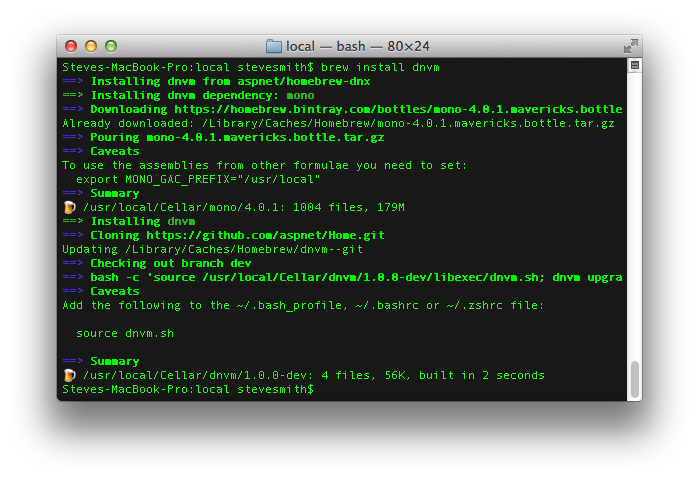
成功安装之后,可以在终端窗口中执行 dnvm 命令来检查一下。
dnvm应该看到如下的输出。
    ___  _  ___   ____  ___
   / _ \/ |/ / | / /  |/  /
  / // /    /| |/ / /|_/ /
 /____/_/|_/ |___/_/  /_/

.NET Version Manager - Version 1.0.0-beta5-10374
By Microsoft Open Technologies, Inc.

DNVM can be used to download versions of the .NET Execution Environment and manage which version you are using.
You can control the URL of the stable and unstable channel by setting the DNX_FEED and DNX_UNSTABLE_FEED variables.

Current feed settings:
Default Stable: https://www.nuget.org/api/v2
Default Unstable: https://www.myget.org/F/aspnetvnext/api/v2
Current Stable Override: <none>
Current Unstable Override: <none>

Use dnvm [help|-h|-help|--help]  to display help text.
如果你看到的是
-bash: dnvm: command not found
也没有关系,这是因为没有找到 dnvm 这个命令而已,将 dnvm.sh 加入搜索路径就可以,这可以通过下面的命令来实现。
source dnvm.sh
如果需要更新 DNX,那么,可以使用 upgrade 命令。
dnvm upgrade 现在,你的 DNX 就已经成功安装了。使用 dnvm list 可以查看所有的版本。
Active Version              Runtime Arch Location             Alias
------ -------              ------- ---- --------             -----
       1.0.0-beta5-11682    coreclr x64  ~/.dnx/runtimes
  *    1.0.0-beta4          mono         ~/.dnx/runtimes      default
       1.0.0-beta5-11682    mono         ~/.dnx/runtimes
可以切换当前使用的 .NET 版本。
localhost:helloClr $ dnvm alias default 1.0.0-beta5-11682
Updating alias 'default' to 'dnx-mono.1.0.0-beta5-11682'
重新显示一下当前的版本。
ocalhost:helloClr $ dnvm list

Active Version              Runtime Arch Location             Alias
------ -------              ------- ---- --------             -----
       1.0.0-beta5-11682    coreclr x64  ~/.dnx/runtimes
  *    1.0.0-beta4          mono         ~/.dnx/runtimes
       1.0.0-beta5-11682    mono         ~/.dnx/runtimes      default
1.3 保存路径
当关闭现在的终端窗口之后,重新打开终端窗口就会发现 dnx 不好用了。这是因为我们使用 source 设置的路径只能在当前的终端窗口中才能使用,如果希望能够保存下来,需要修改配置文件了。
查找一下 dnvm.sh 所在的文件夹。
localhost:~ $ mdfind -namednvm.sh /usr/local/Cellar/dnvm/1.0.0-dev/libexec/dnvm.sh
2. 创建控制台程序
环境创建之后,我们一般都会创建一个控制台的 Hello, world 程序来爽一把,程序就不用说了,主要是环境。
在桌面上创建了一个测试使用的文件夹 helloClr。在这里面创建下面的两个文件。
使用你喜欢的编辑器写一个 helloworld.cs 程序,其实与 Windows 下当然是一摸一样了。
using System;
public class Program {public static void Main() {Console.WriteLine("Hello from DNX!");
    }
}
不一样的是需要为我们这个简单的项目,创建一个项目文件,文件名必须是 project.json,是 json 格式呀,不要写错了。在与 helloworld.cs 相同的文件夹下,创建这个 project.json 文件。内容如下。
{"dependencies": { },
  "frameworks": {"dnx451": {},
    "dnxcore50": {"dependencies": {"System.Console": "4.0.0-beta-22605"
        }
      }
   }
}
现在已经一切都准备好了,注意当前目录需要在这个文件夹下,在终端窗口中,输入运行的命令就可以了。
dnx . run没有问题的话,就应该看到输出的 Hello from DNX! 了。
在 Mac OS X 下面,还可以设置一个环境变量 DNX_TRACE 来看看详细的输出。
export DNX_TRACE=1现在的输出丰富多了。
Information: [DefaultHost]: Project path: /Users/haogj/Desktop/helloClr
Information: [DefaultHost]: Project root: /Users/haogj/Desktop/helloClr
Information: [DefaultHost]: Packages path: /Users/haogj/.dnx/packages
Information: [Breadcrumbs] Breadcrumbs for servicing will not be written because the breadcrumbs folder () does not exist.
Information: [DependencyWalker]: Walking dependency graph for 'helloClr DNX,Version=v4.5.1'.
Information: [WalkContext]: Graph walk stage 1 took in 9ms
Information: [DependencyWalker]: Graph walk took 17ms.
Information: [WalkContext]: Populate took 7ms
Information: [DependencyWalker]: Resolved dependencies for helloClr in 26ms
Information: [LoaderContainer]: Load name=helloClr
Information: [ProjectLibraryExportProvider]: GetLibraryExport(helloClr, DNX,Version=v4.5.1, Debug, )
Information: [Microsoft.Framework.Runtime.Roslyn.RoslynProjectReferenceProvider]: GetProjectReference(helloClr, DNX,Version=v4.5.1, Debug, )
Information: [ProjectExportProviderHelper]: Resolving references for 'helloClr'
Information: [ProjectExportProviderHelper]: Resolved 4 references for 'helloClr' in 6ms
Information: [RoslynCompiler]: Compiling 'helloClr'
Information: [LoaderContainer]: Load name=System.Security.Cryptography.Hashing
Information: [LoaderContainer]: Load name=System.Security.Cryptography.Hashing.Algorithms
Information: [RoslynCompiler]: Compiled 'helloClr' in 373ms
Information: [CompilationContext]: Generating resources for helloClr
Information: [CompilationContext]: Generated resources for helloClr in 3ms
Information: [RoslynProjectReference]: Emitting assembly for helloClr
Warning: PDB generation is not supported on this platform
Information: [RoslynProjectReference]: Emitted helloClr in 827ms
Information: [ProjectAssemblyLoader]: Loaded name=helloClr in 1240ms
Hello from DNX!
查看一下当前目录,可以看到我们熟悉的 helloworld.exe 文件,当然了,它必须使用 dnx 才能执行,可以这样直接执行程序。
dnx helloworld.exe3. 创建网站程序
激动人心的时刻快到了,但是,我们还需要做一些准备工作。
先确认一下你的 .NET 版本。还记得下面的命令吗?检查默认的版本。
dnvm listYeoman 是一个创建项目框架的应用,使用它我们可以创建出网站项目的基本框架。
默认的网站需要很多文件组成,包括样式、脚本、配置等等,在 Mac 下面可没有强大的 Visual Studio,这里需要通过 Yeoman 来搭建基本的网站框架。
yeoman 需要通过 npm 来安装,如果你已经安装过 nodejs,就已经安装过它了,如果没有,就先安装 nodejs 吧。
由于 npm 服务器在国外,国内使用起来问题较多,淘宝提供了一个国内镜像,保障了安装网络环境的稳定,和源地址 10 分钟同步一次,没有被收录的包会自动切换到 npm 官方下载,并添加进镜像库。说明链接地址:http://ju.outofmemory.cn/entry/118659
临时使用淘宝 npm 库,可以使用如下命令
npm --registry https://registry.npm.taobao.org info underscore 安装了 npm 之后,就可以使用 install 命令来安装 yeoman 了。
sudo npm install -g yo安装的输出如下。
/usr/local/bin/yo -> /usr/local/lib/node_modules/yo/lib/cli.js

> yo@1.4.6 postinstall /usr/local/lib/node_modules/yo
> yodoctor


Yeoman Doctor
Running sanity checks on your system

✔ Global configuration file is valid
✔ NODE_PATH matches the npm root
✔ No .bowerrc file in home directory
✔ No .yo-rc.json file in home directory

Everything looks all right!
yo@1.4.6 /usr/local/lib/node_modules/yo
├── array-uniq@1.0.2
├── figures@1.3.5
├── titleize@1.0.0
├── user-home@1.1.1
├── opn@1.0.2
├── humanize-string@1.0.1 (decamelize@1.0.0)
├── sort-on@1.2.0 (dot-prop@2.0.0)
├── yeoman-character@1.0.1 (supports-color@1.3.1)
├── async@0.9.0
├── string-length@1.0.0 (strip-ansi@2.0.1)
├── root-check@1.0.0 (sudo-block@1.2.0, downgrade-root@1.1.0)
├── cross-spawn@0.2.9 (lru-cache@2.6.2)
├── chalk@1.0.0 (escape-string-regexp@1.0.3, ansi-styles@2.0.1, supports-color@1.3.1, strip-ansi@2.0.1, has-ansi@1.0.3)
├── findup@0.1.5 (commander@2.1.0, colors@0.6.2)
├── yosay@1.0.3 (ansi-regex@1.1.1, ansi-styles@2.0.1, word-wrap@1.0.3, strip-ansi@2.0.1, pad-component@0.0.1, taketalk@1.0.0, minimist@1.1.1)
├── meow@3.1.0 (object-assign@2.0.0, camelcase-keys@1.0.0, minimist@1.1.1, indent-string@1.2.1)
├── package-json@1.1.0 (registry-url@3.0.3)
├── npm-keyword@1.1.1 (registry-url@3.0.3)
├── update-notifier@0.3.2 (is-npm@1.0.0, latest-version@1.0.0, semver-diff@2.0.0)
├── got@2.9.2 (lowercase-keys@1.0.0, is-stream@1.0.1, timed-out@2.0.0, object-assign@2.0.0, prepend-http@1.0.1, nested-error-stacks@1.0.0, statuses@1.2.1, infinity-agent@2.0.3, duplexify@3.3.0, read-all-stream@2.1.2)
├── fullname@1.1.0 (npmconf@2.1.1)
├── yeoman-environment@1.2.5 (escape-string-regexp@1.0.3, untildify@2.0.0, log-symbols@1.0.2, diff@1.4.0, text-table@0.2.0, debug@2.2.0, mem-fs@1.1.0, globby@1.2.0, grouped-queue@0.3.0)
├── configstore@0.3.2 (object-assign@2.0.0, xdg-basedir@1.0.1, osenv@0.1.0, graceful-fs@3.0.6, uuid@2.0.1, mkdirp@0.5.0, js-yaml@3.3.0)
├── insight@0.5.3 (object-assign@2.0.0, lodash.debounce@3.0.3, os-name@1.0.3, tough-cookie@0.12.1, request@2.55.0)
├── lodash@3.8.0
├── yeoman-doctor@1.3.2 (object-values@1.0.0, log-symbols@1.0.2, each-async@1.1.1, twig@0.7.2)
└── inquirer@0.8.3 (ansi-regex@1.1.1, cli-width@1.0.1, through@2.3.7, readline2@0.1.1, rx@2.5.2)
安装 yeoman 之后,还需要安装 aspnet 的模版库。使用下面的命令
sudo npm install -g yo generator-aspnet输出如下内容。
/usr/local/bin/yo -> /usr/local/lib/node_modules/yo/lib/cli.js

> yo@1.4.6 postinstall /usr/local/lib/node_modules/yo
> yodoctor


Yeoman Doctor
Running sanity checks on your system

✔ Global configuration file is valid
✔ NODE_PATH matches the npm root
✔ No .bowerrc file in home directory
✔ No .yo-rc.json file in home directory

Everything looks all right!
yo@1.4.6 /usr/local/lib/node_modules/yo
├── titleize@1.0.0
├── array-uniq@1.0.2
├── figures@1.3.5
├── user-home@1.1.1
├── opn@1.0.2
├── humanize-string@1.0.1 (decamelize@1.0.0)
├── sort-on@1.2.0 (dot-prop@2.0.0)
├── yeoman-character@1.0.1 (supports-color@1.3.1)
├── async@0.9.0
├── string-length@1.0.0 (strip-ansi@2.0.1)
├── cross-spawn@0.2.9 (lru-cache@2.6.2)
├── chalk@1.0.0 (escape-string-regexp@1.0.3, ansi-styles@2.0.1, supports-color@1.3.1, strip-ansi@2.0.1, has-ansi@1.0.3)
├── root-check@1.0.0 (sudo-block@1.2.0, downgrade-root@1.1.0)
├── findup@0.1.5 (commander@2.1.0, colors@0.6.2)
├── yosay@1.0.3 (ansi-regex@1.1.1, ansi-styles@2.0.1, word-wrap@1.0.3, strip-ansi@2.0.1, pad-component@0.0.1, taketalk@1.0.0, minimist@1.1.1)
├── meow@3.1.0 (object-assign@2.0.0, camelcase-keys@1.0.0, minimist@1.1.1, indent-string@1.2.1)
├── npm-keyword@1.1.1 (registry-url@3.0.3)
├── package-json@1.1.0 (registry-url@3.0.3)
├── update-notifier@0.3.2 (is-npm@1.0.0, latest-version@1.0.0, semver-diff@2.0.0)
├── got@2.9.2 (lowercase-keys@1.0.0, is-stream@1.0.1, timed-out@2.0.0, object-assign@2.0.0, prepend-http@1.0.1, nested-error-stacks@1.0.0, statuses@1.2.1, infinity-agent@2.0.3, read-all-stream@2.1.2, duplexify@3.3.0)
├── fullname@1.1.0 (npmconf@2.1.1)
├── configstore@0.3.2 (object-assign@2.0.0, xdg-basedir@1.0.1, osenv@0.1.0, graceful-fs@3.0.6, uuid@2.0.1, mkdirp@0.5.0, js-yaml@3.3.0)
├── yeoman-environment@1.2.5 (untildify@2.0.0, log-symbols@1.0.2, escape-string-regexp@1.0.3, diff@1.4.0, text-table@0.2.0, debug@2.2.0, mem-fs@1.1.0, globby@1.2.0, grouped-queue@0.3.0)
├── insight@0.5.3 (object-assign@2.0.0, lodash.debounce@3.0.3, os-name@1.0.3, tough-cookie@0.12.1, request@2.55.0)
├── lodash@3.8.0
├── yeoman-doctor@1.3.2 (object-values@1.0.0, log-symbols@1.0.2, each-async@1.1.1, twig@0.7.2)
└── inquirer@0.8.3 (ansi-regex@1.1.1, cli-width@1.0.1, through@2.3.7, readline2@0.1.1, rx@2.5.2)

generator-aspnet@0.0.34 /usr/local/lib/node_modules/generator-aspnet
├── uuid@2.0.1
├── chalk@1.0.0 (escape-string-regexp@1.0.3, ansi-styles@2.0.1, supports-color@1.3.1, strip-ansi@2.0.1, has-ansi@1.0.3)
├── yosay@1.0.3 (string-length@1.0.0, word-wrap@1.0.3, strip-ansi@2.0.1, ansi-regex@1.1.1, ansi-styles@2.0.1, pad-component@0.0.1, taketalk@1.0.0, minimist@1.1.1)
├── chai@1.10.0 (assertion-error@1.0.0, deep-eql@0.1.3)
└── yeoman-generator@0.19.2 (read-chunk@1.0.1, detect-conflict@1.0.0, dargs@4.0.0, yeoman-welcome@1.0.1, xdg-basedir@1.0.1, user-home@1.1.1, diff@1.4.0, text-table@0.2.0, mime@1.3.4, async@0.9.0, istextorbinary@1.0.2, nopt@3.0.1, debug@2.2.0, run-async@0.1.0, cross-spawn@0.2.9, mem-fs-editor@1.2.3, mkdirp@0.5.0, shelljs@0.4.0, through2@0.6.5, cli-table@0.3.1, pretty-bytes@1.0.4, dateformat@1.0.11, underscore.string@3.0.3, glob@5.0.5, github-username@1.1.1, findup-sync@0.2.1, rimraf@2.3.3, class-extend@0.1.1, yeoman-assert@1.0.0, html-wiring@1.1.0, yeoman-environment@1.2.5, sinon@1.14.1, gruntfile-editor@1.0.0, lodash@3.8.0, download@4.1.2, inquirer@0.8.3)
安装好生成器之后,我们终于可以创建一个网站项目了。直接在命令行输入 yo 或者直接输入 yo aspnet 就可以了。有向导的呀。
? 'Allo OpenXLive! What would you like to do? Aspnet Make sure you are in the directory you want to scaffold into. This generator can also be run with: yo aspnet _-----_ | | .--------------------------. |--(o)--| | Welcome to the | `---------´ | marvellous ASP.NET 5 | (_´U`_) | generator! | /___A___\ '--------------------------' | ~ | __'.___.'__ ´ ` |° ´ Y ` ? What type of application do you want to create? Web Application ? What's the name of your ASP.NET application? WebApplication create WebApplication/.gitgnore create WebApplication/Startup.cs create WebApplication/bower.json create WebApplication/config.json create WebApplication/MessageService.cs create WebApplication/project.json create WebApplication/package.json create WebApplication/gruntfile.js create WebApplication/Models/AccountViewModels.cs create WebApplication/Models/IdentityModels.cs create WebApplication/Models/ManageViewModels.cs create WebApplication/Controllers/AccountController.cs create WebApplication/Controllers/HomeController.cs create WebApplication/Controllers/ManageController.cs create WebApplication/Compiler/Preprocess/RazorPreCompilation.cs create WebApplication/Migrations/000000000000000_CreateIdentitySchema.cs create WebApplication/Migrations/ApplicationDbContextModelSnapshot.cs create WebApplication/Properties/AppSettings.cs create WebApplication/Views/Account/ConfirmEmail.cshtml create WebApplication/Views/Account/ExternalLoginConfirmation.cshtml create WebApplication/Views/Account/ExternalLoginFailure.cshtml create WebApplication/Views/Account/ForgotPassword.cshtml create WebApplication/Views/Account/ForgotPasswordConfirmation.cshtml create WebApplication/Views/Account/Login.cshtml create WebApplication/Views/Account/Register.cshtml create WebApplication/Views/Account/ResetPassword.cshtml create WebApplication/Views/Account/ResetPasswordConfirmation.cshtml create WebApplication/Views/Account/SendCode.cshtml create WebApplication/Views/Account/VerifyCode.cshtml create WebApplication/Views/Home/Contact.cshtml create WebApplication/Views/Home/About.cshtml create WebApplication/Views/Home/Index.cshtml create WebApplication/Views/Manage/AddPhoneNumber.cshtml create WebApplication/Views/Manage/ChangePassword.cshtml create WebApplication/Views/Manage/Index.cshtml create WebApplication/Views/Manage/ManageLogins.cshtml create WebApplication/Views/Manage/RemoveLogin.cshtml create WebApplication/Views/Manage/SetPassword.cshtml create WebApplication/Views/Manage/VerifyPhoneNumber.cshtml create WebApplication/Views/Shared/Error.cshtml create WebApplication/Views/Shared/_Layout.cshtml create WebApplication/Views/Shared/_LoginPartial.cshtml create WebApplication/Views/Shared/_ValidationScriptsPartial.cshtml create WebApplication/Views/_GlobalImport.cshtml create WebApplication/Views/_ViewStart.cshtml create WebApplication/wwwroot/_references.js create WebApplication/wwwroot/css/site.css create WebApplication/wwwroot/favicon.ico create WebApplication/wwwroot/images/ASP-NET-Banners-01.png create WebApplication/wwwroot/images/ASP-NET-Banners-02.png create WebApplication/wwwroot/images/Banner-01-Azure.png create WebApplication/wwwroot/images/Banner-02-VS.png create WebApplication/wwwroot/lib/bootstrap-touch-carousel/css/bootstrap-touch-carousel.css create WebApplication/wwwroot/lib/bootstrap-touch-carousel/js/bootstrap-touch-carousel.js create WebApplication/wwwroot/lib/bootstrap/css/bootstrap-theme.css create WebApplication/wwwroot/lib/bootstrap/css/bootstrap-theme.min.css create WebApplication/wwwroot/lib/bootstrap/css/bootstrap.css create WebApplication/wwwroot/lib/bootstrap/css/bootstrap.min.css create WebApplication/wwwroot/lib/bootstrap/fonts/glyphicons-halflings-regular.eot create WebApplication/wwwroot/lib/bootstrap/fonts/glyphicons-halflings-regular.svg create WebApplication/wwwroot/lib/bootstrap/fonts/glyphicons-halflings-regular.ttf create WebApplication/wwwroot/lib/bootstrap/fonts/glyphicons-halflings-regular.woff create WebApplication/wwwroot/lib/bootstrap/js/bootstrap.js create WebApplication/wwwroot/lib/bootstrap/js/bootstrap.min.js create WebApplication/wwwroot/lib/hammer.js/hammer.js create WebApplication/wwwroot/lib/hammer.js/hammer.min.js create WebApplication/wwwroot/lib/hammer.js/hammer.min.map create WebApplication/wwwroot/lib/jquery-validation-unobtrusive/jquery.validate.unobtrusive.js create WebApplication/wwwroot/lib/jquery-validation/jquery.validate.js create WebApplication/wwwroot/lib/jquery/jquery-migrate.js create WebApplication/wwwroot/lib/jquery/jquery-migrate.min.js create WebApplication/wwwroot/lib/jquery/jquery.js create WebApplication/wwwroot/lib/jquery/jquery.min.js create WebApplication/wwwroot/lib/jquery/jquery.min.map Your project is now created, you can use the following commands to get going dnu restore dnu builddnx . runfor console projectsdnx . kestrelor dnx . web for web projects _-----_ | | .----------------------. |--(o)--| | Bye from us! | `---------´ | Chat soon. | (_´U`_) | Yeoman team | /___A___\ | http://yeoman.io | | ~ | '----------------------' __'.___.'__ ´ ` |° ´ Y `
太麻烦了?看看动画吧。

资料来源:http://blogs.msdn.com/b/webdev/archive/2014/12/17/yeoman-generators-for-asp-net-vnext.aspx
在输出的最后,已经说明我们需要的工作。执行 dnu restore,但是,报错了。
Restoring packages for /Users/Openxlive/Desktop/helloWeb/WebApplication/project.json
Writing lock file /Users/Openxlive/Desktop/helloWeb/WebApplication/project.lock.json
npm WARN package.json WebApplication@0.0.0 No description
npm WARN package.json WebApplication@0.0.0 No repository field.
npm WARN package.json WebApplication@0.0.0 No README data
grunt@0.4.5 node_modules/grunt
├── which@1.0.9
├── dateformat@1.0.2-1.2.3
├── eventemitter2@0.4.14
├── getobject@0.1.0
├── rimraf@2.2.8
├── colors@0.6.2
├── async@0.1.22
├── hooker@0.2.3
├── grunt-legacy-util@0.2.0
├── exit@0.1.2
├── nopt@1.0.10 (abbrev@1.0.5)
├── lodash@0.9.2
├── minimatch@0.2.14 (sigmund@1.0.0, lru-cache@2.6.2)
├── glob@3.1.21 (inherits@1.0.0, graceful-fs@1.2.3)
├── coffee-script@1.3.3
├── underscore.string@2.2.1
├── iconv-lite@0.2.11
├── findup-sync@0.1.3 (glob@3.2.11, lodash@2.4.2)
├── grunt-legacy-log@0.1.1 (underscore.string@2.3.3, lodash@2.4.2)
└── js-yaml@2.0.5 (esprima@1.0.4, argparse@0.1.16)

grunt-bower-task@0.4.0 node_modules/grunt-bower-task
├── colors@0.6.2
├── async@0.1.22
├── wrench@1.4.4
├── rimraf@2.0.3 (graceful-fs@1.1.14)
├── lodash@0.10.0
└── bower@1.3.12 (is-root@1.0.0, junk@1.0.1, stringify-object@1.0.1, which@1.0.9, abbrev@1.0.5, chmodr@0.1.0, osenv@0.1.0, archy@0.0.2, opn@1.0.2, rimraf@2.2.8, bower-logger@0.2.2, bower-endpoint-parser@0.2.2, graceful-fs@3.0.6, lockfile@1.0.0, lru-cache@2.5.2, nopt@3.0.1, retry@0.6.0, tmp@0.0.23, q@1.0.1, request-progress@0.3.0, shell-quote@1.4.3, chalk@0.5.0, semver@2.3.2, bower-json@0.4.0, fstream@1.0.6, p-throttler@0.1.0, mkdirp@0.5.0, promptly@0.2.0, bower-config@0.5.2, fstream-ignore@1.0.2, tar-fs@0.5.2, decompress-zip@0.0.8, request@2.42.0, glob@4.0.6, bower-registry-client@0.2.4, cardinal@0.4.0, mout@0.9.1, inquirer@0.7.1, insight@0.4.3, handlebars@2.0.0, update-notifier@0.2.0)
----------
System.ComponentModel.Win32Exception: ApplicationName='bower', CommandLine='install', CurrentDirectory='/Users/Openxlive/Desktop/helloWeb/WebApplication', Native error= Cannot find the specified file
  at System.Diagnostics.Process.Start_noshell (System.Diagnostics.ProcessStartInfo startInfo, System.Diagnostics.Process process) [0x00000] in <filename unknown>:0
  at System.Diagnostics.Process.Start_common (System.Diagnostics.ProcessStartInfo startInfo, System.Diagnostics.Process process) [0x00000] in <filename unknown>:0
  at System.Diagnostics.Process.Start (System.Diagnostics.ProcessStartInfo startInfo) [0x00000] in <filename unknown>:0
  at Microsoft.Framework.PackageManager.ScriptExecutor.Execute (Microsoft.Framework.Runtime.Project project, System.String scriptName, System.Func`2 getVariable) [0x00000] in <filename unknown>:0
  at Microsoft.Framework.PackageManager.RestoreCommand+<RestoreForProject>d__69.MoveNext () [0x00000] in <filename unknown>:0
--- End of stack trace from previous location where exception was thrown ---
  at System.Runtime.ExceptionServices.ExceptionDispatchInfo.Throw () [0x00000] in <filename unknown>:0
  at System.Runtime.CompilerServices.TaskAwaiter.ThrowForNonSuccess (System.Threading.Tasks.Task task) [0x00000] in <filename unknown>:0
  at System.Runtime.CompilerServices.TaskAwaiter.HandleNonSuccessAndDebuggerNotification (System.Threading.Tasks.Task task) [0x00000] in <filename unknown>:0
  at System.Runtime.CompilerServices.TaskAwaiter.ValidateEnd (System.Threading.Tasks.Task task) [0x00000] in <filename unknown>:0
  at System.Runtime.CompilerServices.TaskAwaiter`1[System.Boolean].GetResult () [0x00000] in <filename unknown>:0
  at Microsoft.Framework.PackageManager.RestoreCommand+<>c__DisplayClass68_0+<<ExecuteCommand>b__0>d.MoveNext () [0x00000] in <filename unknown>:0
--- End of stack trace from previous location where exception was thrown ---
  at System.Runtime.ExceptionServices.ExceptionDispatchInfo.Throw () [0x00000] in <filename unknown>:0
  at System.Runtime.CompilerServices.TaskAwaiter.ThrowForNonSuccess (System.Threading.Tasks.Task task) [0x00000] in <filename unknown>:0
  at System.Runtime.CompilerServices.TaskAwaiter.HandleNonSuccessAndDebuggerNotification (System.Threading.Tasks.Task task) [0x00000] in <filename unknown>:0
  at System.Runtime.CompilerServices.TaskAwaiter.ValidateEnd (System.Threading.Tasks.Task task) [0x00000] in <filename unknown>:0
  at System.Runtime.CompilerServices.TaskAwaiter.GetResult () [0x00000] in <filename unknown>:0
  at Microsoft.Framework.PackageManager.RestoreCommand+<ExecuteCommand>d__68.MoveNext () [0x00000] in <filename unknown>:0
----------
Restore failed
ApplicationName='bower', CommandLine='install', CurrentDirectory='/Users/Openxlive/Desktop/helloWeb/WebApplication', Native error= Cannot find the specified file
看样子是少了一个 bower 组件,重新安装一下吧。
sudo npm install -g bower输出如下:
/usr/local/bin/bower -> /usr/local/lib/node_modules/bower/bin/bower
bower@1.4.1 /usr/local/lib/node_modules/bower
├── is-root@1.0.0
├── junk@1.0.1
├── stringify-object@1.0.1
├── user-home@1.1.1
├── abbrev@1.0.5
├── chmodr@0.1.0
├── rimraf@2.3.3
├── archy@1.0.0
├── opn@1.0.2
├── bower-logger@0.2.2
├── bower-endpoint-parser@0.2.2
├── graceful-fs@3.0.6
├── lockfile@1.0.0
├── nopt@3.0.1
├── lru-cache@2.6.2
├── retry@0.6.1
├── tmp@0.0.24
├── q@1.4.0
├── semver@2.3.2
├── p-throttler@0.1.1 (q@0.9.7)
├── fstream@1.0.6 (inherits@2.0.1)
├── promptly@0.2.0 (read@1.0.5)
├── which@1.1.1 (is-absolute@0.1.7)
├── tar-fs@1.5.0 (pump@1.0.0, tar-stream@1.1.4)
├── request-progress@0.3.1 (throttleit@0.0.2)
├── glob@4.5.3 (inherits@2.0.1, once@1.3.2, inflight@1.0.4, minimatch@2.0.7)
├── fstream-ignore@1.0.2 (inherits@2.0.1, minimatch@2.0.7)
├── chalk@1.0.0 (ansi-styles@2.0.1, escape-string-regexp@1.0.3, supports-color@1.3.1, strip-ansi@2.0.1, has-ansi@1.0.3)
├── github@0.2.4 (mime@1.3.4)
├── mkdirp@0.5.0 (minimist@0.0.8)
├── cardinal@0.4.4 (ansicolors@0.2.1, redeyed@0.4.4)
├── mout@0.11.0
├── bower-config@0.6.1 (osenv@0.0.3, graceful-fs@2.0.3, optimist@0.6.1, mout@0.9.1)
├── handlebars@2.0.0 (optimist@0.3.7, uglify-js@2.3.6)
├── decompress-zip@0.1.0 (mkpath@0.1.0, touch@0.0.3, readable-stream@1.1.13, binary@0.3.0)
├── shell-quote@1.4.3 (array-filter@0.0.1, array-reduce@0.0.0, array-map@0.0.0, jsonify@0.0.0)
├── bower-json@0.4.0 (graceful-fs@2.0.3, intersect@0.0.3, deep-extend@0.2.11)
├── inquirer@0.8.0 (figures@1.3.5, ansi-regex@1.1.1, mute-stream@0.0.4, through@2.3.7, readline2@0.1.1, chalk@0.5.1, lodash@2.4.2, rx@2.5.2, cli-color@0.3.3)
├── request@2.53.0 (caseless@0.9.0, json-stringify-safe@5.0.0, forever-agent@0.5.2, aws-sign2@0.5.0, stringstream@0.0.4, tunnel-agent@0.4.0, oauth-sign@0.6.0, isstream@0.1.2, node-uuid@1.4.3, qs@2.3.3, form-data@0.2.0, combined-stream@0.0.7, tough-cookie@1.1.0, bl@0.9.4, hawk@2.3.1, mime-types@2.0.11, http-signature@0.10.1)
├── bower-registry-client@0.3.0 (graceful-fs@2.0.3, request-replay@0.2.0, rimraf@2.2.8, lru-cache@2.3.1, async@0.2.10, mkdirp@0.3.5, request@2.51.0)
├── insight@0.5.3 (object-assign@2.0.0, async@0.9.0, lodash.debounce@3.0.3, tough-cookie@0.12.1, os-name@1.0.3)
├── update-notifier@0.3.2 (is-npm@1.0.0, string-length@1.0.0, semver-diff@2.0.0, latest-version@1.0.0)
└── configstore@0.3.2 (object-assign@2.0.0, xdg-basedir@1.0.1, osenv@0.1.0, uuid@2.0.1, js-yaml@3.3.0)
把 grunt 也安装一下。
sudo npm install -g grunt-cli输出。
/usr/local/bin/grunt -> /usr/local/lib/node_modules/grunt-cli/bin/grunt
grunt-cli@0.1.13 /usr/local/lib/node_modules/grunt-cli
├── resolve@0.3.1
├── nopt@1.0.10 (abbrev@1.0.5)
└── findup-sync@0.1.3 (lodash@2.4.2, glob@3.2.11)
重新 restore,终于成功了。
Restoring packages for /Users/Openxlive/Desktop/helloWeb/WebApplication/project.json
Writing lock file /Users/Openxlive/Desktop/helloWeb/WebApplication/project.lock.json
npm WARN package.json WebApplication@0.0.0 No description
npm WARN package.json WebApplication@0.0.0 No repository field.
npm WARN package.json WebApplication@0.0.0 No README data
Running "bower:install" (bower) task
>> Installed bower packages
>> Copied packages to /Users/Openxlive/Desktop/helloWeb/WebApplication/wwwroot/lib

Done, without errors.
Restore complete, 12380ms elapsed
运行网站。
dnx . kestrelStarted
打开浏览器,访问地址:http://localhost:5001
居然又报了一个错误。
An unhandled exception occurred while processing the request.

IOException: kqueue() FileSystemWatcher has reached the maximum nunmber of files to watch.
System.IO.KqueueMonitor.Add (System.String path, Boolean postEvents, System.Collections.Generic.List`1& fds) [0x00000] in <filename unknown>, line 0
这是 Mono 的一个已知错误,需要一个设置。
export MONO_MANAGED_WATCHER=false再次运行,终于可以看到网站了。
本文永久更新链接地址 :http://www.linuxidc.com/Linux/2015-05/117358.htm