共计 13465 个字符,预计需要花费 34 分钟才能阅读完成。
安装 SmokePing 建议用 CentOS 7,用 CentOS 6.5 一直卡在 SmokePing 那里,下载不了 perl 的扩展插件,可能是因为 CentOS 6 出来太久,适配的安装包和插件已经迁移了。
yum groupinstall “Compatibility libraries” “Base” “Development tools” -y
yum -y install cpan perl perl-FCGI perl-CGI perl-Digest-HMAC perl-Net-Telnet perl-Net-OpenSSH perl-Net-SNMP perl-LDAP perl-Net-DNS perl-IO-Pty-Easy perl-Test-Simple perl-Sys-Syslog perl-libwww-perl perl-IO-Socket-SSL perl-Socket6 perl-CGI-SpeedyCGI perl-FCGI perl-Time-HiRes perl-ExtUtils-MakeMaker rrdtool rrdtool-perl curl fping httpd httpd-devel gcc make wget libxml2-devel libpng-devel glib pango pango-devel freetype freetype-devel fontconfig cairo cairo-devel libart_lgpl libart_lgpl-devel mod_fcgid screen
安装 echoping
tar xvf echoping-6.0.2.tar.gz
cd echoping-6.0.2
./configure –prefix=/usr/local/echoping
报错:
configure: error: Missing popt library, get it from ftp://ftp.rpm.org/pub/rpm/dist/rpm-x.y.z
解决办法:
yum install -y popt-devel
继续报错:
configure: error: Get the GNU libidn library (http://www.josefsson.org/libidn/) in order to use Unicode – multi-script – domain names or use –without-libidn to disable it
解决办法:
./configure –prefix=/usr/local/echoping –with-ssl –without-libidn
报错:
configure: error: Get the OpenSSL library (http://www.openssl.org/)
解决办法:
yum install -y openssl openssl-devel
make && make install
2.3 安装 smokeping
下载地址:http://oss.oetiker.ch/smokeping/pub/smokeping-2.6.11.tar.gz
tar -xvf smokeping-2.6.11.tar.gz
cd smokeping-2.6.11
#export PERL5LIB=/usr/local/smokeping/thirdparty/lib/perl5/
./setup/build-perl-modules.sh /usr/local/smokeping/thirdparty
./configure –prefix=/usr/local/smokeping
gmake install
****************************************************************
如果./configure 过程中提示找不到某些 perl 扩展,如下所示
checking checking for perl module‘Config::Grammar‘… Can‘t locate Config/Grammar.pm in @INC (@INC contains:/usr/local/smokeping/thirdparty/lib/perl5 /usr/local/lib64/perl5 /usr/local/share/perl5/usr/lib64/perl5/vendor_perl /usr/share/perl5/vendor_perl /usr/lib64/perl5/usr/share/perl5 .) at -e line 1.
BEGIN failed–compilation aborted at -e line 1.
请使用以下命令安装对应模块:
perl -MCPAN -e ‘install Config::Grammar’
注意:有时候需要重复安装几次才能装上模块。
注意要选择国内的的模块源,不然速度很慢。
****************************************************************
2.4 创建相关目录和日志文件(因为这里的 web 服务器使用的是 httpd,所以相关文件的属主属组均为 apache)
cd /usr/local/smokeping
mkdir cache data var
touch /var/log/smokeping.log
chown apache.apache cache/ data/ var/ /var/log
2.5 创建相关配置文件
#fcgi 文件
cp /usr/local/smokeping/htdocs/smokeping.fcgi.dist /usr/local/smokeping/htdocs/smokeping.fcgi
# 主配置文件
cp /usr/local/smokeping/etc/config.dist /usr/local/smokeping/etc/config
2.6 修改配置文件
# 指定 cgi 的 url 地址为本机
sed -i ‘s#cgiurl = http://some.url/smokeping.cgi#cgiurl = http://192.168.3.13/smokeping.cgi#g’ /usr/local/smokeping/etc/config
# 指定检测的时间为 60 秒
sed -i ‘s#step = 300#step = 60#g’ /usr/local/smokeping/etc/config
# 指定 ping 的次数为 60
sed -i ‘s#pings = 20#pings = 60#g’ /usr/local/smokeping/etc/config
将 step 和 pings 都设置为 60 表示每 60 秒 ping60 次。
2.7 修改字符集和字体支持中文
vim /usr/local/smokeping/etc/config
***Presentation *** # 加在 ***Presentation *** 后面
charset = utf-8
yum -y install wqy-zenhei-fonts
vim /usr/local/smokeping/lib/Smokeping/Graphs.pm
my$val = 0;
formy $host (@hosts){
my ($graphret,$xs,$ys) = RRDs::graph
(“dummy”,
‘–start’, $tasks[0][1],
‘–end’, $tasks[0][2],
‘–font TITLE:20″WenQuanYiZen Hei Mono”‘,
“DEF:maxping=$cfg->{General}{datadir}${host}.rrd:median:AVERAGE”,
‘PRINT:maxping:MAX:%le’);
my $ERROR = RRDs::error();
2.8 修改 apache 配置文件增加登录验证
htpasswd -c /usr/local/smokeping/htdocs/htpasswd smokeping
chmod 600 /usr/local/smokeping/etc/smokeping_secrets.dist
2.9 修改 httpd.conf 增加 smokeping 的 web 界面
在 httpd.conf 末尾添加如下内容
vim /etc/httpd/conf/httpd.conf
#########changed by jack 2016/11/02##############
Alias /cache “/usr/local/smokeping/cache/”
Alias /cropper “/usr/local/smokeping/htdocs/cropper/”
Alias /smokeping “/usr/local/smokeping/htdocs/smokeping.fcgi”
<Directory “/usr/local/smokeping”>
AllowOverride None
Options All
AddHandler cgi-script .fcgi .cgi
AllowOverride AuthConfig
Order allow,deny
Allow from all
AuthName “Smokeping”
AuthType Basic
AuthUserFile /usr/local/smokeping/htdocs/htpasswd
Require valid-user
DirectoryIndex smokeping.fcgi
</Directory>
2.10 添加监控对象
vim /usr/local/smokeping/etc/config
*** Targets ***
++ Localhost
menu = Localhost
title = Localhost
alerts = someloss
#slaves = boomer slave2
host = 192.168.3.13
2.11 添加监控节点
注意:每次修改配置文件后需要重启 smokeping 进程
/usr/local/smokeping/bin/smokeping –restart
或
/usr/local/smokeping/bin/smokeping –reload
或
pkill smokeping
/usr/local/smokeping/bin/smokeping
/usr/local/smokeping/bin/smokeping –restart
报错:
WARNING: Hostname ‘james.address’ does currently not resolve to an IPv6 or IPv4 address
ERROR: Can not read pid from /usr/local/smokeping/var/smokeping.pid: No such file or directory
解决:
touch /usr/local/smokeping/var/smokeping.pid
WARNING: Hostname ‘james.address’ does currently not resolve to an IPv6 or IPv4 address
Note: logging to syslog as local0/info.
Can’t kill a non-numeric process ID at /usr/local/smokeping/bin/../lib/Smokeping.pm line 3680.
可以正常访问:http://192.168.3.13/smokeping
监控节点样例如下,注意 + 是第一层,++ 是第二层,+++ 是第三层:
vim /usr/local/smokeping/etc/config
加在最后
+ Other
menu = 三大网络监控
title = 监控统计
++ dianxin
menu = 电信网络监控
title = 电信网络监控列表
host = /Other/dianxin/dianxin-bj /Other/dianxin/dianxin-hlj /Other/dianxin/dianxin-tj /Other/dianxin/dianxin-sc /Other/dianxin/dianxin-sh /Other/dianxin/dianxin-gz
+++ dianxin-bj
menu = 北京电信
title = 北京电信
alerts = someloss
host = 202.96.199.133
+++ dianxin-hlj
menu = 黑龙江电信
title = 黑龙江电信
alerts = someloss
host = 219.147.198.242
+++ dianxin-tj
menu = 天津电信
title = 天津电信
alerts = someloss
host = 219.150.32.132
+++ dianxin-sc
menu = 四川电信
title = 四川电信
alerts = someloss
host = 61.139.2.69
+++ dianxin-sh
menu = 上海电信
title = 上海电信
alerts = someloss
host = 116.228.111.118
+++ dianxin-gz
menu = 广东电信
title = 广东电信
alerts = someloss
host = 113.111.211.22
++ liantong
menu = 联通网络监控
title = 联通网络监控列表
host = /Other/liantong/liantong-bj /Other/liantong/liantong-hlj /Other/liantong/liantong-tj /Other/liantong/liantong-sc /Other/liantong/liantong-sh /Other/liantong/liantong-gz
+++ liantong-bj
menu = 北京联通
title = 北京联通
alerts = someloss
host = 61.135.169.121
+++ liantong-hlj
menu = 黑龙江联通
title = 黑龙江联通
alerts = someloss
host = 202.97.224.69
+++ liantong-tj
menu = 天津联通
title = 天津联通
alerts = someloss
host = 202.99.96.68
+++ liantong-sc
menu = 四川联通
title = 四川联通
alerts = someloss
host = 119.6.6.6
+++ liantong-sh
menu = 上海联通
title = 上海联通
alerts = someloss
host = 210.22.84.3
+++ liantong-gz
menu = 广东联通
title = 广东联通
alerts = someloss
host = 221.5.88.88
++ yidong
menu = 移动网络监控
title = 移动网络监控列表
host = /Other/yidong/yidong-bj /Other/yidong/yidong-hlj /Other/yidong/yidong-tj /Other/yidong/yidong-sc /Other/yidong/yidong-sh /Other/yidong/yidong-gz
+++ yidong-bj
menu = 北京移动
title = 北京移动
alerts = someloss
host = 221.130.33.52
+++ yidong-hlj
menu = 黑龙江移动
title = 黑龙江移动
alerts = someloss
host = 211.137.241.35
+++ yidong-tj
menu = 天津移动
title = 天津移动
alerts = someloss
host = 211.137.160.5
+++ yidong-sc
menu = 四川移动
title = 四川移动
alerts = someloss
host = 218.201.4.3
+++ yidong-sh
menu = 上海移动
title = 上海移动
alerts = someloss
host = 117.131.19.23
+++ yidong-gz
menu = 广东移动
title = 广东移动
alerts = someloss
host = 211.136.192.6
smokeping 会根据配置文件中配置监控节点的内容,在 /usr/local/smokeping/data 目录下生成对应的 moniter 文件夹,其下包含 website 子文件夹。
# tree /usr/local/smokeping/data/
/usr/local/smokeping/data/
├── Other
│ ├── dianxin
│ │ ├── dianxin-bj.rrd
│ │ ├── dianxin-gz.rrd
│ │ ├── dianxin-hlj.rrd
│ │ ├── dianxin-sc.rrd
│ │ ├── dianxin-sh.rrd
│ │ └── dianxin-tj.rrd
│ ├── liantong
│ │ ├── liantong-bj.rrd
│ │ ├── liantong-gz.rrd
│ │ ├── liantong-hlj.rrd
│ │ ├── liantong-sc.rrd
│ │ ├── liantong-sh.rrd
│ │ └── liantong-tj.rrd
│ └── yidong
│ ├── yidong-bj.rrd
│ ├── yidong-gz.rrd
│ ├── yidong-hlj.rrd
│ ├── yidong-sc.rrd
│ ├── yidong-sh.rrd
│ └── yidong-tj.rrd
└── Test
├── James~boomer.rrd
├── James.rrd
├── James~slave2.rrd
└── Localhost.rrd
5 directories, 22 files
2.12 启动服务并测试
systemctl start httpd
/usr/local/smokeping/bin/smokeping
在浏览器中访问 http://192.168.3.13/smokeping 输入刚才配置的验证账号 smokeing 和密码 smokeping 即可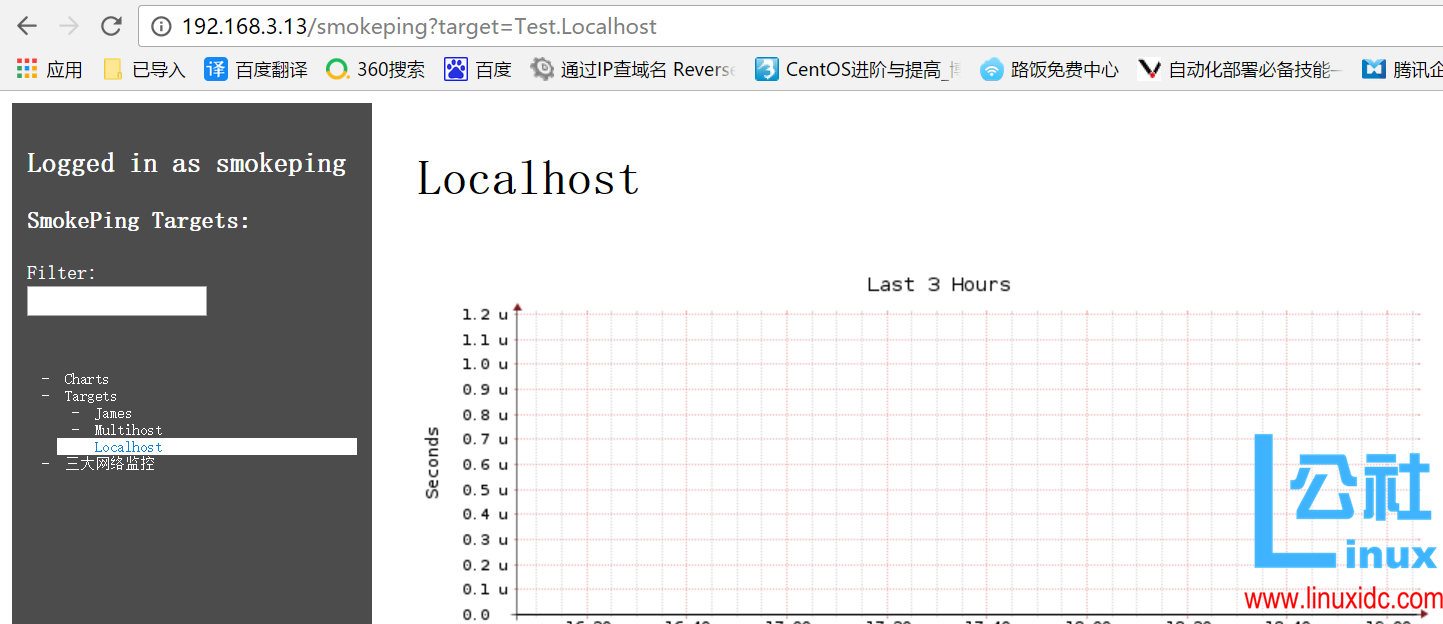
可以看到添加的节点的相关信息。
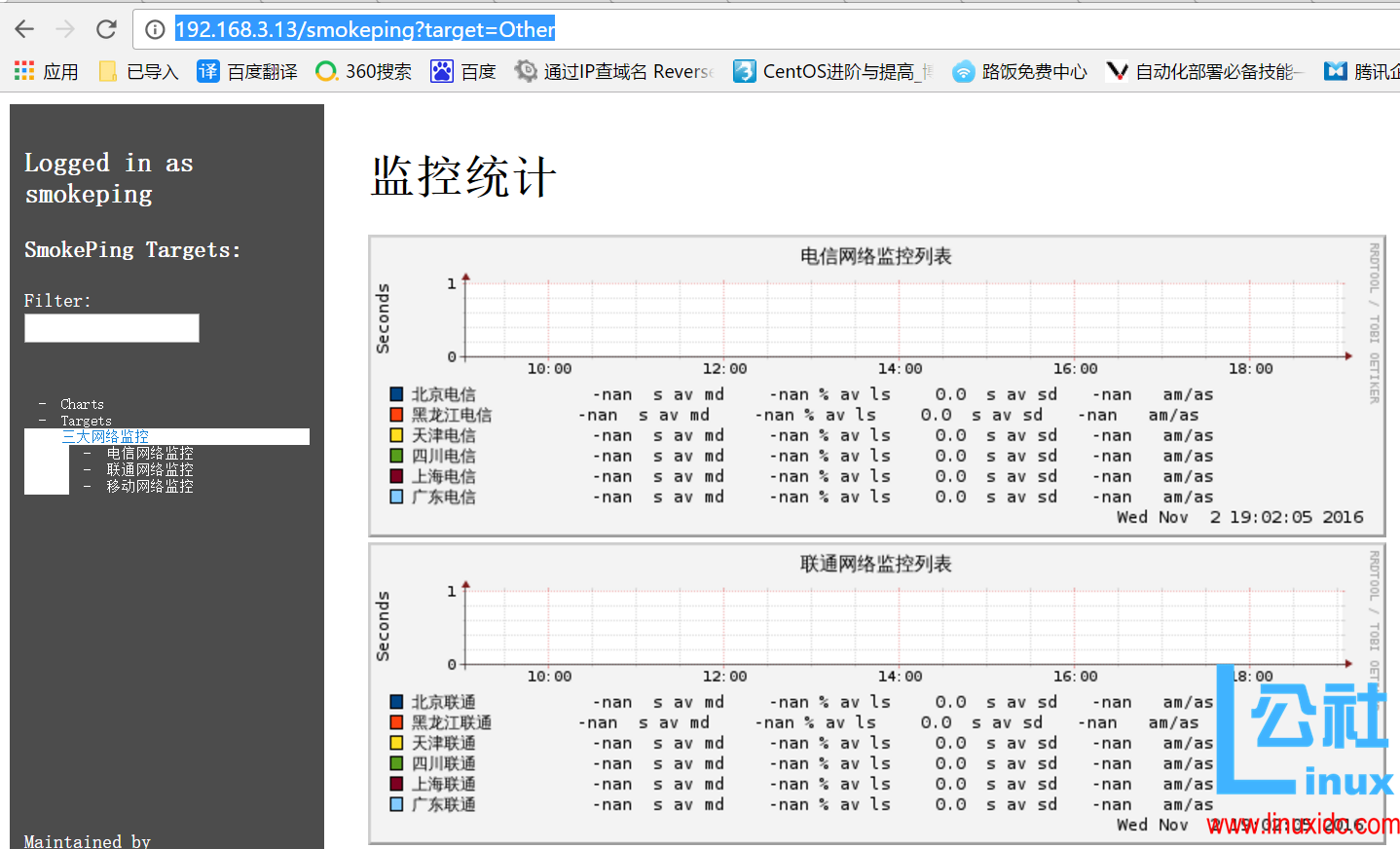
可以看到添加的监控点的 ping 状态
附录:
更改 CPAN 源的方法:
# cpan
Sorry, we have to rerun the configuration dialogfor CPAN.pm due to
some missing parameters. Configuration will bewritten to
<</root/.cpan/CPAN/MyConfig.pm>>
CPAN.pm requires configuration, but most of it canbe done automatically.
If you answer‘no‘below, you will enter aninteractive dialog for each
configuration option instead.
Would you like to configure as much as possibleautomatically? [yes] yes
<install_help>
Warning: You do not have write permission for Perllibrary directories.
To install modules, you need to configure a localPerl library directory or
escalate your privileges. CPAN can help you by bootstrapping thelocal::lib
module or by configuring itself to use‘sudo‘(ifavailable). You may also
resolve this problem manually if you need tocustomize your setup.
What approach do you want? (Choose‘local::lib‘,‘sudo‘or‘manual‘)
[local::lib]
Autoconfigured everything but‘urllist‘.
Now you need to choose your CPAN mirror sites. You can let me
pick mirrors for you, you can select them from alist or you
can enter them by hand.
Would you like me to automatically choose someCPAN mirror
sites for you? (This means connecting to theInternet) [yes] no
Would you like to pick from the CPAN mirror list?[yes] yes
Found a cached mirror list as of Mon Jun 1307:01:48 2016
If you‘d like to just use the cached copy, answer‘yes‘, below.
If you‘d like an updated copy of the mirror list,answer‘no‘and
I‘ll get a fresh one from the Internet.
Shall I use the cached mirror list? [yes] yes
First, pick a nearby continent and country bytyping in the number(s)
in front of the item(s) you want to select. Youcan pick several of
each, separated by spaces. Then, you will bepresented with a list of
URLs of CPAN mirrors in the countries youselected, along with
previously selected URLs. Select some of thoseURLs, or just keep the
old list. Finally, you will be prompted for anyextra URLs — file:,
ftp:, or http: — that host a CPAN mirror.
You should select more than one (just in case thefirst isn‘t available).
(1) Africa
(2) Asia
(3) Europe
(4) North America
(5) Oceania
(6) South America
Select your continent (or several nearbycontinents) [] 2
(1) Bangladesh
(2) China
(3) India
(4) Indonesia
(5) Iran
(6) Israel
(7) Japan
(8) Kazakhstan
(9) Philippines
(10) Qatar
(11) Republic of Korea
(12) Singapore
(13) Taiwan
(14) Turkey
(15) Viet Nam
Select your country (or several nearby countries)[] 2
(1) ftp://ftp.cuhk.edu.hk/pub/packages/perl/CPAN/
(2) ftp://mirrors.ustc.edu.cn/CPAN/
(3) ftp://mirrors.xmu.edu.cn/CPAN/
(4) http://cpan.communilink.net/
(5) http://ftp.cuhk.edu.hk/pub/packages/perl/CPAN/
(6) http://mirror.lzu.edu.cn/CPAN/
(7) http://mirrors.163.com/cpan/
(8) http://mirrors.hust.edu.cn/CPAN/
(9) http://mirrors.neusoft.edu.cn/cpan/
(10) http://mirrors.sohu.com/CPAN/
(11) http://mirrors.ustc.edu.cn/CPAN/
(12) http://mirrors.xmu.edu.cn/CPAN/
(13) http://mirrors.zju.edu.cn/CPAN/
Select as many URLs as you like (by number),
put them on one line, separated by blanks,hyphenated ranges allowed
e.g.‘1 45‘or‘7 1-4 8‘[] 7
Now you can enter your own CPAN URLs by hand. Alocal CPAN mirror can be
listed using a‘file:‘URL like‘file:///path/to/cpan/‘
Enter another URL or ENTER to quit: []
New urllist
http://mirrors.163.com/cpan/
Autoconfiguration complete.
Attempting to bootstrap local::lib…
Writing /root/.cpan/CPAN/MyConfig.pm forbootstrap…
commit: wrote‘/root/.cpan/CPAN/MyConfig.pm‘
Fetching with LWP:
http://mirrors.163.com/cpan/authors/01mailrc.txt.gz
Reading‘/root/.cpan/sources/authors/01mailrc.txt.gz‘
………………………………………………………………….DONE
Fetching with LWP:
http://mirrors.163.com/cpan/modules/02packages.details.txt.gz
Reading‘/root/.cpan/sources/modules/02packages.details.txt.gz‘
Databasewas generated on Thu, 09 Jun 2016 22:53:42 GMT
………….
NewCPAN.pm version (v2.10) available.
[Currentlyrunning version is v1.9800]
You mightwant to try
install CPAN
reloadcpan
to bothupgrade CPAN.pm and run the new version without leaving
thecurrent session.
………………………………………………………DONE
Fetching with LWP:
http://mirrors.163.com/cpan/modules/03modlist.data.gz
Reading‘/root/.cpan/sources/modules/03modlist.data.gz‘
DONE
Writing /root/.cpan/Metadata
Running make forH/HA/HAARG/local-lib-2.000019.tar.gz
Fetching with LWP:
http://mirrors.163.com/cpan/authors/id/H/HA/HAARG/local-lib-2.000019.tar.gz
Fetching with LWP:
http://mirrors.163.com/cpan/authors/id/H/HA/HAARG/CHECKSUMS
Checksum for/root/.cpan/sources/authors/id/H/HA/HAARG/local-lib-2.000019.tar.gz ok
CPAN.pm:Building H/HA/HAARG/local-lib-2.000019.tar.gz
Checking if your kit is complete…
Looks good
Warning: prerequisite Test::More 0 not found.
Generating a Unix-style Makefile
Writing Makefile for local::lib
Writing MYMETA.yml and MYMETA.json
—- Unsatisfied dependencies detected during —-
—- HAARG/local-lib-2.000019.tar.gz —-
Test::More [build_requires]
Running make test
Delayeduntil after prerequisites
Running make install
Delayeduntil after prerequisites
Tried to deactivate inactive local::lib‘/root/perl5‘
local::lib is installed. You must now add thefollowing environment variables
to your shell configuration files (or registry, ifyou are on Windows) and
then restart your command line shell and CPANbefore installing modules:
Use of uninitialized value $deactivating innumeric eq (==) at /usr/share/perl5/vendor_perl/local/lib.pm line 381.
Use of uninitialized value $deactivating innumeric eq (==) at /usr/share/perl5/vendor_perl/local/lib.pm line 383.
Use of uninitialized value$options{“interpolate”} in numeric eq (==) at /usr/share/perl5/vendor_perl/local/lib.pmline 424.
Use of uninitialized value$options{“interpolate”} in numeric eq (==) at/usr/share/perl5/vendor_perl/local/lib.pm line 424.
Use of uninitialized value$options{“interpolate”} in numeric eq (==) at /usr/share/perl5/vendor_perl/local/lib.pmline 424.
exportPERL_LOCAL_LIB_ROOT=”$PERL_LOCAL_LIB_ROOT:/root/perl5″;
export PERL_MB_OPT=”–install_base/root/perl5″;
exportPERL_MM_OPT=”INSTALL_BASE=/root/perl5″;
exportPERL5LIB=”/root/perl5/lib/perl5:$PERL5LIB”;
export PATH=”/root/perl5/bin:$PATH”;
Would you like me to append that to /root/.bashrcnow? [yes]
commit: wrote‘/root/.cpan/CPAN/MyConfig.pm‘
You can re-run configuration any time with‘o confinit‘in the CPAN shell
Terminal does not support AddHistory.
cpan shell — CPAN exploration and modulesinstallation (v1.9800)
Enter‘h‘for help.
cpan[1]> exit
Terminal does not support GetHistory.
Lockfile removed.
*** Remember to restart your shell before runningcpan again ***
或
# perl -MCPAN -e shell
cpan> o conf urllist unshift http://mirrors.aliyun.com/CPAN/
cpan> o conf commit
本文永久更新链接地址:http://www.linuxidc.com/Linux/2016-11/137648.htm





![Codex卡在手机号验证?终极解法免费号也能搞定[被wx制裁]](https://www.xgss.net/timthumb/w_120/h_80/q_90/zc_1/a_c/aHR0cHM6Ly9pbWdvc3MueGdzcy5uZXQvcGljZ28tdHgyMDI2L1FRXzE3ODAxNjQwODI5NjcucG5nP3R4.png)